
Professional DiagnosticsMatch the software environment to your vehicles, equipment and repair tasks.
Allison DOC Premium Transmission Diagnostic Kit
Our listed Allison Toughbook kit includes DOC Premium software. Compare its contents and understand the difference between Premium, Fleets and the separate Premium + Flash edition.
- DOC Premium kit
- NEXIQ USB-Link 3
- Refurbished Toughbook
- Transmission matching
Expert SupportU.S.-based technicians with dealer and fleet experience ready to help.
Ready-to-Run KitsPreconfigured software with everything you need to get up and running fast.
Financing Available0% APR options available on qualifying orders over $1,500.
Featured Allison Products
View All Allison Products →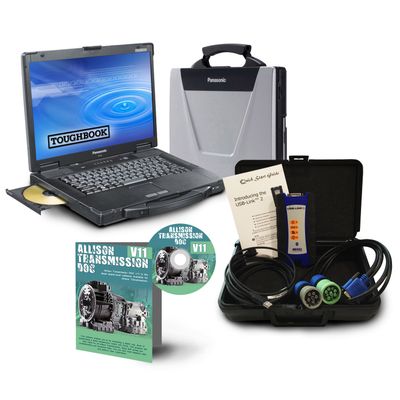
Allison DOC Premium + NEXIQ + Toughbook
Premium software, USB-Link 3 interface and refurbished Panasonic laptop.
$3,009.00 View Product
Allison DOC Premium kit price and contents
This kit is supplied with Premium software, NEXIQ USB-Link 3 and a refurbished Toughbook. Confirm the subscription term and current computer specifications for your order.
| Product | Application / package | Catalog price |
|---|---|---|
| Allison DOC Premium + NEXIQ + Toughbook | Premium software, USB-Link 3 interface and refurbished Panasonic laptop. | $3,009.00 |
Prices reflect the listed default configuration. Review selected options, availability, shipping and tax on the product and checkout pages. Ask us to match a kit to your equipment or call 866-217-0063.
Read the detailed Allison buying guide ↓
Choose your Allison setup
- Premium software is included in this specific kit.
- The package combines software, interface and a refurbished laptop.
- Identify the transmission and control generation.
- Select flashing capability only when the job requires the appropriate edition.
- Confirm subscription length and computer specifications.
Find the Right Allison Tool
Answer a few quick questions and we'll help you find the best tool for your shop's needs.
- Personalized Recommendations
- Expert Guidance
- Fast & Easy
Powerful Diagnostics. Proven Performance.
Capabilities vary by tool, software license, vehicle, and manufacturer requirements. Contact HDT to confirm compatibility.
Expert Phone SupportU.S.-based technicians
Setup & Training HelpGet started with confidence
Shipping HelpConfirm availability and timing
Warranty & SupportBacked by HDT
0% APR FinancingOn qualifying orders
Start with the correct Allison DOC edition
Allison DOC Premium is intended for supported 1000, 2000, 3000 and 4000 Series, TC10 and select off-highway applications. Fleets and Premium + Flash are separate subscription choices. Match the transmission and controller generation before comparing license prices.
Premium + Flash adds supported 5th- and 6th-generation TCM flashing. Do not read that capability into a package simply because its name includes Premium. Hybrid applications also have their own edition requirements.
What our Premium laptop kit includes
The HDT kit combines Allison DOC Premium, a NEXIQ USB-Link 3 and a refurbished Panasonic Toughbook. This is a complete package listing, rather than an adapter advertised as if software were included. Ask us to specify the supplied laptop, cables, subscription term and activation arrangements on your quote.
Already have a diagnostic laptop?
Send the laptop and interface model with your transmission information. We can help you determine what you can reuse and arrange the appropriate software choice. When comparing a software-only purchase against a laptop package, include the adapter, cables and subscription in the total.
For a different transmission brand, see the Eaton ServiceRanger guide. For broader shop diagnostics, compare JPRO while keeping Allison-specific service requirements in view.
Get a setup matched to your shop
Tell us the equipment model, year, controller and job you need to complete, plus any computer or adapter you already own. Ask HDT for help choosing or call 866-217-0063, Monday–Friday, 8am–5pm CT.
Manufacturer reference: Allison documentation. Guide reviewed September 19, 2026.
Frequently Asked Questions
Does the Allison Toughbook kit include Premium or Fleets?
The kit shown here includes Allison DOC Premium, together with a NEXIQ USB-Link 3 and a refurbished Panasonic Toughbook.
Is Allison DOC Premium the same as Premium + Flash?
No. Premium + Flash is a separate edition adding supported 5th- and 6th-generation TCM flashing. The kit listed here is Premium.
Which Allison transmission should I identify before buying?
Provide the transmission model and control generation, including whether it is a hybrid or off-highway application. Those details determine the appropriate DOC edition and connection.
Is Allison DOC software a one-time lifetime license?
Allison DOC uses time-based subscriptions. Confirm the subscription term included in your selected purchase and the renewal arrangements.
Resources & Buyer Guides
Allison manufacturer reference
Check the manufacturer’s software and equipment information.
Read Guide →Compare diagnostic approaches
Explore Jaltest options for a shop working on multiple brands.
Read Guide →NEXIQ adapters and software
Understand the difference between an interface and a software license.
Read Guide →Allison diagnostic tools: detailed buying guide
Reviewed September 21, 2026
Match the transmission and controls to the application
Allison work can involve a delivery truck, school bus, refuse vehicle, motorhome or specialized off-highway installation. Knowing the application is helpful, but the transmission model, serial number and control generation are the details that determine the diagnostic setup.
The Allison DOC family covers different transmission and control applications. A 3000 Series unit in one vehicle should not be assumed to have the same electronics and service requirements as every other 3000 Series installation. For an older fleet, identify legacy controls explicitly. For hybrid or specialized equipment, describe that system separately.
Start a quote request with the transmission identification and the work you need to carry out: fault diagnosis, a named service routine, a parameter change or TCM programming. This prevents a routine-maintenance purchase from being confused with a flashing requirement.
DOC Premium, Fleets, Premium + Flash and Classic
Allison's DOC selection guide distinguishes time-based subscription products. Premium is intended for supported 1000/2000, 3000/4000, TC10 and selected off-highway applications. Premium + Flash adds supported 5th- and 6th-generation TCM flashing. Fleets is a separate option, and specialized hybrid coverage must be selected appropriately.
The guide also identifies DOC Classic for legacy controls and states that a copy accompanies the listed subscription types. An older WTEC or CEC application should therefore be discussed with its exact control identification, rather than automatically assuming that a completely separate purchase is needed.
The right edition follows the job. A shop that requires a specific flash operation needs to establish the correct edition and access. That does not make Premium + Flash a universal requirement for every refuse fleet, bus shop or general diagnostic task.
What the HDT Toughbook package includes
The Allison kit shown on this page includes Allison DOC Premium, a NEXIQ USB-Link 3 and a refurbished Panasonic Toughbook. It is not described as Fleets or Premium + Flash. If you need flashing, identify that requirement before treating this package as the complete solution.
Review the included software term, computer specifications, cable list and any selected options when ordering. A general photo or the word “complete” should not replace the actual contents. For an existing shop laptop and interface, ask which additional software or hardware is required instead of assuming you need to repurchase both.
Keep the software edition with the invoice and activation records. That gives technicians and whoever handles renewals a clear record of what the business owns, and makes it easier to discuss an upgrade without confusing similarly named DOC products.
Adapters and vehicle connections
Allison identifies DOC as compatible with RP1210C-compliant vehicle interfaces. The installed driver, vehicle cable and target control system still need to form a working setup. In a mixed workshop, reusing a suitable supported interface can be practical, but each diagnostic application has its own requirements.
Do not assume that a GM pickup and a commercial vehicle use the same software route simply because the transmission carries an Allison name. Supply the vehicle and transmission details, including the control generation. A GM-specific programming requirement should be checked for that application.
For a mobile or shared shop kit, organize cables by application and retain their part numbers. A loose collection of similar connectors without labels makes it harder to diagnose connection problems and easier to order unnecessary replacements.
Shift quality, communication and service records
A shift complaint should be described in operating terms: when it occurs, whether the transmission is warm or cold, what service was recently performed and which faults were recorded. Those details help identify the data and procedures required. They do not justify assuming that a missed adaptation routine is always the cause.
For a communication complaint, retain the initial scan information and controller identity. A reported loss of communication can require checks beyond the diagnostic laptop. The appropriate service procedure guides the electrical and network investigation; purchasing another software edition should follow an identified need.
After maintenance, determine which supported service records or routines apply to the particular transmission. Fluid, filter and adaptation procedures are not interchangeable across all installations. Use the applicable documentation and verify the completed work rather than relying on one generic sequence copied from another vehicle.
DOC and the rest of the vehicle
Transmission diagnostics are one part of a complete vehicle inspection. If a complaint also involves the engine or brakes, plan access to those systems. Cummins INSITE, Detroit DiagnosticLink and multi-brand applications address different parts of a shop's workload.
Compare a multi-brand tool with DOC by the named Allison functions you need. Avoid treating “reads Allison codes” as proof of a particular service or programming capability. Conversely, do not assume every useful Allison operation is absent from a multi-brand platform without checking its current coverage.
A shop can keep a broad inspection tool and add DOC for recurring Allison work. The value of that combination depends on the repairs you perform, the hardware already owned and the work you want to stop sending elsewhere.
Choosing a setup for your fleet or shop
For a school bus or municipal fleet, list the transmission and control generations represented in the yard. For a rebuild or replacement business, list the exact post-repair routines and programming requirements. For motorhome or mobile work, include the chassis and access to the diagnostic connection.
Compare the initial equipment price with the subscription and additional services needed for those jobs. Keep renewal and account information under business control. Use the current package above as the starting point, then request an Allison configuration or call 866-217-0063.
Ready to Upgrade Your Diagnostic Game?
Our experts are here to help you choose the right Allison solution for your shop. Call now or shop online today.