
Professional DiagnosticsMatch the software environment to your vehicles, equipment and repair tasks.
PACCAR DAVIE4 MX Software & Toughbook Kit
Compare an initial DAVIE4 software purchase with a complete MX diagnostic laptop kit. Match the engine, account access and connection hardware to the work you need to do.
- MX-11 / MX-13
- Annual subscription
- Software or kit
- NEXIQ kit hardware
Expert SupportU.S.-based technicians with dealer and fleet experience ready to help.
Ready-to-Run KitsPreconfigured software with everything you need to get up and running fast.
Financing Available0% APR options available on qualifying orders over $1,500.
Featured PACCAR Products
View All PACCAR Products →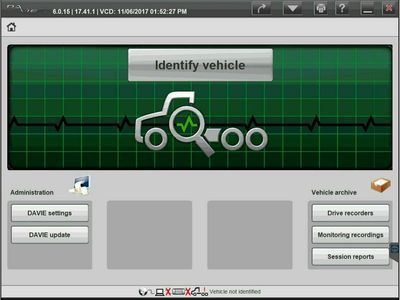
DAVIE4 initial software license
Annual software subscription; computer and adapter separate.
$3,045.00 View Product
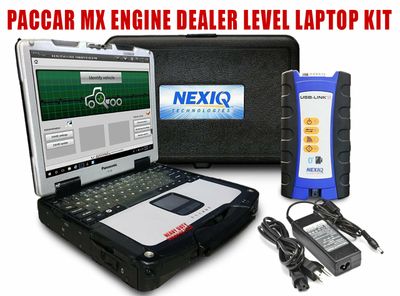
DAVIE4 MX Toughbook kit
Annual software, NEXIQ USB-Link 3 and refurbished CF-54 Toughbook.
$4,795.00 View Product
Compare PACCAR DAVIE4 license and kit prices
Both listings specify an annual MX-11/MX-13 subscription for U.S. customers. Allow the listed 3–5 business days for license processing; the kit also includes hardware.
| Product | Application / package | Catalog price |
|---|---|---|
| DAVIE4 initial software license | Annual software subscription; computer and adapter separate. | $3,045.00 |
| DAVIE4 MX Toughbook kit | Annual software, NEXIQ USB-Link 3 and refurbished CF-54 Toughbook. | $4,795.00 |
Prices reflect the listed default configuration. Review selected options, availability, shipping and tax on the product and checkout pages. Ask us to match a kit to your equipment or call 866-217-0063.
Read the detailed PACCAR buying guide ↓
Choose your PACCAR setup
- Identify the MX engine and the specific service operation.
- Choose an initial software purchase or a complete laptop kit.
- Keep license processing time in your repair schedule.
- Check required manufacturer accounts and service information.
- Confirm existing interface and cable compatibility before buying extras.
Find the Right PACCAR Tool
Answer a few quick questions and we'll help you find the best tool for your shop's needs.
- Personalized Recommendations
- Expert Guidance
- Fast & Easy
Powerful Diagnostics. Proven Performance.
Capabilities vary by tool, software license, vehicle, and manufacturer requirements. Contact HDT to confirm compatibility.
Expert Phone SupportU.S.-based technicians
Setup & Training HelpGet started with confidence
Shipping HelpConfirm availability and timing
Warranty & SupportBacked by HDT
0% APR FinancingOn qualifying orders
DAVIE4 for PACCAR MX engines
DAVIE4 is PACCAR’s diagnostic and programming application for electronic components on MX-equipped vehicles. Our two offers separate the software license from the full laptop package. Start with the engine model and service task when choosing between them.
What the kit adds to a software purchase
The MX kit lists a refurbished Panasonic CF-54 Toughbook and NEXIQ USB-Link 3, with a 9-pin cable, OBD II cable, USB cable and case. The initial-license listing is intended for a shop arranging its own compatible computer and interface. Use the comparison above to price those two routes.
Plan access, activation and renewal together
The HDT offers specify U.S. customers, an annual subscription and 3–5 business days of license processing. They exclude factory repair manuals and E-portal access. PACCAR also offers its own MX Access service; do not assume every component of that service is included in a different reseller package. Ask us to confirm the access and any programming charges for your intended operation.
For a Cummins-equipped truck, review Cummins INSITE. For an Eaton transmission job, use the ServiceRanger guide. Engine and transmission software can be separate purchases on the same truck.
Get a setup matched to your shop
Tell us the equipment model, year, controller and job you need to complete, plus any computer or adapter you already own. Ask HDT for help choosing or call 866-217-0063, Monday–Friday, 8am–5pm CT.
Manufacturer reference: PACCAR documentation. Guide reviewed September 19, 2026.
Frequently Asked Questions
What is included in the PACCAR DAVIE4 Toughbook kit?
The listing includes an annual DAVIE4 MX subscription, a NEXIQ USB-Link 3 and a refurbished Panasonic CF-54 Toughbook. Review the product page for cables and current terms.
Is the DAVIE4 license delivered immediately?
The HDT listings specify 3–5 business days for license processing and delivery to the end user. It is not an instant software delivery.
Does this DAVIE4 purchase include every PACCAR portal and manual?
No. These HDT listings exclude factory repair manuals and E-portal access. Confirm the account, service information and programming access needed for your work.
Is DAVIE4 the right choice for every Kenworth or Peterbilt?
Choose by the installed engine and controller. These listings are for PACCAR MX-11 and MX-13 work; the truck badge alone does not establish the right software.
Resources & Buyer Guides
PACCAR manufacturer reference
Check the manufacturer’s software and equipment information.
Read Guide →Compare diagnostic approaches
Explore Jaltest options for a shop working on multiple brands.
Read Guide →NEXIQ adapters and software
Understand the difference between an interface and a software license.
Read Guide →PACCAR diagnostic tools: detailed buying guide
Reviewed September 21, 2026
Start with the powertrain, not just the truck badge
Kenworth and Peterbilt trucks can present several different diagnostic requirements. Identify the installed engine, transmission and controller involved in the work. An MX engine complaint, a transmission calibration and a chassis-electronics problem should not be treated as the same software purchase.
The PACCAR offers on this page are centered on DAVIE4 for MX-11 and MX-13 applications. If you are working on a PX engine, a Cummins-powered truck or a DAF-market vehicle, provide those details before choosing a package. A familiar truck badge or engine-family name is not enough to establish software, account or cable compatibility.
For a fleet, record the VIN and engine identity for representative vehicles rather than relying on a broad model-year range. Trucks with similar model names may have different powertrains and electronics. Good information at the quote stage helps avoid buying a configuration for the wrong application.
DAVIE4 licensing and the package being purchased
HDT lists an initial DAVIE4 software license and a diagnostic Toughbook package. The initial license listing describes an annual subscription for PACCAR MX-11/MX-13 and states a processing period of 3–5 business days before the license is emailed. Treat that as the listing's processing guidance, not as instant activation or a guaranteed delivery date for a physical kit.
A software-only order is different from a laptop-and-interface purchase. If your shop already owns the required equipment, review the license-only option. If it needs a complete workstation, compare the kit's computer, interface, cables, software and setup information. Keep the account and end-user details accurate so the license can be processed for the intended business.
When renewing an existing installation, supply the current license and account details. A new initial-purchase license should not be substituted for a renewal without checking the appropriate route. Likewise, a downloaded program is not evidence that the intended subscription and access have been activated.
Engine diagnostics, programming and additional access
Write down the work you need to perform with DAVIE4. Fault diagnosis and a specific supported test are different requirements from a calibration update or controller replacement. The quote should identify the intended operations and any access or charges that are separate from the base subscription.
Do not assume that a DAVIE4 package includes ESA, PVP or every PACCAR service-information system. Our product information distinguishes the purchased diagnostic package from additional access. If a job specifically calls for one of those systems, include that requirement before ordering.
A programming plan should also consider the applicable procedure, the connection and power arrangements, and who will manage the account. Buying a license cannot by itself remove a controller restriction or turn a particular account into unrestricted manufacturer access.
PACCAR transmission work and ServiceRanger
Transmission identity matters even when related hardware appears under different branding. Eaton's TAIB-0882 bulletin directs ordinary Basic/Pro users to DAVIE4 for PACCAR TX12/TX18 software and configuration changes. The bulletin distinguishes those restrictions from the diagnostic functions shown in its access table.
That is why a general statement that ServiceRanger handles every transmission related to Eaton is not sufficient. Obtain the transmission model and requested operation. Then select the supported application and access level for that combination.
If you are comparing a DAVIE4 purchase with ServiceRanger, list the transmissions in the fleet and the work performed on each. This can reveal whether the shop needs one application, both applications or only a particular additional license for work it currently sends elsewhere.
Computer, interface and vehicle connection
The interface connects the software to the truck; it does not supply the software subscription. Our kit listings identify the included hardware. For an existing system, record the adapter model and installed driver before ordering another license or computer.
Check the vehicle cable against the actual truck and intended operation. Connector shape alone is not a complete compatibility check. A general-purpose adapter may be appropriate for several applications, but the diagnostic-software provider's support requirements still govern each application.
For a Toughbook purchase, read the particular listing for condition, specifications and included software. Keep laptop upgrades separate from the base configuration when comparing prices. If a shop needs several technicians working at once, plan the necessary licenses and complete stations rather than just buying additional display devices.
Aftertreatment and driveability: what the tool needs to show
For an MX engine with an aftertreatment complaint, capture the full fault text and controller information before clearing anything. The useful question is which readings, tests and service routines are needed to follow the applicable diagnostic procedure. A tool should support that workflow; a promise to “fix every derate” is not a meaningful specification.
For fuel, air-handling or communication complaints, describe the actual symptom and work planned. A fault associated with a component does not prove that the component has failed. Save the initial report and use the engine-specific service information to guide the checks and repair verification.
This approach also helps when comparing a multi-brand tool with DAVIE4. Reading PACCAR faults and performing a particular PACCAR programming operation are different capabilities. Check each task rather than relying on an all-or-nothing comparison chart.
Choose the setup around the work you keep in-house
A fleet maintaining a consistent MX-powered group can focus on those engines and its regular service tasks. An independent shop should include the range of engines and transmissions it actually encounters. A mobile technician should also account for computer power, cable storage and the connection requirements of the intended work.
Use the current offers above for price and contents. Send the VIN, engine and transmission details, requested operation, existing equipment and whether you need an initial license or renewal. Ask HDT about a PACCAR setup or call 866-217-0063.

Ready to Upgrade Your Diagnostic Game?
Our experts are here to help you choose the right PACCAR solution for your shop. Call now or shop online today.