Heavy Duty Truck Diagnostics

Store

Cummins INLINE 8 Datalink Adapter (Standalone)

$1 995.00
In stock
Share this product with your friends
Cummins INLINE 8 Datalink Adapter (Standalone)
Product Details

The Cummins INLINE 8 is the current-generation OEM datalink adapter Cummins builds and supports for use with INSITE, the same factory diagnostic software the engineers in Columbus, Indiana use to develop and validate Cummins engines. This is the standalone listing — adapter, cables, and documentation — without an INSITE software license bundled in. It is the right SKU for shops that already own an active INSITE Lite or INSITE Pro subscription and need to add, replace, or rotate in another piece of OEM hardware on the bench.

Three buyers come through this page on a regular basis. The first is the existing INSITE owner whose INLINE 7 has finally given up — usually a USB driver problem on a fresh Windows 11 laptop, a frayed USB cable, or an adapter that simply got dropped one too many times in a service bay. They have a current INSITE license, they know the software, and they need a piece of Cummins-branded hardware that is going to talk to their installed copy of INSITE without a fight. The second is the multi-truck fleet shop or owner-operator service program that has decided to standardize on Cummins-branded hardware across every diagnostic laptop in the building. They want the same adapter on every shop cart so that any technician can grab any laptop, plug into any Cummins-powered truck, and pull faults without anyone learning a new tool. The third is the new shop that is buying the adapter first and adding the INSITE license later — they want the OEM hardware in hand before they commit to the per-seat software cost, and they often pair the INLINE 8 with a free trial or a short-term license while they ramp up paying work.

If any of those describe your situation, the INLINE 8 standalone is the listing you want. If you do not yet have INSITE and want a single bundle that ships ready to plug in and pull a fault code, call the number at the bottom of this page and we will quote you the INLINE 8 plus an INSITE Lite or INSITE Pro license together.

About the Cummins INLINE 8

The INLINE 8 is the eighth-generation INLINE datalink adapter and the only INLINE Cummins currently builds and ships new. It replaces the INLINE 7, which itself replaced the INLINE 6, INLINE 5, and so on back through the original. The current adapter is housed in a hardened plastic shell sized to slip into a tech's apron pocket and is engineered for the realities of a shop floor — diesel mist, dropped tools, cold mornings, hot afternoons, and the occasional unplanned trip from a bumper to a concrete floor.

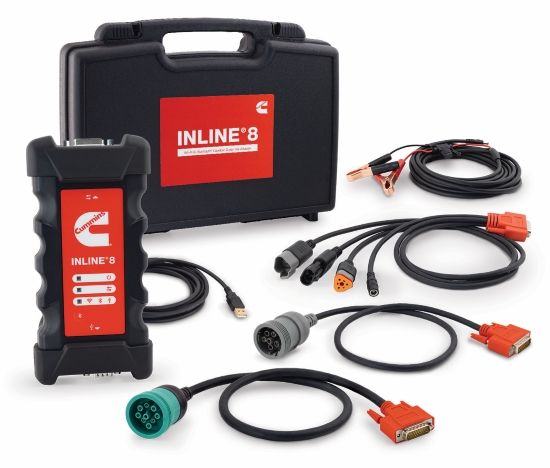
The adapter ships in a kit with everything needed to connect to virtually every Cummins-powered chassis built in the last forty years: the INLINE 8 module itself, a USB 2.0 cable for the wired PC connection, a 9-pin Deutsch cable for the J1939 service connector found on Class 7 and Class 8 trucks, a 6-pin Deutsch cable for legacy J1708 and J1587 chassis, and a 16-pin OBD-II cable for light-duty and medium-duty Cummins applications such as Ram pickups and Class 3 to Class 5 chassis cabs. Manufacturer documentation, a quick-start guide, and the driver media round out the box.

On the connectivity side, the INLINE 8 talks to the laptop three ways. USB 2.0 over the supplied cable is the primary method, and it is what every shop should use for daily work — it is fast, it is reliable, and it does not depend on anyone's shop Wi-Fi being healthy. Bluetooth is built in for short-range wireless work, useful when the laptop has to sit on a bench while the technician is under the hood checking sensors. Wi-Fi is built in as well, useful in fleet shops where multiple bays share a single laptop cart and the truck is parked thirty feet from the keyboard.

Protocol support on the INLINE 8 is broad. The adapter is fully compliant with the Technology and Maintenance Council's RP1210 and RP1227 standards, and it supports J1939, J1708, J1587, CAN (including CAN FD), ISO 15765, ISO 9141, ISO 14230, KWP2000 on the K and L lines, and CAT Data Link (CDL) for shops that occasionally cross over into Caterpillar work. Three simultaneous CAN connections are supported with selectable baud rates of 250 kbps, 500 kbps, and 1 Mbps, which covers every CAN bus speed currently in service on a heavy-duty truck.

INLINE 8 vs INLINE 7

The INLINE 7 was a good adapter for its day, and there are still tens of thousands of them in service across the United States and Canada. The INLINE 8 is what Cummins built when the INLINE 7 hardware platform began to age out — newer processor, more memory, more sophisticated message filtering, and a USB driver stack that was rebuilt to behave well on Windows 10 and Windows 11.

Three things changed when Cummins moved from the 7 to the 8. The first is raw processing speed. The INLINE 8 has a faster internal processor and larger message buffers, which matters when the adapter is bridging a busy J1939 bus into a relatively chatty piece of Windows software like INSITE. On a truck with a lot of body-builder modules — telematics, refrigeration, lift gates, hydraulic PTOs, third-party cameras — the INLINE 7 could occasionally drop frames or stall during a long ECM file flash. The INLINE 8 has the headroom to keep up.

The second is improved CAN FD support. CAN FD (Flexible Data Rate) is the next-generation CAN protocol used on newer ECMs to push larger data payloads at higher bit rates, and it is showing up on more and more Cummins applications as model years roll forward. The INLINE 7 was upgraded over its life to support CAN FD, but the INLINE 8 was designed for it from the start. If you are working on the latest X15, B6.7, L9, or 6.7-liter pickup engines, the INLINE 8 will keep up with whatever the ECM throws at it.

The third change is the most practical one for most shops: USB driver stability on modern Windows. INLINE 7 owners who upgraded to Windows 11 know what we are talking about — driver signing changes, USB enumeration quirks, and the occasional disappearing COM port. Cummins rebuilt the USB driver stack for the INLINE 8 to work with Windows 10 and Windows 11 out of the box, and the install process on a fresh laptop is genuinely uneventful. Plug in the adapter, run the installer, reboot once, and INSITE finds it.

What RP1210 Means and Why You Want It

RP1210 is the heavy-duty diagnostic industry's adapter standard. It is published by the Technology and Maintenance Council, a division of the American Trucking Associations, and it defines the application programming interface that lets a single physical adapter talk to many different OEM diagnostic software packages on a Windows PC. When Cummins says the INLINE 8 is RP1210-compliant, what they are saying is that any diagnostic software written to the RP1210 standard can — in theory — use the INLINE 8 to reach the truck.

That is fundamentally different from the way light-duty diagnostics work. A consumer OBD-II scanner is a closed system: cable on one end, screen on the other, and the protocol stack hardcoded inside. RP1210, by contrast, is open at the adapter layer. One physical box can sit on the shelf and serve INSITE on Monday, Detroit Diesel Diagnostic Link on Tuesday, and Cat Electronic Technician on Wednesday — provided each of those software titles is licensed and installed on the laptop and the firmware on the adapter has been validated by the software vendor.

A related standard, RP1226, defines a vehicle-side connector for telematics and aftermarket-device installation; it is the green nine-pin port many newer Class 8 trucks have on the dash for tablet-based driver tools and ELD telematics. RP1226 is a vehicle wiring spec, not a PC adapter spec — the INLINE 8 is RP1210 (and RP1227, the wireless extension), and it does not directly compete with RP1226 telematics gateways.

J2534 is the third standard worth mentioning. J2534 is the SAE pass-through programming standard used heavily in light-duty automotive — Ford IDS, GM GDS2, Mopar wiTECH, and the rest of the dealership-tool ecosystem use J2534 adapters as their normal pipe to the vehicle. Some adapters are dual-mode RP1210/J2534, but the INLINE 8 is purpose-built for the heavy-duty side. If your work is split between Class 8 trucks and a lot of light-duty cars, you will want a separate J2534 adapter for the cars; the INLINE 8 is not the right tool for that side of the shop.

Supported Protocols In Plain English

J1939 is the high-speed CAN-based heavy-duty truck protocol, and it is the workhorse on every Class 7 and Class 8 truck built since roughly 2007. When you plug a 9-pin Deutsch cable into a Peterbilt or a Kenworth and pull active faults out of the ISX, that is J1939. The INLINE 8 supports J1939 at 250k and 500k baud rates, which covers every speed the standard runs at in production.

J1708 and J1587 are the legacy heavy-duty protocols that came before J1939. J1708 is the physical layer (a slow two-wire serial bus), and J1587 is the application layer that runs on top of it. Pre-2007 ISX, ISM, ISL, ISC, ISB, N14, M11, L10, and the original B-series engines all communicate over J1708/J1587 through the 6-pin Deutsch service connector. If you work on older trucks, glider kits, or repower projects, the 6-pin cable in the INLINE 8 kit is what reaches those engines. INSITE supports the legacy protocols going back many years, and the INLINE 8 hardware preserves that capability.

CAN — and specifically CAN FD on newer applications — is the underlying physical bus standard that J1939 and OBD-II both ride on. The INLINE 8 supports raw CAN access in addition to the higher-level protocol stacks, which matters when an aftermarket telematics device or a body-builder module needs to be probed directly. Three simultaneous CAN connections at 250k, 500k, and up to 1 Mbps are available, with the higher rate primarily used for CAN FD and certain proprietary message exchanges during ECM programming.

OBD-II on heavy-duty Cummins applications shows up mainly on light-duty and medium-duty trucks — Ram pickups with the 6.7-liter Cummins, certain school bus chassis, and some medium-duty Cummins applications in Class 3 to Class 5. The 16-pin connector in the kit reaches those vehicles. The OBD-II port carries CAN messaging on most modern applications, and the INLINE 8 handles ISO 15765 (the CAN-based OBD-II transport), ISO 9141, ISO 14230 (KWP2000), and the K-line and L-line variants, which keeps the adapter useful across the full range of light-duty Cummins-powered chassis.

The Three Connectors and What Each One Reaches

The 9-pin Deutsch cable is the one you will reach for most often if your shop runs Class 8 trucks. Every modern Cummins-powered tractor — every ISX, X15, ISX12, X12, X10, X15N — uses the 9-pin Deutsch service connector mounted under the dash on the driver's side. The cable in the INLINE 8 kit is the standard green-plug 9-pin that the industry has used since J1939 became dominant in the late 1990s.

The 6-pin Deutsch cable is for legacy work. Pre-2007 ISX trucks, older ISM and ISL applications, and a lot of vocational equipment — concrete mixers, refuse trucks, on-highway tractors that have been on the road for twenty years — still use the 6-pin connector and J1708/J1587 protocol. If you take in a 1998 Kenworth W900 with an N14 that is throwing a phantom code, the 6-pin cable is what gets you in.

The 16-pin OBD-II cable handles the light-duty and medium-duty side of the Cummins lineup. Ram pickups with the 6.7-liter Cummins from 2007 onward, certain medium-duty bus and chassis-cab applications, and some specialty equipment use the 16-pin OBD-II port instead of the heavy-duty Deutsch connectors. INSITE recognizes the 6.7-liter Cummins and pulls full diagnostic data through the OBD-II port using the INLINE 8 as the pipe.

Software Compatibility

The INLINE 8 is built first and foremost for Cummins INSITE — INSITE Lite for the owner-operator who needs read fault codes, snapshots, and basic parameter monitoring, or INSITE Pro for the shop that needs to run cylinder cutout tests, calibrate injectors, perform forced regens, run trip information reports, and reflash ECMs with updated calibrations. Both INSITE tiers run cleanly on the INLINE 8 with the OEM-supplied driver, and Cummins releases firmware updates for the adapter alongside major INSITE releases to keep the two in sync.

Because the adapter is RP1210-compliant, it can also serve as the physical pipe for many other heavy-duty diagnostic platforms running on the same laptop. Validated and reported-working pairings include:


  • Cummins INSITE / Insite Fault Viewer / PowerSpec
  • Detroit Diesel Diagnostic Link (DDDL)
  • CAT Electronic Technician (Cat ET)
  • Allison DOC (PC service tool and Fleet)
  • Bendix ACom and ACom Pro
  • Eaton ServiceRanger
  • Hino Diagnostic Explorer (DX2)
  • Navistar ServiceMaxx
  • Volvo PTT (Premium Tech Tool)
  • Mack PTT (V-MAC service tools, VCAD Elite)
  • WABCO Toolbox Plus
  • International Diamond Logic Builder (DLB)
  • Dana Diagnostic Tool
  • Ford Module Programming
  • General Motors GDS2

Honest caveat: the INLINE 8 is Cummins-tuned firmware on Cummins-built hardware, and INSITE is where it is most stable. Cross-OEM pairings work, but each one has its own version dependencies and occasional quirks. If your shop's bread and butter is Cummins engines and you only occasionally cross over into Detroit or Cat work, the INLINE 8 is a fine single-adapter solution. If your shop is genuinely a mixed fleet — twenty trucks, six different engine OEMs, three different transmission programs, and a heavy diet of Volvo and Mack work — you may want to consider the NEXIQ USB-Link 3 as your primary adapter and keep the INLINE 8 as the dedicated Cummins box. More on that below.

A note on operating system support: Windows 10 and Windows 11 are both supported, with Windows 11 being the recommended target for new laptop deployments. The driver installer requires administrator rights, and the install path is the standard one — plug the adapter into a USB port on the PC, plug the other end of the supplied cable into the port labeled Computer on the adapter, run the Cummins-supplied installer, reboot once, and INSITE will find the adapter on the next launch. There is no Mac or Linux support; INSITE is a Windows application, and the INLINE 8 driver stack reflects that.

INLINE 8 vs NEXIQ USB-Link 3

This is the question we get most often on the phone, so we are going to answer it honestly here. The INLINE 8 and the NEXIQ USB-Link 3 are both excellent RP1210 adapters, and which one is right for your shop depends on the work you do.

Buy the INLINE 8 if you are a single-OEM shop or a Cummins specialist. Owner-operators with one or two Cummins-powered trucks, fleet shops where 80 to 100 percent of the chassis are Cummins, dealerships, and Cummins-authorized service centers all benefit from running the OEM-built adapter. The firmware and INSITE are tuned to each other, ECM flashing is faster and more reliable, and when something does go wrong, Cummins technical support has a much easier time diagnosing it because the hardware came from them.

Buy the NEXIQ USB-Link 3 if you run a genuine mixed fleet. NEXIQ is the third-party adapter that the heavy-duty industry has standardized on as the universal RP1210 box, and it is the most widely tested adapter against non-Cummins software. If your shop is regularly running Detroit DDDL, Cat ET, Volvo PTT, Mack PTT, and Allison DOC every week, the USB-Link 3 will give you slightly fewer cross-platform headaches than the INLINE 8.

Plenty of well-run shops own both — INLINE 8 on the Cummins-dedicated cart, USB-Link 3 on the universal cart. At $1,995 the INLINE 8 is not an impulse purchase, but it is also not the kind of investment that needs to crowd out a second adapter for the rest of the lineup.

Engine Coverage Through INSITE

When the INLINE 8 is paired with INSITE, the adapter reaches every electronically controlled Cummins engine ever produced. The list includes the heavy-duty highway lineup (X15, X15N, ISX15, ISX, X12, ISX12, ISX12N, ISM, ISL, M11, N14), the medium-duty lineup (L9, ISL9, ISL G, ISC, ISC8.3, ISB, ISB6.7, B6.7, ISB5.9), the light-duty pickup engine (the 6.7-liter Cummins in 2007.5-and-newer Ram heavy-duty trucks), the off-highway and industrial lineup (QSX, QSM, QSL, QSC, QSB, QSK), the natural-gas engines (ISL G, ISX12N, B6.7N, X15N), and the legacy mechanical and early electronic platforms (8.3-liter C-series and B-series with electronic injection). Coverage on each platform depends on the INSITE license tier — Lite reads, Pro reads and writes — but the adapter itself sees them all.

Real-World Use Cases

Picture three shops who picked up the phone last quarter and ordered this exact SKU.

The first is a long-haul owner-operator running a 2018 Peterbilt 579 with an X15. He has been using INSITE Lite on a personal Toughbook for four years, and his INLINE 7 finally died after a winter where the cable got pulled the wrong way one too many times. He did not need software, did not need a laptop — just the adapter. The INLINE 8 ships, he plugs it into the same Toughbook, INSITE finds it on the next launch, and he is back to pulling faults the same evening.

The second is a five-bay independent diesel shop in the Midwest. They run Cummins, Detroit, and Cat work, with Cummins making up about sixty percent of the daily ticket volume. They already had a NEXIQ USB-Link 3 on the universal cart, but the shop owner decided he wanted a Cummins-branded adapter on the dedicated Cummins bench so that ECM flashes on X15s and L9s would go faster and so that any of his three techs could grab the laptop and not need to think about adapter compatibility. He bought the INLINE 8 standalone because INSITE Pro was already licensed on that bench laptop.

The third is a brand-new mobile-service operator in his first six months. He bought the INLINE 8 first, paid for it on a business credit card, and ran an INSITE Lite trial license while he chased his first Cummins jobs. After his second month of paying work he upgraded to INSITE Pro and added a Toughbook 55 to round out the kit. The standalone listing was the entry point — software and laptop came later as the business grew.

Computer Requirements

INSITE and the INLINE 8 driver stack run on Windows 10 (64-bit) and Windows 11. We recommend a Toughbook for shop-floor use because the diesel environment punishes consumer-grade laptops — vibration, temperature swings, oily fingers, dropped tools — but any reasonably current 64-bit Windows machine with at least 8 GB of RAM, a free USB 2.0 (or USB 3.0 backward-compatible) port, and 30 GB of free disk space for INSITE plus calibration files will run the software cleanly.

The driver install requires local administrator rights. On a domain-joined IT-managed laptop, plan to involve your IT person for the install. On a personal or shop-owned laptop where you have admin rights yourself, the install runs through in under five minutes.

Why Cummins-Branded Hardware Costs More Than $200 RP1210 Clones

Walk down the aisle of any heavy-duty parts catalog and you will see RP1210 adapters at every price point — $200 generic boxes from overseas, $400 to $700 mid-tier units, and the $1,200-to-$2,000 OEM-built adapters from Cummins, NEXIQ, Noregon, and Cojali. The price gap is real, and the reasons for it are real.

Driver support is the first reason. Cummins maintains the INLINE 8 driver stack, signs it for Windows 10 and Windows 11, and updates it when Microsoft pushes a Windows update that breaks something at the USB layer. A $200 clone adapter does not have a driver team behind it. When a Windows update breaks the driver, you are on your own — usually rolling back the update, freezing your laptop on an old Windows version, or replacing the adapter.

Firmware updates are the second reason. Every time Cummins releases a new INSITE version, the INLINE 8 firmware gets a corresponding update to match. New protocol behavior, new ECM software trees, new flash routines for newer engines — they get firmware support so that the adapter keeps up with the software. Clone adapters typically get a single firmware load and never see another update.

ECM flashing reliability is the third reason, and it is the one that hurts when it goes wrong. A failed ECM flash because of an adapter dropout is a tow bill and a new ECM. The OEM-built adapters have margin built in for marginal cables, busy CAN buses, and noisy shop power. Clone adapters have less margin. We have seen plenty of brick-the-ECM stories from clone adapters; we have not seen one from a current-generation INLINE 8 or USB-Link 3.

Technical support is the fourth reason. When you call Cummins or your authorized dealer with an INLINE 8 problem, there is a tech-support tree that will get you a real answer. Clone adapters do not have that.

What You'll Still Need

The INLINE 8 standalone listing is exactly what it sounds like — the adapter and its cables. To put it to work, you will also need:


  • An active Cummins INSITE Lite or INSITE Pro license. Lite is read-only and runs around the price of a quality scan tool; Pro adds calibration, reflash, and bidirectional capability. Either tier pairs cleanly with the INLINE 8.
  • A Windows 10 or Windows 11 laptop with at least 8 GB of RAM and a free USB port. A Panasonic Toughbook is the durable choice for shop-floor use; a refurbished business-class laptop works fine if the laptop is going to live on a desk.
  • The truck. The INLINE 8 reaches Cummins engines through the 9-pin Deutsch, 6-pin Deutsch, or 16-pin OBD-II service connector depending on the chassis.

If you want to skip the part where you have to source those pieces yourself, call us. We can quote the INLINE 8 plus an INSITE Lite or Pro subscription plus a service-grade Toughbook 55 as a single ready-to-deploy kit and have it shipped within a couple of business days.

Frequently Asked Questions

Q: I already own an INLINE 7 and it still works. Should I upgrade? A: If your INLINE 7 is healthy and your laptop is on Windows 10, no — keep using it. The INLINE 8 is the better choice when you are buying new, when your INLINE 7 is showing intermittent USB enumeration problems, when you are migrating to Windows 11, or when you are starting to do regular work on newer engines that lean heavily on CAN FD.

Q: Will my existing INSITE license work with the INLINE 8? A: Yes. INSITE recognizes both the INLINE 7 and the INLINE 8 with no license change required. The license is tied to your INSITE subscription, not to the adapter.

Q: Is the INLINE 8 actually wireless, or do I have to use the USB cable? A: It supports USB 2.0, Bluetooth, and Wi-Fi. USB is what we recommend for daily use because it is faster and more reliable. Wireless is genuinely useful in fleet shops where the laptop sits at a workstation while the technician is at the truck.

Q: Can I use the INLINE 8 on a 2018 Ram 2500 with the 6.7-liter Cummins? A: Yes, through the 16-pin OBD-II cable in the kit. INSITE recognizes the pickup-truck 6.7-liter Cummins and pulls full diagnostic data through the OBD-II port.

Q: Will it work on a 2002 Peterbilt with an N14? A: Yes, through the 6-pin Deutsch cable. The N14 communicates over J1708/J1587, and INSITE supports the legacy protocols on that platform.

Q: I run a mixed fleet — Cummins, Detroit, Cat, Volvo, Mack. Is one INLINE 8 enough? A: Technically yes, because the adapter is RP1210-compliant. Practically, if your weekly work is genuinely split across that many OEMs, we usually recommend pairing the INLINE 8 with a NEXIQ USB-Link 3 so that you have an OEM-tuned box for Cummins and a universally validated third-party box for everything else. Plenty of shops own both.

Q: Does it work on macOS or Linux? A: No. INSITE is a Windows application, and the INLINE 8 drivers are Windows-only. Use a Windows 10 or Windows 11 laptop.

Why Buy the INLINE 8 From Heavy Duty Truck Diagnostics

We have been selling Cummins INLINE adapters for years, going back through the INLINE 6 and INLINE 7 generations. We stock the current INLINE 8 — not gray-market product, not a clone with the labels swapped, not an old generation. We ship from US warehouses, we answer the phone when you call, and we will quote you an INLINE 8 plus INSITE plus a laptop as a single bundle if you would rather buy the whole stack at once than chase three separate vendors.

Every adapter ships with the manufacturer's documentation and our own quick-start guidance for the install. If the install does not go cleanly on your laptop, call us — we have walked dozens of techs through Windows USB-driver problems, Cummins login issues, and INSITE-firmware mismatches. We do not pretend to be Cummins technical support, but we have seen most of the same problems you are likely to run into, and we will get you to a working state or get you on the phone with the right Cummins resource.

Pricing on the INLINE 8 standalone is $1,995. Sales tax may apply depending on your state of delivery. Volume pricing is available for fleet shops buying multiple adapters at once.

Call 800-399-9495 to order the INLINE 8 standalone, to add an INSITE Lite or INSITE Pro license to your order, to spec a complete kit with a Toughbook, or to ask any compatibility question about a specific engine, chassis, or laptop. We answer the phone live during business hours and we will not transfer you to a script reader.

MANUFACTURER: Cummins MFG PART #: 6395440 ITEM: CUM-INLINE-8