Professional DiagnosticsMatch the software environment to your vehicles, equipment and repair tasks.
Shop TEXA Diagnostic Tools
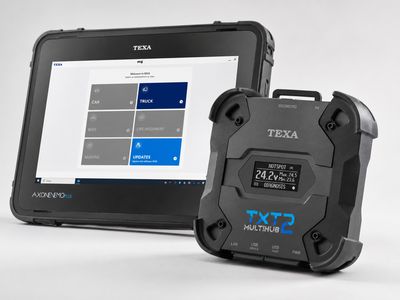
Compare TEXA truck and off-highway kits with AXONE Nemo Light, Nemo Plus or Voice tablets and TXT Multihub 2. Match the software environment and package contents to the work in your shop.
- IDC6 diagnostic software
- Truck & OHW packages
- TXT Multihub 2 kits
- TEXPACK renewal help
Expert SupportU.S.-based technicians with dealer and fleet experience ready to help.
Ready-to-Run KitsPreconfigured software with everything you need to get up and running fast.
Financing Available0% APR options available on qualifying orders over $1,500.
For Existing TEXA Owners
Lost your TEXA distributor? TEXPACK renewal questions?
Straight answers on warranty, software updates, prepaid coverage, and what to do next. No tier-confusion, no upsell theatre.
Featured TEXA Products
View All TEXA Products →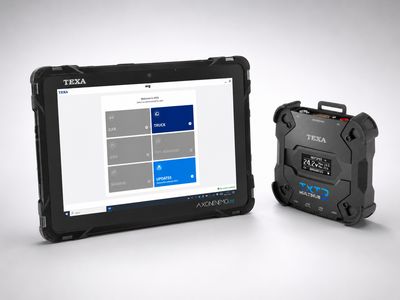
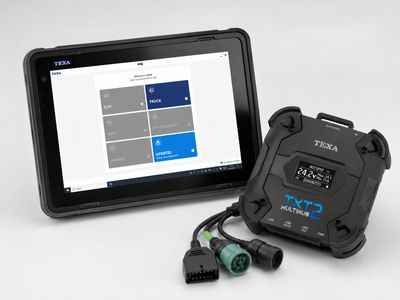
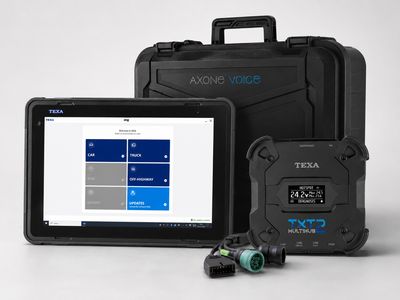
Compare TEXA kits and prices
Choose the application first, then compare the included computer, software and cables.
| Diagnostic kit | Application / package | Catalog price |
|---|---|---|
| Nemo Light Truck kit | Truck package; LCMH catalog SKU | $4,995.00 |
| Nemo Plus Truck kit | Truck package; PLHDT | $7,495.00 |
| AXONE Voice Truck kit | Truck package; VHDT | $9,595.00 |
| AXONE Voice Deluxe Fleet kit | Truck, OHW and Car package; DFP | $11,195.00 |
| Nemo Light OHW kit | Off-highway package; AOHDK-01 | $4,695.00 |
| Nemo Plus OHW kit | Off-highway package; PLOHW | $7,495.00 |
| AXONE Voice OHW kit | Off-highway package; VOHW | $9,360.00 |
Prices reflect the listed default configuration. Review selected options, availability, shipping and tax on the product and checkout pages. Ask us to match a kit to your equipment or call 866-217-0063.
Read the detailed TEXA buying guide ↓
Why Choose TEXA?
- Comprehensive vehicle coverage
- Diagnostics and service functions on supported systems
- Regular software updates & releases
- Rugged hardware built for the shop
- Backed by HDT expert support
TEXA Resources & Guides
Buyer's guides, vehicle coverage charts, current promotions, and deep dives on TEXA platforms — built from TEXA's manufacturer documentation.
Current Promotions
TEXA Offers & Eligibility
Review offer eligibility, included services and current dates before choosing a renewal or upgrade.
Buyer's Guide
Truck Package Comparison
Compare tablet specifications, software environments and kit contents. Check the product listing for its current configuration and price.
Buyer's Guide
OHW Package Comparison
Compare off-highway tablet packages and software environments for your equipment.
Why TEXA
One Platform — Every Environment
TEXA's on-highway / off-highway / on-road / off-road story, IDC6 AI Diagnostic Assistant, and the 2025 PTEN Innovation Award.
Vehicle Coverage
TEXA OHW Coverage
Review agricultural, construction and industrial-engine applications, then confirm your machine and required function.
ADAS Calibration
Truck ADAS Calibration (CCS2 Dynamics)
Mobile calibration frame for heavy-duty trucks — bring high-margin ADAS work in-house.
Fleet & Remote
eTRUCK Remote Diagnostics
Permanent in-truck dongle + Road Triage — remote DPF regens, fleet monitoring, three-persona platform.
For Owners
TEXA Support & FAQ
Owner answers on TEXPACK renewals, warranty, software updates, kit selection — plus what to do if you've lost your TEXA distributor.
Shop TEXA by Category
Find the Right TEXA Tool
Answer a few quick questions and we'll help you find the best tool for your shop's needs.
- Personalized Recommendations
- Expert Guidance
- Fast & Easy
Powerful Diagnostics. Proven Performance.
Capabilities vary by tool, software license, vehicle, and manufacturer requirements. Contact HDT to confirm compatibility.
Expert Phone SupportU.S.-based technicians
Setup & Training HelpGet started with confidence
Shipping HelpConfirm availability and timing
Warranty & SupportBacked by HDT
0% APR FinancingOn qualifying orders
Choosing a TEXA truck diagnostic kit
Choose the software environment and kit contents, then the tablet. TEXA AXONE Nemo Light, Nemo Plus and Voice are different computers. Truck and OHW packages are also separate choices. The comparison above shows our listed configurations and current prices, with a direct link to each kit.
Nemo Light, Nemo Plus or AXONE Voice?
Compare the Nemo Light Truck kit with PLHDT Nemo Plus and VHDT Voice for truck work. For a shop servicing several kinds of equipment, the DFP Deluxe Fleet package combines Truck, OHW and Car environments. For construction or agricultural work, start with the OHW listings. Do not choose an OHW package solely because its tablet has the same name as a Truck kit.
Check the specific product SKU, display and computer specifications, included cables and licensed environments before ordering. TEXA's package chart is a useful manufacturer reference, but offers and update periods can differ from an individual dealer configuration. Use your selected product and quote to identify what you are buying. TEXA USA truck package chart.
IDC6 software versus TEXPACK and TEXAINFO
IDC6 runs the diagnostics. TEXPACK provides software updates for the licensed environment; TEXAINFO supplies additional technical-information services. Compare these separately when pricing a kit or renewal. Extra environments require the appropriate license activation. TEXA software and update services and IDC6 installation and activation guide.
Already own TEXA equipment?
For a TEXPACK renewal, replacement computer or another software environment, send HDT the interface serial number, tablet model and current licenses. We can identify the appropriate option without duplicating hardware you already own. Review TEXA support and renewal questions before choosing an upgrade.
Match the diagnostic function to the vehicle
A kit's brand name alone does not confirm a particular regen, calibration, coding or ADAS procedure. Give us your vehicle or machine model, year, engine and the exact operation. We can help match the software coverage and connector; additional calibration equipment or manufacturer access may be needed for some work.
Ask HDT about TEXA coverage, browse TEXA diagnostic tools, or call 866-217-0063. Guide reviewed September 19, 2026.
Frequently Asked Questions
How much does a TEXA diagnostic kit cost?
The comparison table shows current HDT catalog prices for the listed configurations. Compare the tablet, software environments, cables and included update period. Truck, OHW and Deluxe Fleet packages have different contents; selected options, shipping and applicable tax can change the order total.
What is the difference between TEXA Nemo Light, Plus and Voice?
Nemo Light, Nemo Plus and Voice are different tablets, not interchangeable names for the same kit. The software environments and included accessories also depend on the package. Compare the specific SKU and kit contents; buying a Truck kit does not automatically include OHW or Car software.
What are IDC6, TEXPACK and TEXAINFO?
IDC6 is the diagnostic software. TEXPACK provides software updates for the licensed environment, while TEXAINFO adds technical-information services. An update subscription does not by itself add every diagnostic environment. Check the included term and renewal options for the package you choose.
Can I renew TEXPACK or add another TEXA environment?
Contact HDT with the interface serial number, tablet model and current licenses. We can identify the appropriate TEXPACK renewal or additional environment and any hardware requirements. A software download alone does not activate an additional license.
Resources & Buyer Guides
Heavy Duty Scan Tool Comparison 2026
How to choose the right kit for your shop.
Read Guide →Mixed Fleet Class 3-8 Diagnostic Tools
Explore software features and capabilities.
Read Guide →JPRO vs Jaltest — Honest Comparison
Understanding the difference and when to use each.
Read Guide →TEXA diagnostic tools: detailed buying guide
Reviewed September 21, 2026
Where TEXA fits in your workshop
TEXA combines diagnostic software, a vehicle interface and a display device in several configurations. For a buyer, the important distinction is between the work the software covers and the hardware used to run it. Two kits with a similar tablet can have different software environments, cables and service subscriptions.
A truck shop should start with its truck and trailer work. A contractor should add its construction and agricultural requirements to the comparison. A mixed shop should list both rather than expecting an “all makes” description to mean every type of equipment. The result should be a package that covers identifiable jobs, with a clear path for adding another environment when the workload supports it.
IDC6 and the diagnostic environments
IDC6 is the diagnostic software in the current TEXA packages shown above. Truck and OHW are distinct purchasing choices. Our catalog separates the Truck packages from the OHW packages, including options built around Nemo Light, Nemo Plus and AXONE Voice. Check the environment on the selected SKU as carefully as the tablet name.
If you already own an IDC5 installation, provide the interface serial number, display model and existing licenses when asking about an upgrade. Buying another environment, renewing update access and replacing an older interface are different changes. An installation file alone does not establish that a new license or hardware entitlement has been supplied.
For mixed work, make a simple equipment list with one line per machine type. Include the engine, the system you need to reach and the procedure you want to complete. This helps distinguish engine diagnostics on a machine from access to its other controllers. It also makes a Truck/OHW comparison much more concrete than comparing advertised brand counts.
TXT Multihub 2 and the connection to the vehicle
The TEXA TXT Multihub 2 specification describes USB, Bluetooth, Wi-Fi and Ethernet connections, with support for protocols including CAN FD and DoIP. These are hardware capabilities. The diagnostic application, licensed environment, cable and target controller still determine the usable functions.
Choose the connection for the work and operating environment. A mobile technician may value wireless movement around a vehicle. A fixed station may favor a direct connection and organized cable storage. For a module-writing procedure, use the connection and power arrangements specified by the applicable service instructions.
Do not treat older names such as Navigator TXTs or TXC as interchangeable with TXT Multihub 2. If you are keeping an existing interface, identify the precise model before deciding what software or display to add. Compatibility should be checked for the existing unit, not inferred from a photo of a newer kit.
Nemo Light, Nemo Plus, Voice or an existing computer
The display is a daily-use decision as well as a specification. Think about screen size, portability, the technician's workspace, available storage and the complete package contents. Our listings distinguish the Light, Plus and Voice configurations. The top-of-page comparison links to the current offers so you can compare what is actually supplied.
A larger display may be helpful for reading diagrams at a workbench; a smaller system may be easier to carry on a service call. Neither choice automatically changes the diagnostic coverage. A shop with suitable existing equipment should ask about compatible expansion options before purchasing a second complete system.
For a fleet standardizing several bays, record which display and interface belong to each license. Plan who will handle updates and keep the account and activation information with the business. A well-documented setup is easier to maintain than several individually configured tools with unknown renewal dates.
TEXPACK, TEXAINFO and the ongoing cost
TEXA distinguishes the diagnostic application from its associated services. TEXPACK supplies updates, while TEXAINFO adds technical-information services. When comparing a new kit with an existing system's renewal, make sure the quote names the environment, included period and service package.
Calculate the cost of the configuration your shop needs: initial equipment, additional vehicle cables, the licensed environments and the services you intend to maintain. A short promotional price or an old package chart may describe a different offer. The current product listing and written quote should establish your purchase.
Do not assume that a renewal adds every TEXA environment or every optional accessory. Likewise, questions about use after a subscription expires should be answered for the specific service and license, rather than with a universal “everything stops” or “everything continues” statement.
Regeneration, active tests, programming and ADAS
These tasks need separate consideration. Reading an engine fault, commanding a supported actuator and carrying out a particular calibration are different requirements. Start with the vehicle, controller and operation, then ask for the matching coverage. That is especially helpful if you are buying a kit to finish a repair already in your shop.
ADAS work can involve additional calibration equipment, targets and setup requirements. Owning a diagnostic tablet alone should not be interpreted as owning a complete ADAS workstation. Our TEXA truck ADAS page provides a separate starting point for discussing that equipment.
Remote monitoring is also a different requirement from a workshop diagnostic kit. If that is your objective, describe the fleet and the information you want to receive rather than expecting the tablet package to create a remote fleet service automatically.
Comparing TEXA with Jaltest or JPRO
Begin with the same list of repair jobs for each platform. Compare the specific vehicle/controller coverage, the service operations, included repair information, laptop or tablet, cables and renewal terms. Jaltest and JPRO should be evaluated against that list rather than ranked with an unsupported claim that one is always deeper on a particular engine.
For a shop that already owns OEM software, the strongest addition may be a multi-brand system that fills the gaps in its workload. For a shop starting from scratch, the complete kit and its setup requirements may matter more than a small difference in the headline hardware price.
Preparing your TEXA quote
Send your principal truck and equipment makes, the model years and engines, the jobs you need to perform, and any TEXA hardware already owned. Tell us whether you need a complete kit, another environment or a renewal. Include the serial number for an existing installation.
Use the comparison above to shortlist a Truck or OHW configuration, then review the included cable set and subscription period. Read the TEXA owner questions, request a package recommendation, or call 866-217-0063 to work through the choices.

Ready to Upgrade Your Diagnostic Game?
Our experts are here to help you choose the right TEXA solution for your shop. Call now or shop online today.