Heavy Duty Truck Diagnostics

Store

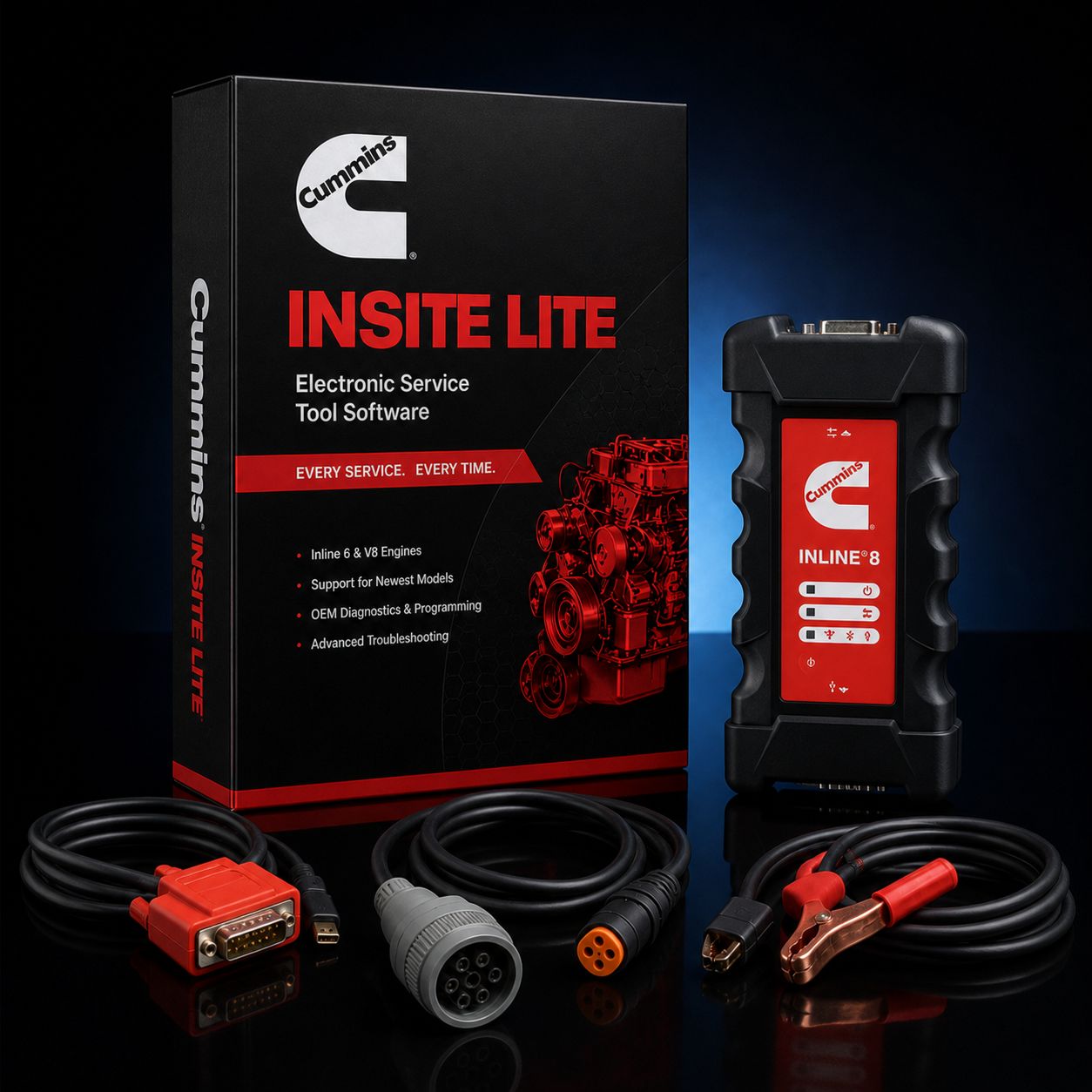
Cummins INSITE Lite + Cummins INLINE 8 Datalink Adapter

$3 295.00
In stock
Share this product with your friends
Cummins INSITE Lite + Cummins INLINE 8 Datalink Adapter
Product Details

This is the all-Cummins pairing. Cummins INSITE Lite is the diagnostic software Cummins itself sells to independent shops, fleets, and owner-operators. The Cummins INLINE 8 is the current-generation OEM datalink adapter Cummins designed and built specifically to drive that software. When a Cummins dealer's master tech sits down at a B6.7 or an X15, this is the hardware-and-software stack on the bench. Buy this kit and you are running the same diagnostic chain Cummins runs internally, minus the dealer-only password tools and the Pro-tier calibration features.

The reason to spec the all-Cummins pairing instead of going third-party on the adapter is straightforward: Cummins writes both halves. The INSITE software talks to the INLINE 8 firmware through a driver Cummins maintains in lockstep with both products. When INSITE pushes a release that adds a new engine year or a new aftertreatment routine, the INLINE 8 firmware update lands at the same time. There is no third-party translation layer to misinterpret a CAN frame, no RP1210 vendor playing catch-up after Cummins changes a service tool message ID. For shops that live on Cummins iron and only need one OEM software in the door, this is the cleanest, lowest-troubleshoot pairing on the market.

This package is built for the shop that has already decided. You rebuild ISX15s, you regen B6.7s, you chase active codes on QSB-powered industrial gear, and you don't care about Detroit DD15s or PACCAR MX-13s sitting on the next bay over because you don't take that work. If that's you, this is the kit. Add a Windows 10 or Windows 11 laptop, plug the 9-pin Deutsch into the truck, fire INSITE, and you are reading codes inside two minutes. If you'd rather have us pre-build it on a Panasonic Toughbook so you aren't buying a consumer laptop that'll die in a working bay, ask about our INSITE Lite + INLINE 8 + Toughbook kit when you call.

Kit Contents


  • Cummins INSITE Lite software license, 12-month subscription, full diagnostic access. This is a Cummins-issued license keyed to the laptop you install it on. It is not a one-and-done install — Cummins runs an online activation against your machine fingerprint, and the license clock starts the day you activate.

  • Cummins INLINE 8 datalink adapter, current-generation Cummins-built RP1210 vehicle communication interface. P/N 6395440. This is the Cummins-branded adapter, not a clone, not an INLINE 6 or INLINE 7 left over from a clearance bin. It ships with current firmware and the full driver package.

  • USB cable. Standard A-to-B USB. The INLINE 8 is fully functional over USB alone — Wi-Fi and Bluetooth are bonuses, not requirements. For a shop bay where the truck is parked next to your bench, USB is what you'll use 90% of the time and it's the most stable connection.

  • 9-pin Deutsch (J1939) cable for Class 8 trucks. This is your daily-driver cable. Every modern Cummins-powered Class 8 truck you'll see — Peterbilt, Kenworth, Freightliner, International, Western Star, Mack — runs a 9-pin Deutsch under the dash. ISX15, X15, X12, ISX12, all of them.

  • 6-pin Deutsch cable for legacy J1708/J1587 applications. This gets you on pre-2007 trucks and older off-highway equipment that never moved up to J1939. Less common now but you will absolutely meet a 1998 ISM or an early ISC that still runs 6-pin only.

  • OBD-II 16-pin cable for light/medium-duty applications. For Cummins-powered RAM trucks, smaller medium-duty chassis, and any OBD-II-equipped Cummins application. This is the cable that lets you walk up to a 6.7L Cummins in a 5500 chassis and pull codes without any adapter wizardry.

  • Activation instructions and registration documentation. Step-by-step paperwork for Cummins online activation, plus the registration sheet you'll need if you ever call Cummins technical support — which is included free with your subscription.

About Cummins INSITE Lite

INSITE is a Windows-based diagnostic application built and supported by Cummins. The Lite tier is the version that handles every diagnostic task short of writing new calibrations to the ECM. It is the right tool for independent diesel shops, fleet maintenance shops, owner-operators, and industrial service operations that need real OEM-level access without paying for the full reflash and calibration suite.

What it actually does in the bay: First, fault code work. INSITE reads active and inactive (stored) codes off the engine ECM, pulls the SPN/FMI breakdown, gives you the Cummins-specific fault description, and links you straight to the troubleshooting tree for that code. This is the Fault Information System (FIS) integration — instead of guessing what SPN 3251 FMI 16 means on a 2014 ISX15, INSITE walks you through the documented Cummins service procedure. Clearing codes is one click after diagnosis is complete.

Second, live data. INSITE displays the ECM data stream in real time with commanded-versus-actual parameter pairing. That distinction matters. A scan tool that just shows "boost = 18 psi" tells you what the sensor reads. INSITE shows "commanded boost = 22 psi, actual boost = 18 psi" and now you know there's a 4 psi shortfall — which is the kind of data you need to chase a sticky VGT. Same logic on rail pressure, EGR position, dosing valve flow, turbo speed, all the parameters that matter on a modern common-rail Cummins.

Third, bidirectional functional tests. This is where INSITE separates from a generic code reader. Cylinder cutout test — INSITE will kill fuel to one cylinder at a time so you can hear and feel a dead hole. EGR valve sweep — the software commands the EGR through its full range while you watch the position feedback. VGT actuator sweep — same idea on the variable geometry turbo. DEF dosing valve test, fuel shutoff valve test, cooling fan engage, intake throttle valve sweep. These are the tests that turn a "engine runs rough" complaint into a specific failed component.

Fourth, stationary forced regenerations. On Cummins engines equipped with DPF aftertreatment, INSITE Lite commands a parked regen — engine spools up to high idle, raises EGT into burn-off territory, and burns soot out of the DPF substrate while the truck sits in the bay. After a DPF service or filter swap, INSITE also runs the post-service reset procedure that tells the ECM the soot load model is fresh.

Fifth, snapshot recording. INSITE captures a parameter-and-code snapshot when a fault sets, so when an intermittent comes back six weeks later you can pull up exactly what the engine was doing at the moment the code triggered. Saves a lot of "well, it ran fine when we had it" conversations.

Sixth, Cummins-specific parameter access. Things a generic J1939 reader can't see — injector trim values, IMV (inlet metering valve) duty cycle, individual cylinder balance numbers, rail pressure target versus actual, soot load percentage, DEF tank quality readings. These are the values you need when chasing a misfire, a no-start, or an aftertreatment derate.

Seventh, wiring diagrams and sensor location maps. INSITE pulls up the connected engine's harness diagrams and a physical location map for every sensor on the engine. No more digging through a service manual binder to figure out where the cam sensor lives on a 2018 X15.

Where Lite Ends and Pro Begins

INSITE Lite is full-access diagnostics. INSITE Pro is full-access diagnostics plus calibration. The line is drawn at writing changes back into the ECM that affect engine behavior beyond a service reset. Specifically:

INSITE Lite will NOT reflash the ECM to a new calibration revision. If Cummins issues a TSB-driven calibration update for your engine and you need to write the new flash file in, that's a Pro-only operation.

INSITE Lite will NOT program injector trim files. When you swap injectors on a common-rail Cummins, each injector has a calibration code printed on the body. Pro lets you load those trim files into the ECM. Lite reads injector trim values but won't write new ones.

INSITE Lite will NOT change locked parameters. Things like maximum vehicle speed, idle shutdown timer, cruise control max speed, PTO settings — most of those are dealer-locked behind ECM passwords. Pro plus the ECM password unlock (Zap-It) gets you access.

INSITE Lite will NOT load engine calibrations. If you're doing a long-block swap and need to flash the new ECM with the chassis calibration, that's Pro territory.

If you find yourself needing those operations more than once or twice a year, the Pro upgrade pays for itself. We sell INSITE Pro packages and we sell upgrade paths. The conversation is straightforward — call 800-399-9495 and we'll spec which tier fits your work.

About the Cummins INLINE 8

The INLINE 8 is Cummins' current-generation vehicle communication interface (VCI) — the OEM-branded RP1210 datalink adapter. Cummins launched it as the successor to the INLINE 7, and it's the adapter Cummins is shipping new today. Part number 6395440.

What changed from INLINE 7 to INLINE 8: faster main processor, more RAM for handling heavier bus traffic, dual-band Wi-Fi (802.11 a/b/g/n/ac instead of single-band on the 7), Bluetooth bumped to v5.1 Classic BR/EDR, more sophisticated CAN message filtering, and full RP1210C compliance plus RP1227 for wireless. Baud rates supported up to 1 Mb/s. The INLINE 7 was a solid adapter and is still in service across thousands of shops, but on a CAN FD bus or a heavy-traffic 1939 network with multiple ECMs talking simultaneously, the INLINE 8 simply has more headroom.

Supported protocols on the INLINE 8: J1939 (the modern heavy-duty CAN backbone), J1708/J1587 (legacy heavy-duty), CAN (250K, 500K, 1M baud), ISO 15765, ISO 9141, ISO 14230 (KWP2000 K-line and L-line), and CAT Data Link (CDL) for older Caterpillar applications. OBD-II is covered through the standard ISO 15765 stack on the 16-pin connector.

Connectivity: USB, Bluetooth 5.1, and Wi-Fi. USB is the most stable and is what we recommend for any sustained reflash or long parameter-write operation — wireless is fine for code reads and live data, but if your laptop's Wi-Fi drops mid-flash you have a problem. Bluetooth is handy when the truck is parked outside the bay door and you want to walk around the engine while INSITE is connected.

Why Cummins runs the most reliable INSITE connection on the INLINE 8: same vendor, same firmware team, same release schedule. Cummins owns both products. When INSITE 9.x adds support for a new engine, the INLINE 8 firmware is qualified against that release before it ships. Third-party RP1210 adapters get the same RP1210 spec, but they don't get inside Cummins' release pipeline. They work — that's not in question — but on the rare edge case where a CAN frame timing sensitivity or a service tool message ID changes, the OEM-branded adapter is the one that already knows about the change.

INLINE 8 vs NEXIQ USB-Link 3 — The Honest Comparison:

This is the question we field most often. Both adapters are RP1210-compliant, both run INSITE, both will pull codes off your X15. The right answer depends on what work you take.

INLINE 8 is the most "Cummins-correct" adapter. Cummins designs the firmware. Cummins designs the software. Cummins certifies them as a pair. For pure INSITE work, this is the most stable, lowest-troubleshoot, most-likely-to-Just-Work pairing you can buy. If a Cummins service campaign drops next quarter that touches some new aftertreatment routine, the INLINE 8 firmware will be ready for it on day one. The downside: it's a single-purpose adapter from a multi-OEM perspective. Yes, the INLINE 8 is RP1210 and will technically run on Detroit DDDL, CAT ET, Allison DOC, Volvo PTT, and other RP1210-compliant stacks — Cummins lists this compatibility — but it is not the adapter those OEMs prefer or test against.

NEXIQ USB-Link 3 is the multi-platform adapter. NEXIQ designed it specifically to be the universal RP1210 + J2534 interface across the heavy-duty industry. It runs Cummins INSITE, Detroit DDDL, CAT ET, Mack/Volvo PTT, Allison DOC, Eaton ServiceRanger, Bendix ACom, Wabco Toolbox, International ServiceMaxx, and the rest of the heavy-duty OEM stack. It's also CAN FD- and DoIP-capable for the newest model-year work. If your shop does mixed-fleet work — Cummins today, Detroit tomorrow, CAT next week — USB-Link 3 is the adapter most heavy-duty shops standardize on because one piece of hardware covers everything.

Different shop priorities pick differently. Cummins-only shop, owner-operator with a Cummins-powered truck, Cummins industrial service tech: INLINE 8 is the right call. Independent heavy-duty shop running multiple OEM softwares: USB-Link 3 makes more sense as the single hardware point. We sell both. We sell INSITE Lite paired with USB-Link 3 as a separate kit if that's the direction you want to go. No wrong answer — pick the one that matches your work.

One more honest note: the INLINE 8 is more expensive than third-party RP1210 adapters from companies like Jaltest, Noregon, or DG Technologies. You're paying for the Cummins logo and the in-house engineering. For a shop that runs INSITE every single day, that premium is justified. For a shop that runs INSITE three times a month, a third-party adapter probably gets the same job done.

Engine Coverage via INSITE

INSITE Lite paired with the INLINE 8 covers the full Cummins on-highway and off-highway lineup. Specifically:

On-highway heavy-duty: X15 (2017-current, the current Cummins flagship for Class 8), X12 (2018-current, displacement-down option for weight-sensitive Class 8), ISX15 (2010-2017, including the 2013 emissions-update generation), ISX (2002-2010), ISX12 (2010-2018).

On-highway medium-duty: ISB (1998-2007, Dodge Ram and medium-duty chassis), ISB 6.7 / B6.7 (2007-current, the 6.7L Cummins in RAM 2500/3500/4500/5500 and similar chassis), ISC 8.3 (1998-2010), L9 (2017-current), ISL (2002-2010), ISL9 (2010-2017), ISM (1998-2010), and the legacy 8.3, 8.9, and B5.9 mechanical-to-electronic transition engines.

Off-highway and industrial: QSB, QSC, QSL, QSM, QSX, QSK families covering construction equipment, agricultural, mining, marine, oil-and-gas, and stationary power gen applications. KTA series for large industrial and locomotive applications.

If it has a Cummins ECM and a diagnostic connector, INSITE talks to it. The only Cummins engines you won't see on this kit are mechanical pre-electronic engines (mid-90s and earlier) that have no ECM to talk to in the first place.

Real-World Workflow Examples

Job one — 2016 Peterbilt 579 with an ISX15 throwing an SPN 3251 FMI 16 (DPF differential pressure high). Plug 9-pin into the truck, USB into the laptop, fire INSITE. INSITE reads the active code, pulls the FIS troubleshooting tree, displays the soot load model and the differential pressure live. You see soot load at 138%, DPF differential pressure at 11 kPa — that's a regen request that didn't complete. Command a stationary regen from INSITE. Watch EGT climb to 600°C, watch differential pressure drop, watch soot load climb back down to baseline. Clear the code, document the snapshot, send the truck back out.

Job two — 2020 RAM 5500 with a 6.7L Cummins, customer complaint of rough idle. Plug 16-pin OBD-II into the truck, INSITE connects through the INLINE 8. Pull live data. Cylinder balance numbers are reading -8% on cylinder 4 — that's a misfire. Run the cylinder cutout test from INSITE. Cylinders 1, 2, 3, 5, 6 each drop RPM around 80 when killed. Cylinder 4 drops 15 RPM. Confirmed dead hole. Pull injector 4, send it for testing.

Job three — 2014 Kenworth T880 with an ISX15, customer says "DEF light is on, going into derate." Plug in, INSITE shows SCR catalyst efficiency below threshold — DEF quality is bad or the SCR is contaminated. Pull DEF quality reading off the live data, compare against the reagent test, run the SCR efficiency test from INSITE bidirectional functions. Get a clean diagnosis instead of guessing whether it's the DEF tank, the dosing valve, or the catalyst.

Job four — 2008 ISC 8.3 in a medium-duty box truck. Pre-DPF, but customer has an active engine derate code. Plug in, INSITE pulls the code, walks you through the FIS procedure, you find a corroded ground stud on the back of the engine block. Twenty-minute fix that would've been a four-hour parts-throwing exercise without the FIS data.

Common Cummins Faults and How This Kit Gets You There

Sensor wiring corrosion is rampant on Cummins aftertreatment systems. DEF lines run sensors that live in road salt and water. INSITE shows you FMI 4 (voltage low) or FMI 18 (data erratic) and the sensor location map tells you exactly which connector to inspect. No more chasing the harness end-to-end.

Contaminated fuel shows up as abnormal rail pressure variation. INSITE's SPN 157 family covers rail pressure faults. Watch commanded rail pressure versus actual rail pressure live — if actual won't track commanded, you're looking at lift pump, supply restriction, or contaminated injectors. The injector trim values help confirm.

DPF ash accumulation shows as SPN 3251 FMI 16 (DPF differential pressure too high) or SPN 3720 (ash load high). INSITE commands the regen, then if regen doesn't drop the differential pressure, the DPF is ash-loaded and needs to come off for cleaning or replacement.

Low battery voltage triggers J1939 communication faults — SPN 639 FMI 9 family. Before you start replacing wiring, pull the battery voltage reading off INSITE while cranking. If the ECM is browning out below 9V, fix the batteries before chasing harness ghosts.

Turbo actuator (VGT) failures on ISX/X15 — INSITE bidirectional sweep tests the VGT through its full range. If the actuator won't track command, you've confirmed VGT failure without dropping the turbo.

EGR cooler failures on ISL/L9 and ISX — coolant intrusion shows up as misfires and erratic running. INSITE rail pressure live data combined with the cylinder balance numbers will point you at the cylinder being washed by coolant.

Camshaft and crankshaft position sensor failures — INSITE shows sync status and engine position errors. The wiring diagrams and sensor location maps get you straight to the connector.

License and Subscription Reality

Cummins INSITE Lite is sold as a 12-month subscription. That's the only way Cummins legally sells INSITE. The license starts when you activate online, runs for 365 days, and at the end of that 12 months the software reverts to read-only mode until you purchase a renewal. Read-only means you can still read codes and view live data, but you lose bidirectional tests, forced regen, and parameter writes.

If you see a listing online for "lifetime" or "perpetual" or "non-expiring" Cummins INSITE for $200 — that is pirated software. It will work for a while. It will eventually get blacklisted, your activation will die, and you will have no support, no updates, and no recourse. Cummins audits activations and shuts down cracked installs. Anyone selling you a permanent license is either lying about the license terms or is selling you stolen software. We don't sell that. Cummins doesn't sell that.

Activation is online and machine-locked. INSITE phones home to Cummins during activation, fingerprints the laptop, and binds the license to that hardware. If your laptop dies, Cummins will move the license — but you have to call them and request a transfer. Plan accordingly.

Subscription includes Cummins technical support. If you hit a wall on a diagnosis, you can call Cummins and a Cummins tech will help you work through INSITE itself. That support line is included with the subscription, not extra.

Computer Requirements

Windows 10 or Windows 11. INSITE 9.x current generation runs cleanly on both. Windows 7 is end-of-life and not supported. macOS, Linux, ChromeOS — none of those run INSITE.

Minimum specs: 4 GB RAM, 4 GB free hard disk space. Realistic working specs: 8 GB RAM minimum, 16 GB if you can swing it, SSD storage, an i5 or better processor. The software itself isn't heavy, but the laptop has to hold up to bay use.

Strong recommendation: a Panasonic Toughbook. Consumer laptops do not survive in working bays. Diesel soot, condensation, vibration, getting knocked off the workbench by a tech reaching for a 9/16 wrench — Toughbooks tolerate that. A Dell Inspiron does not. We pre-build INSITE Lite + INLINE 8 packages on Toughbooks (CF-31, CF-53, CF-54, FZ-55 depending on what we have in stock) for shops that want a single-piece deployment ready to roll out of the box. Call and we'll spec it.

What's NOT Included:


  • Cummins dealer ECM password unlocks. Those are Pro-tier with a separate Zap-It utility. Lite reads parameters, it doesn't unlock locked ones.

  • ECM reflash files / calibration files. Pro tier only.

  • Injector trim file writing. Pro tier only.

  • Anything that requires writing a new calibration to the ECM. Pro tier only.

  • A laptop. You bring the Windows 10/11 machine, or you upgrade to one of our Toughbook packages.

  • Other OEM softwares (Detroit DDDL, CAT ET, etc.). The INLINE 8 is RP1210 and will technically run them, but those licenses are sold separately by their respective OEMs.

FAQ

Q: INLINE 8 or USB-Link 3 — which should I get? A: Cummins-only shop, get the INLINE 8 (this kit). Mixed-fleet shop running multiple OEM softwares, get USB-Link 3. The INLINE 8 is the most Cummins-stable adapter on the market because Cummins makes both halves; USB-Link 3 is the universal-OEM adapter most heavy-duty shops standardize on because one adapter covers Cummins, Detroit, CAT, Volvo, Mack, Allison, and the rest. Different jobs, different right answers.

Q: Will the INLINE 8 work with INSITE Pro if I upgrade later? A: Yes. INLINE 8 hardware is identical between Lite and Pro use. The license is the difference, not the adapter. When you upgrade from Lite to Pro, you keep the same INLINE 8 and just install the upgraded license.

Q: Does the INLINE 8 work with Detroit DDDL or PACCAR DAVIE? A: Technically yes — it's RP1210-compliant. Practically, those OEMs test against and recommend their own preferred adapters (DDDL prefers NEXIQ USB-Link or DDR; PACCAR DAVIE has its own DAVIE4 communication device or NEXIQ). The INLINE 8 will run them but it's not the adapter those OEMs design for. If you need to run multiple OEM softwares, USB-Link 3 is the more sensible single-hardware play.

Q: Bluetooth, Wi-Fi, or USB only? A: All three. INLINE 8 supports USB, Bluetooth 5.1, and dual-band Wi-Fi. USB is most stable and is what we recommend for reflashing and any sustained operation. Wi-Fi and Bluetooth are real and they work, but if you're three rooms away from the truck and the wireless signal drops mid-regen, the regen aborts. For the everyday shop bay, USB.

Q: Why is the Cummins-branded adapter more expensive than third-party RP1210 adapters? A: You're paying for Cummins engineering, Cummins firmware support, Cummins's qualification of the adapter against every INSITE release, and Cummins technical support that knows the hardware end-to-end. Third-party adapters are RP1210-compliant and they work — they just don't get the inside-Cummins development pipeline. If you live in INSITE every day, that premium is real value. If you touch INSITE three times a month, a third-party adapter is probably fine.

Q: Can I use the INLINE 8 for off-highway Cummins (QSB, QSC, marine, gen-set)? A: Yes. The 9-pin and 6-pin Deutsch cables cover the J1939 and J1708 connectors on most off-highway equipment. INSITE coverage includes the full QS-family. Marine and gen-set Cummins applications use the same J1939 backbone as on-highway and the same diagnostic stack works.

Q: Does this kit handle CAN FD on the newest model-year trucks? A: The INLINE 8 supports CAN FD and the INSITE software has been updated for current model years. As Cummins rolls out CAN FD across new platforms, the INLINE 8 is positioned to cover them. The third-party adapter market is mixed on CAN FD support — INLINE 8 is the safe call here.

Why Buy This Kit From Heavy Duty Truck Diagnostics

We bench-test every adapter before it ships. INLINE 8 hooked up to a known-good test ECM, INSITE Lite installed and activated to confirm the license works, all three cables continuity-checked. If anything looks off, the kit doesn't ship.

We are an authorized Cummins INSITE reseller. The license you get is a real Cummins license, registered to you, with full Cummins technical support included. Not a cracked install, not a grey-market activation that'll die in three months.

We answer the phone. 800-399-9495 — and the person who picks up has used this kit in a working bay. If you need help getting INSITE talking to the INLINE 8, configuring Bluetooth pairing, sorting out a Windows 11 driver question, or deciding whether you actually need Pro instead of Lite, the conversation is real. We don't punt to a script.

We ship same day on in-stock orders. Most kits leave the warehouse the same business day if ordered before 2 PM Central.

Call 800-399-9495 with any questions about adapter compatibility, INSITE Lite vs Pro, software activation, or to spec a complete shop-ready kit including a Panasonic Toughbook.

All Cummins licenses are subject to applicable sales tax.

MANUFACTURER: Cummins MFG PART #: INSITE-LITE-INLINE8 ITEM: CUM-INSITE-LITE-IL8