
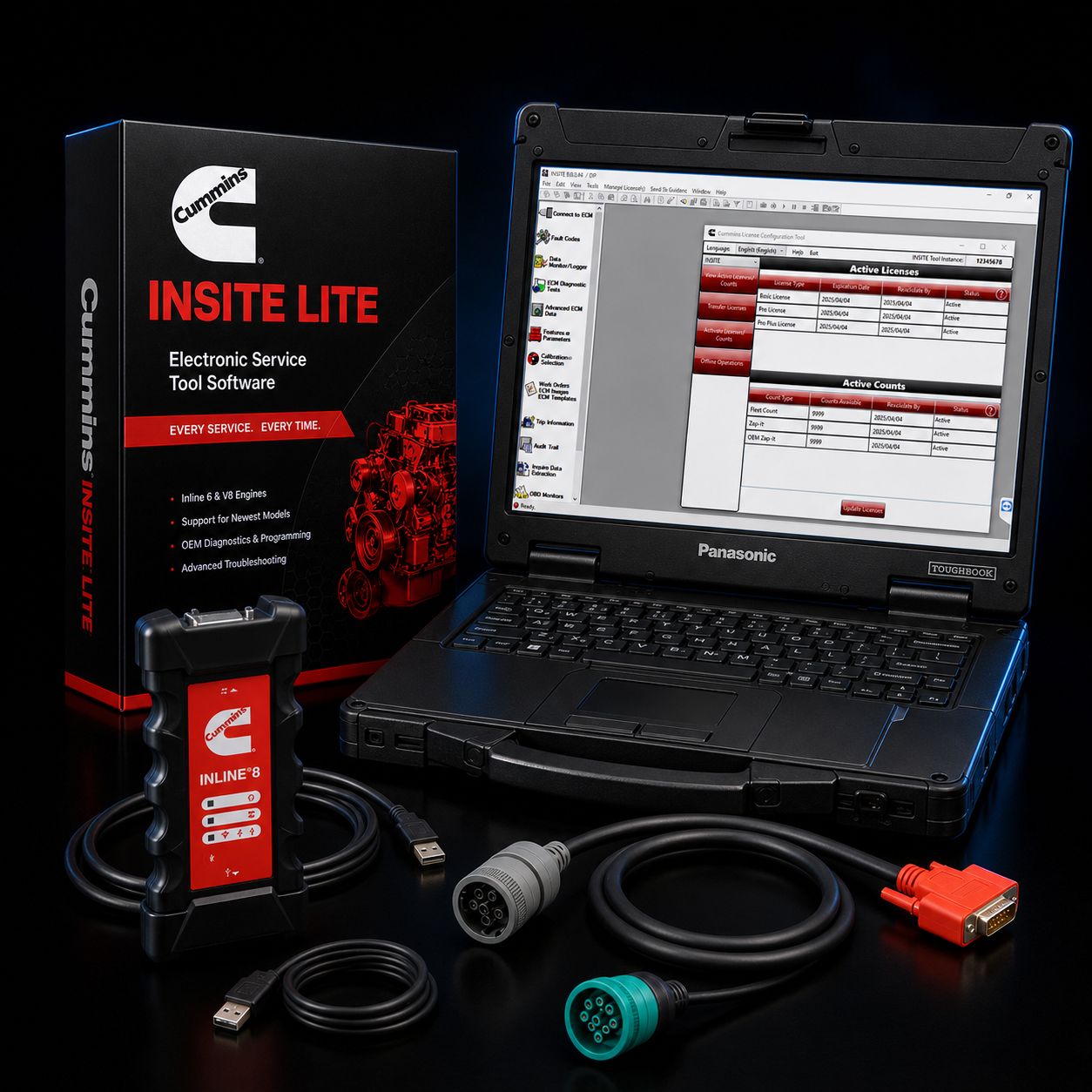
This is the all-Cummins, budget-tier diagnostic kit for shops that work on Cummins engines and want to stop fighting their tools. Every component in this bundle either comes from Cummins itself or carries a service record long enough to prove it belongs in a working bay. INSITE Lite is the same diagnostic application Cummins dealers run on the read-and-test side of the counter. The INLINE 8 is the datalink adapter Cummins engineered specifically to talk to that software, sharing firmware lineage with the units sitting on every authorized Cummins service rack from California to Pennsylvania. The Toughbook FZ-55 is Panasonic's current semi-rugged platform, refurbished to running condition and reloaded with Windows 11 Pro so it lands on your bench ready to plug into a Class 8 datalink and pull codes the same hour it arrives.
The pitch on this package is simple. You are not paying dealer-tier money, but you are getting dealer-tier hardware on the part that matters most: the wire between the truck and the laptop. Third-party RP1210 adapters are fine for many jobs, and the technicians using them are not wrong to do so. But when you are 100 percent Cummins-focused, the cleanest path to fewer dropped sessions, fewer mismatched protocol stacks, and fewer "INSITE crashed mid-regen" mornings is to use the same datalink adapter Cummins built around its own software. Pair it with INSITE Lite for read, live data, bidirectional, and forced regen, and you can handle the volume that fills most independent shop schedules without ever paying for a Pro license you would barely use.
The third leg of the kit, the refurbished Toughbook, is where the budget tier shows up honestly. New FZ-55 units run well over four thousand dollars before you load any software. A clean, tested, refurbished unit gives you the same magnesium-alloy chassis, the same spill-resistant keyboard, the same drop-tested rugged build, at a fraction of the price, and with several years of useful service life still in the tank. We bench-test, re-image, and license every machine before it ships. You unbox it, plug it into a truck, and start working.
Kit Includes: - Cummins INSITE Lite software license (12-month subscription) — pre-installed and activated - Cummins INLINE 8 datalink adapter (P/N 6395440) — current-generation Cummins-built RP1210 adapter - Refurbished Panasonic Toughbook FZ-55 with Windows 11 Pro pre-installed - USB cable for INLINE 8 to laptop connection - 9-pin Deutsch (J1939) cable for Class 8 trucks - 6-pin Deutsch cable for legacy J1708/J1587 applications - OBD-II 16-pin cable for light/medium-duty applications including Ram with Cummins - Toughbook AC power adapter - Activation documentation and license registration paperwork - Quick-start setup guide
Every cable is in the kit on purpose. You should not have to chase a 6-pin Deutsch on day one because somebody in 1998 put a Cummins ISC in a school bus your customer just rolled in.
About INSITE Lite — What This Software Actually Does
INSITE Lite is the read-and-diagnose tier of Cummins' factory diagnostic application. It is not a simulator, it is not a third-party reskin, it is not a wrapper around generic OBD-II calls. It is the same software a Cummins dealer technician opens, with one ECM-write category fenced off behind the Pro license. Once activated and connected through the INLINE 8, INSITE Lite gives you full visibility into every modern Cummins engine ECM and most legacy ones.
What INSITE Lite handles in a normal shop day: - Read and clear active and inactive engine fault codes across the full Cummins lineup - Live data display with commanded vs. actual parameter pairs, the comparison Cummins technicians use to spot sensor drift - Bidirectional component testing including cylinder cutout, EGR sweep, VGT actuator sweep, dosing valve test, and aftertreatment injector test - Stationary forced regeneration on equipped Cummins engines with full DPF and DEF status reporting - Snapshot recording during fault occurrence for offline analysis - Cummins-specific parameter set including high-pressure fuel rail pressure, individual injector trim values, IMV duty cycle, turbocharger speed, and aftertreatment temperature stack - Wiring diagrams, sensor location maps, and fault tree troubleshooting steps drawn directly from Cummins service literature - Driver reward parameter configuration where allowed - Trip information reset and review - Engine feature on/off toggling on parameters not locked behind dealer authorization - Work order and job creation, with session logging for audit and warranty paperwork - Settings template creation so you can apply the same baseline to multiple ECMs - ECM password set and change, when paired with the appropriate Zap-It file
That last set is what makes Lite the right tool for so many independent shops. You can write basic parameters, you can change passwords with the right authorization file, and you can run every functional test the engine ECM exposes. What you cannot do is rewrite the engine calibration itself.
INSITE Lite vs INSITE Pro — The Honest Upgrade Path
INSITE Lite does not reflash ECMs, does not download or install new engine calibrations, and does not perform horsepower upgrades or fuel map changes. It does not load injector trim files when you swap a complete injector set. It does not push down ECM firmware updates published by Cummins. Those four operations are the Pro license's territory.
For roughly seventy percent of the work that walks into a Cummins-focused independent shop, none of those operations are needed. Diagnose a regen failure. Pull codes after a check engine light. Sweep a VGT to confirm a sticky actuator. Run a cylinder cutout to chase a misfire. Do a forced regen for a customer who never lets the truck idle long enough on a long-haul to clean itself out. All of that is Lite work.
Pro becomes the right tool when you are doing rebuild returns where new injectors require trim files, when you are pushing emissions-recall calibrations from Cummins, when you are correcting horsepower ratings on a customer's request, or when a Cummins service bulletin demands an ECM update before you can clear a recurring code. If your shop does that work weekly, buy Pro. If it does that work three or four times a year, buy Lite, and call us when you need a Pro session — many shops we sell to keep one Pro license at one bench and Lite at the others.
The good news on the upgrade path: when you outgrow Lite, you do not throw out hardware. The INLINE 8 in this kit is the exact adapter Pro uses. The Toughbook keeps running. You change the software tier, get a new license, and the bench you built today is the bench you keep tomorrow.
About the Cummins INLINE 8
The Cummins INLINE 8 (P/N 6395440) is the current-generation OEM datalink adapter Cummins designed to pair with INSITE. It replaced the INLINE 7 in regular dealer service starting in 2019, and the design intent on the INLINE 8 was straightforward: faster processor, larger memory buffers, better wireless stack, broader protocol coverage, and full compliance with the latest Technology and Maintenance Council standards.
Protocol support on the INLINE 8 covers everything in the heavy-duty world plus the relevant light-duty protocols for Cummins-equipped Ram trucks and aftertreatment systems: - SAE J1939 (the Class 8 standard CAN-based protocol) - SAE J1708 / J1587 (legacy datalink for pre-2007 Cummins, still alive on plenty of yard tractors and older fleet equipment) - ISO 15765 (CAN-based diagnostic standard, used on Ram with Cummins) - ISO 9141, ISO 14230, KWP2000 (K-line protocols, used for some Cummins industrial and off-highway gear) - CAT Data Link (CDL) — yes, the INLINE 8 talks Caterpillar's proprietary datalink for shops that occasionally work CAT - CAN, including CAN FD support for newer architectures
Connectivity is USB 2.0 wired, dual-band Wi-Fi (802.11 a/b/g/n/ac), and Bluetooth 5.1 BR/EDR. The INLINE 8 is a TMC RP1210 and RP1227 compliant device, which means any RP1210-aware diagnostic application — Detroit DDDL, CAT ET, Navistar ServiceMaxx, Volvo PTT/PTH, Allison DOC, JPRO, Diesel Explorer, the lot — will recognize and use the adapter through the standard interface. You are not locked into INSITE just because you bought Cummins hardware. The INLINE 8 is RP1210 first, Cummins-optimized second.
Baud rates supported: 250 kbit, 500 kbit, and 1 megabit. Three simultaneous CAN connections. Larger memory buffers than the INLINE 7 mean the adapter holds more data when the laptop falls behind, which matters when you are pulling a long snapshot during an intermittent fault. The processor upgrade also matters during forced regens — the adapter does not lose its place in a long live-data stream because the bus got busy.
Why Cummins-designed firmware is the most stable choice for INSITE: every protocol stack on every adapter has small idiosyncrasies. Third-party RP1210 adapters work fine in INSITE most of the time. But when an INSITE update lands, or when a new ECM calibration changes how the engine talks back, the first adapter to get a firmware patch is always the OEM unit. We have seen plenty of third-party adapters work great for two years and then start dropping sessions on a specific engine family because the vendor was slow to push an update. The INLINE 8 does not have that lag because its firmware comes from the same engineering group that ships INSITE.
INLINE 8 vs USB-Link 3 — The Honest Comparison
The Nexiq USB-Link 3 and the Cummins INLINE 8 are the two adapters most often considered for this price range. Here is the honest cut on which one belongs on your bench.
The USB-Link 3 is the broader tool. It is the adapter most multi-brand shops should buy. It supports CAN FD, J1939 FD, DoIP (Diagnostics Over IP), and single-wire CAN, which puts it ahead on the very newest equipment. It runs on Windows 10 and 11, Android, and iOS. It carries Wi-Fi (2.4 and 5 GHz) and Bluetooth 5.0. For a shop running INSITE one bay, DDDL the next, JPRO the third, and CAT ET the fourth, the USB-Link 3 is the safer single-cable answer.
The INLINE 8 is the deeper Cummins tool. The firmware is engineered around INSITE. Cummins' service network uses this adapter, which means every INSITE update is validated against this adapter first. If your shop is 100 percent Cummins, or 90 percent Cummins with occasional CAT Data Link work, the INLINE 8 will give you the cleanest INSITE experience available short of the dealership's full Pro setup. Sessions hold longer, forced regens complete more reliably on borderline cases, and the adapter does not need a vendor patch every time Cummins ships an INSITE point release.
This kit is built deliberately for the Cummins-only shop. If your work is split across brands, look at our INLINE 7 or USB-Link 3 packages — they are better fits for that work pattern.
About the Refurbished Panasonic Toughbook FZ-55
The Toughbook FZ-55 is Panasonic's current semi-rugged business laptop. It is the unit you see in the hands of utility crews, military logistics, public-safety vehicles, fleet maintenance trucks, and yes, diesel mechanics. Panasonic builds the FZ-55 around a magnesium-alloy chassis, recessed screen, spill-resistant backlit keyboard, and a modular xPAK expansion bay system that lets you add ports your specific work needs.
Specifications on the unit shipping with this kit: - Chassis: magnesium alloy with recessed display, MIL-STD-810H certified to drop, shock, vibration, sand, dust, altitude, freeze/thaw, high temperature, low temperature, humidity, and temperature shock testing - Display: 14-inch HD IPS panel, anti-glare coating, readable in direct sunlight at the bay door - Processor: Intel Core i5 13th-generation vPro, four performance cores plus efficiency cores, turbo boost into the 4 GHz range — comfortably enough for INSITE plus a browser, a service-bulletin PDF, and your shop management software running at the same time - RAM: 16 GB DDR4 standard, with most refurbished units shipping at this spec; upgrades available on request - Storage: 512 GB NVMe SSD standard - Wireless: Wi-Fi 6 / 6E and Bluetooth, optional 4G LTE module on configured units - Ports: multiple USB-A and USB-C, HDMI, gigabit Ethernet, headphone/mic combo jack, and the xPAK bay typically loaded with a serial port for older diagnostic adapters - Keyboard: full-size, spill-resistant, backlit - Battery: hot-swappable design with extended runtime configurations available - Weight: roughly 4.4 pounds, manageable for a tech moving between bays all day - Operating system: Windows 11 Pro, fully updated, INSITE installed and license-activated before shipping
The Refurb Process
Refurbished does not mean used-and-resold. Every Toughbook in our refurbishment line goes through the same sequence: 1. Full functional test on every port, screen, keyboard key, battery cell, wireless radio, and storage device 2. Disassembly down to the chassis for dust and debris removal — these laptops live in shops, and shops have grit 3. Battery health check and replacement when capacity falls under threshold 4. SSD secure-wipe and replacement when SMART data shows wear 5. Fresh Windows 11 Pro install, fully activated, all current updates applied 6. INSITE Lite installation and license activation against your account 7. Final 24-hour burn-in test before boxing
When the laptop arrives at your shop, the only thing you do is plug it in, log into Windows, and connect the INLINE 8 to a truck. We have done the rest.
Refurbished Toughbooks routinely run 5+ years in active shop service, and many continue past that. The chassis design is the reason — there is no plastic flex point waiting to crack, the keyboard does not get destroyed by one coffee spill, the screen survives a counter slide that would shatter a consumer laptop. The economics on a refurb FZ-55 in a diesel shop are hard to beat.
Refurb vs New — The Honest Tradeoff
A new FZ-55 from Panasonic carries a multi-year manufacturer warranty, the latest revision of the chassis hardware, and a battery at one hundred percent of design capacity. It also runs roughly twice the price of a comparable refurbished unit, and on a shop laptop where the value comes from durability and software compatibility — both of which are identical between new and refurb — the math usually favors refurb.
The honest tradeoff: you are giving up two to three years of remaining manufacturer warranty in exchange for thousands of dollars of savings, and you are accepting a battery that may have ninety percent of its original capacity instead of one hundred. Both are fixable later. Battery is a user-replaceable part. Warranty extensions are available on request. For most shops, the savings buy a second adapter, a year of license renewal, or a coffee budget that puts a smile on every tech in the bay.
If your shop has had bad luck with refurb gear in the past, that is a fair concern. Ask us about the burn-in records on your specific unit before you commit. We keep them.
Why Toughbooks Beat Consumer Laptops in Shop Bays
Anyone who has ever tried to run INSITE on a five-hundred-dollar consumer laptop has the story. The hinge breaks. The keyboard fills with metal shavings and stops typing the letter E. A coffee mug slides three inches and the screen goes dark. The fan inhales diesel soot for eight months and then the laptop thermal-throttles every time you open a browser tab. Cold mornings the battery is at twenty percent before lunch. Drop it once on the concrete from the workbench and the bezel cracks all the way around.
Toughbooks were built for this environment from the original concept. The FZ-55 is rated for a three-foot drop, which is roughly the height from a workbench to a concrete shop floor. The keyboard is sealed against spills. The chassis seal keeps dust and debris out of the internals. The screen is recessed, so when you set the laptop face-down on a fender, the screen does not contact the surface. Battery chemistry holds up at temperatures where consumer cells fold. The display brightness is high enough to read at the bay door in summer sun, and the night-vision mode keeps you readable on a roadside service call after dark.
A consumer laptop in a shop bay is a one-year part. A Toughbook is a five-to-eight-year part. The total cost of ownership math is not even close.
Engine Coverage via INSITE
INSITE — Lite or Pro — covers the full modern and legacy Cummins engine lineup. Through the INLINE 8 and the cables in this kit, you can read codes, run live data, perform bidirectional tests, and trigger forced regens (where the engine supports them) on:
On-Highway Engines: - X15 (current heavy-duty highway engine, model years 2017-current) - X12 (medium-heavy highway and vocational, 2017-current) - ISX15 (heavy-duty highway, 2010-2016) - ISX12 (medium-heavy highway and vocational, 2010-2016) - ISX (heavy-duty highway, 2002-2010) - L9 (medium-duty highway and vocational, 2017-current) - ISL9 (medium-duty, 2010-2016) - ISL (medium-duty, 2002-2010) - B6.7 (medium-duty highway and Ram pickup, 2017-current) - ISB6.7 (medium-duty and Ram pickup, 2007-2016) - ISB (medium-duty and Ram pickup, 1998-2006) - ISC 8.3 (medium-duty, late 1990s through 2010) - ISM (medium-heavy highway, late 1990s through 2010) - B5.9 / 5.9L (legacy medium-duty and Ram pickup)
Off-Highway, Industrial, and Power Generation: - QSB family (industrial, marine, off-highway 4.5L through 6.7L) - QSC (industrial, off-highway 8.3L) - QSL (industrial, off-highway 9L) - QSM (industrial, off-highway 11L) - QSX (industrial, off-highway 15L) - QSK (mining and large industrial, 19L through 78L) - KTA (legacy industrial and large stationary)
If your shop sees a Cummins-powered unit at all — line haul, vocational, RV, Ram pickup, marine, mining, generator, fire pump, agricultural — INSITE through the INLINE 8 reads it.
Real-World Workflow — Three Example Jobs
Job one: a customer rolls in with a Class 8 day cab and a steady regen-needed light. INSITE Lite reads the active codes, shows you the soot accumulation percentage, walks you through the prerequisites for a stationary forced regen (engine warm, no faults blocking, parking brake set, transmission in neutral), and runs the regen. You watch the DPF inlet and outlet temperatures climb on live data, watch the soot percentage drop, hand the keys back. Forty-five minutes counter-time, billable.
Job two: an ISX15 with an intermittent rail-pressure code. You connect, pull the snapshot data INSITE captured at the last fault occurrence, and see commanded rail pressure climbing while actual rail pressure stays flat. You sweep the IMV through bidirectional control, confirm it responds, then walk through the pressure relief valve check using the Cummins fault-tree steps INSITE displays. The wiring diagram is one click away when you need to backprobe the harness.
Job three: an ISL9 vocational truck where one cylinder is suspected of a contribution problem. You run the cylinder cutout test through INSITE's bidirectional menu, watch the engine speed drop on each cylinder in turn, identify the one that does not contribute, and head to the injector. Without bidirectional control, that diagnosis is a guess and a tear-down. With it, twenty minutes.
These are the jobs Lite handles cleanly every day. None of them require ECM reflash or trim file work.
Common Cummins Faults INSITE Lite Helps Diagnose
A short list of recurring Cummins issues you will see, and what Lite does for each:
- DPF regen failures (codes around SPN 3251, 3719, 3936): live-data temperature monitoring during forced regen, dosing valve bidirectional test, aftertreatment injector test
- DEF system faults (SPN 4364, 4360 family): NOx sensor live data, dosing pump pressure check, DEF quality status review
- VGT turbo issues (SPN 27, 2791, 4765): VGT actuator bidirectional sweep, turbo speed live data
- High-pressure fuel system faults (SPN 157, 1347): rail pressure live data, IMV duty cycle, injector trim review
- EGR system faults (SPN 411, 412, 2659, 2791): EGR valve bidirectional sweep, EGR temperature differential live data
- Low coolant level / coolant temperature faults: live data and sensor verification
- Oil pressure faults: live data verification and sensor circuit check via fault-tree
- Charge air cooler / boost pressure faults: bidirectional boost pressure test, intake manifold pressure live data
License and Subscription — The Important Fine Print
INSITE Lite ships as a 12-month subscription license. The license is machine-locked to the Toughbook in this kit. At the end of the 12-month period, the software reverts to read-only mode — you can still pull codes and view live data, but bidirectional commands and forced regens stop working until the license is renewed. Annual renewal is straightforward; we handle it for you when the date approaches.
Piracy warning, plain English: do not buy "lifetime" or "cracked" INSITE installs from overseas marketplaces. Cummins detects unauthorized installs, blacklists the machine and the user account, and you can lose access to your legitimate license going forward. The dealer network shares this data. Every shop we have ever talked into trying a cracked copy regrets it within six months when their bench machine gets locked out at the worst possible moment. Pay for the license, keep the bench legitimate, sleep at night.
What Is NOT Included
To be straight with you about what this kit does not cover: - INSITE Pro features: ECM reflash, calibration file load, injector trim file write, ECM firmware update push - Dealer password unlock authority: some Cummins parameters are dealer-locked at the engine and require an authorized Cummins dealer account to unlock; Lite cannot bypass that - Other-brand OEM software: no Detroit DDDL, CAT ET, Navistar ServiceMaxx, or Volvo PTT licenses (the INLINE 8 hardware will work with those if you license them separately, but no licenses are included) - Software for non-engine systems: transmission programming for Allison, Eaton, or other transmission control modules requires separate licenses - Body controller and chassis programming: not part of INSITE
The Pro upgrade path: when you decide to step up, the cost difference between this kit and a Pro kit is the license itself. Hardware stays. Call us when you are ready.
FAQ
Q: Should my Cummins-only shop buy this kit, or should I get a USB-Link 3 kit instead? A: For a shop that is 100 percent Cummins or close to it, the INLINE 8 is the better adapter — Cummins firmware on Cummins software, fewer surprises during INSITE updates. For a multi-brand shop running DDDL, ServiceMaxx, CAT ET, and JPRO alongside INSITE, the USB-Link 3 has broader protocol coverage and is the more flexible single-cable choice. Both are excellent adapters; the answer depends on your work mix.
Q: Refurb Toughbook vs new Toughbook — really, which should I buy? A: For a shop bench, refurb. The chassis design is identical, the durability rating is identical, the software runs identically. You give up some manufacturer warranty and battery cycle life, you save thousands of dollars. New makes sense for a daily-carry executive laptop or a unit you need to keep under continuous Panasonic warranty for compliance reasons. New does not make sense for a unit that is going to live next to a coolant catch can.
Q: Will the INLINE 8 work with INSITE Pro if I upgrade later? A: Yes. The INLINE 8 is the same adapter Cummins dealers use with INSITE Pro. When you upgrade your license tier, the hardware does not change. The only thing that changes is what the software lets you do.
Q: Why is the INLINE 8 more expensive than a third-party RP1210 adapter? A: Two reasons. First, Cummins does the firmware engineering against the latest INSITE releases first, so the INLINE 8 does not lag protocol updates the way third-party adapters sometimes do. Second, the build quality on the OEM adapter is what dealers hand to their own technicians, and dealer adapters live a hard life. You are paying for the same build the factory service network uses.
Q: What is the warranty on the refurbished Toughbook? A: Standard 90-day shop warranty against defects covers it out of the box. Extended warranty options are available — call to discuss. We have a long history of refurb Toughbooks running well past five years in active shop use, and the 90-day window is typically more than enough to surface any unit that was going to fail early.
Q: Can I use the INLINE 8 with my own laptop instead of the Toughbook? A: Yes. The INLINE 8 is RP1210-compliant and will install on any modern Windows machine. INSITE itself has hardware requirements that most modern laptops meet. The reason this kit ships with the Toughbook is that consumer laptops do not survive shop-bay conditions; the bundle pricing also makes the Toughbook the cheapest laptop you will ever own per service year.
Q: Does the 12-month license auto-renew? A: No, not without your authorization. We will reach out before expiration to arrange renewal. If you let it lapse, INSITE reverts to read-only mode — you keep code-read and live-data viewing, you lose bidirectional and forced regen until you renew.
Why Buy This Kit From Heavy Duty Truck Diagnostics
We bench-test every kit before it ships. The Toughbook gets a 24-hour burn-in. The INLINE 8 gets paired with INSITE on the same Toughbook, connected to a live engine ECM simulator, and verified to read codes and run a sample bidirectional command before we close the box. The license is registered to your account name before the unit leaves our facility. When you open the package, the only thing you do is plug it in.
We answer the phone. If something does not work the first time you plug it into a truck, you call 800-399-9495 and a human who has personally configured these kits picks up. We do not route you through three layers of script. If we cannot solve it on the call, we replace the part. We have been doing this long enough to know that a shop that loses an afternoon to a bad adapter is a shop that does not call us back, so we do not let that happen.
We carry the upgrade path. When you are ready for Pro, we have it. When the INLINE 8 needs replacement five years from now, we still carry it. When INSITE drops a new major version, we are the people who tell you whether to update immediately or wait for the point release.
Phone CTA
Call 800-399-9495 with questions about Cummins-side diagnostic workflow, whether the Pro tier is worth the upgrade for your specific shop volume, refurb Toughbook configuration options, or anything else in this listing. We talk to working shops every day; the call is genuinely useful.
All Cummins licenses are subject to applicable sales tax.
MANUFACTURER: Cummins / Cummins / Panasonic MFG PART #: INSITE-LITE / 6395440 / FZ-55-REFURB ITEM: CUM-INSITE-LITE-IL8-FZ55-R