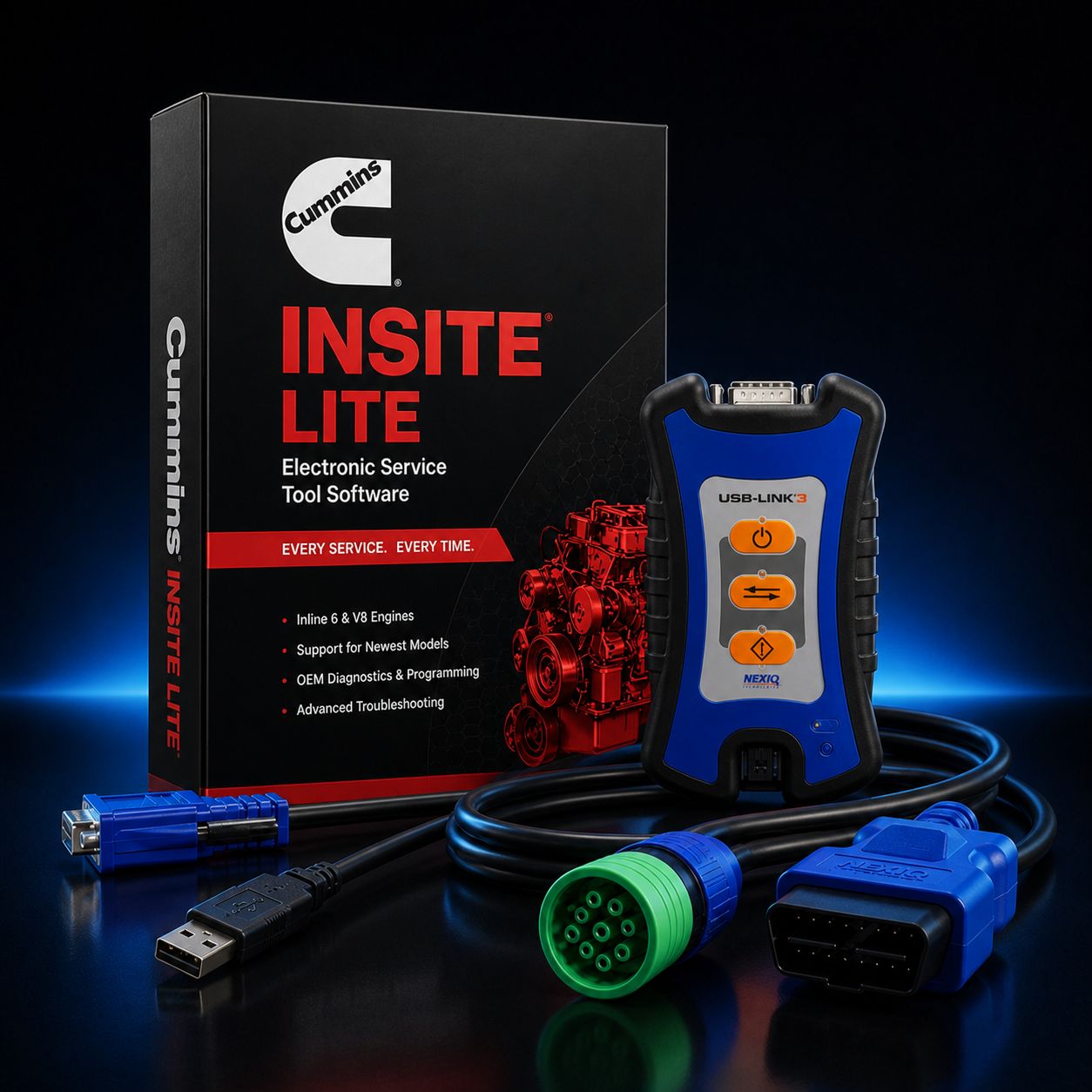
Cummins INSITE Lite + NEXIQ USB-Link 3
Cummins INSITE Lite paired with the NEXIQ USB-Link 3 is the smart starter kit for any shop that wants real Cummins diagnostics today and a clear path to running every other major heavy-duty platform tomorrow without buying another adapter. INSITE Lite gives you the same OE software the Cummins dealer network uses for daily code work, live data analysis, bidirectional component testing, and stationary forced regens across the X15, X12, ISX, ISB, B6.7, L9, ISL, ISM, and the full QSB through QSK industrial lineup. The NEXIQ USB-Link 3 sitting on the truck side of that connection is the de-facto universal RP1210 adapter, the one tool the rest of the industry quietly settled on as the safe default when you do not want to be locked into one OEM ecosystem.
The reason this pairing works so well at $2,095 is that it solves two problems at once. Problem one is getting into the Cummins network correctly the first time, with software that does not stall halfway through a regen, does not throw cryptic communication errors when the engine warms up, and does not get you on the phone with Cummins support for an hour. INSITE Lite handles that. Problem two is that the same shop that owns Cummins customers usually has Detroit Series 60, DD13, DD15, or DD16 in the next bay, then a PACCAR MX-13 in the bay after that, then an Allison transmission, a Bendix ABS module, an Eaton automated manual, and somewhere a Volvo D13. If every one of those platforms requires its own dongle, your tool budget evaporates fast. The USB-Link 3 collapses that mess. The same hardware that talks to INSITE today will talk to Detroit DDDL, PACCAR DAVIE5, Volvo and Mack PTT, Cat ET, Allison DOC, Eaton ServiceRanger, Bendix ACom AE, WABCO and ZF TOOLBOX PLUS, Noregon JPRO Professional, Cojali Jaltest CV, and TEXA IDC6 Truck the day you decide to add any of them.
In other words, this is the kit you buy when you want a real working Cummins setup and you also want the option, six months from now, to start servicing Detroit, PACCAR, Volvo, or anyone else without re-tooling. If you only ever buy one diagnostic adapter for your shop, this is the one to buy.
Kit Includes: - Cummins INSITE Lite software license, 12-month subscription, full diagnostic access on every supported engine family - NEXIQ USB-Link 3 datalink adapter, current generation, P/N 6571050, supporting USB 2.0, Bluetooth 5.0, and dual-band Wi-Fi - USB 2.0 cable, full length, shielded, for hardline connection when Bluetooth or Wi-Fi is not preferred - 9-pin Deutsch (J1939) cable for Class 7 and Class 8 trucks, every modern Cummins-powered tractor and most vocational chassis - 6-pin Deutsch cable for legacy J1708 and J1587 applications including older ISX, ISM, ISC, and 8.3-liter platforms - OBD-II 16-pin cable for light- and medium-duty Cummins applications, including B6.7-powered Ram chassis cabs and certain medium-duty step vans - Activation instructions, registration documentation, and step-by-step license tie-in for the laptop you intend to use - Direct phone support from our diagnostic desk during install and first power-up
About INSITE Lite
INSITE is the engine-side software Cummins itself developed for technician use. INSITE Lite is the same product the Cummins distributor network ships to fleets and independent shops that need full read, full live data, full bidirectional control, and full forced regen capability, but who do not need to reflash an ECM or change locked customer parameters. In day-to-day shop work that covers somewhere between eighty-five and ninety-five percent of every job that walks through the door.
What INSITE Lite Does: - Reads and clears engine fault codes, both active and stored, with full SPN and FMI translation, plus Cummins-specific fault descriptions and probable cause logic that goes deeper than a generic J1939 reader will ever go - Live data with commanded versus actual parameter pairs, so you can see at a glance that the EGR valve is being commanded to forty percent but only physically opening to twelve, or that rail pressure target is sitting at twenty-two thousand PSI but actual is bouncing between eighteen and twenty-five - Bidirectional component testing including cylinder cutout for diagnosing a soft cylinder by ear or by exhaust gas analysis, EGR valve sweep for confirming whether a stuck valve is electrical or mechanical, VGT actuator sweep for catching a sluggish turbo before it sets a code, dosing valve test for the DEF system, and injector solenoid test for confirming a clicker injector is at least answering the ECM - Stationary forced regenerations on every modern Cummins engine equipped with a DPF, with full pre-flight checks for coolant temp, ambient conditions, fuel level, and DEF level, exactly the same procedure the dealer runs - Snapshot recording during fault occurrence, automatically capturing parameter history before, during, and after a fault flag, which is the single most useful tool for catching intermittent issues that refuse to set a hard code while the truck is in your shop - Cummins-specific parameter set including rail pressure, individual injector trim values, IMV duty cycle, EGR valve position, VGT vane position, intake manifold absolute pressure, DEF dosing rate, soot loading, and ash loading on the DPF - Wiring diagrams and component location maps for the connected engine, indexed by ECM serial number, so you are not guessing which harness goes where on a 2018 X15 versus a 2022 X15
What INSITE Lite Does Not Do, And When You Need Pro
INSITE Lite is intentionally scoped. It does not push a calibration to the ECM, it does not modify customer parameters that are protected by Cummins password (governed road speed, idle shutdown timer, PTO settings beyond customer-level limits), and it does not write injector trim files when you replace an injector. Those operations belong to INSITE Pro.
If you are a shop that primarily diagnoses, repairs hardware, and clears codes, Lite is correct. If you also need to flash ECMs after a hardware replacement, change locked parameters for a fleet customer, or write trim files when you install new injectors, you will eventually need Pro. The good news is that the same NEXIQ USB-Link 3 in this kit transitions cleanly to Pro the day you decide to upgrade. The hardware does not change, only the license tier on the software side does. Call us at 800-399-9495 about Pro packages when that day comes.
About the NEXIQ USB-Link 3
The NEXIQ USB-Link 3 is the third-generation flagship vehicle communication interface from NEXIQ Technologies, the heavy-duty diagnostics arm of IDSC Holdings, which is itself owned by Snap-on Incorporated. That ownership chain matters because it means this is not a small-shop product with uncertain firmware support. NEXIQ has been the industry's default RP1210 adapter brand for over twenty years, going back to the original USB-Link, then USB-Link 2, and now USB-Link 3 with current-generation protocol coverage and triple connectivity.
Part numbers in the field: the NEXIQ wired-only configuration is sometimes referenced as NQ121054, and the wireless-equipped configuration as NQ121052. The kit we ship is the wireless-capable unit, P/N 6571050, which gives you all three connection methods (USB 2.0, Bluetooth 5.0, and dual-band Wi-Fi) in a single tool. There is no reason in 2026 to buy a wired-only adapter when the wireless unit costs roughly the same and gives you the option to stand outside the truck while the engine is running.
Supported protocols on the USB-Link 3 are the full modern list, not the trimmed-down list you find on a budget RP1210 clone: - SAE J1939 at 250 Kbps and 500 Kbps, the backbone protocol of every modern heavy-duty truck - SAE J1939 FD (CAN FD over J1939) for the newest model-year chassis moving to higher data rates - ISO 15765 and ISO 15765 FD for OBD-II compliant communications - Diagnostics Over IP (DoIP) for the latest generation of Ethernet-based vehicle networks beginning to appear on premium chassis - Single Wire CAN (SWCAN) for body controllers and certain older GM applications - SAE J1708 with J1587 for legacy heavy-duty platforms, including pre-2007 ISX, ISM, ISC, and N14 work - SAE J1850 VPW and PWM for legacy light- and medium-duty - ISO 9141 and ISO 14230 KWP2000 for legacy European and Asian applications - ALDL for legacy GM applications
Connectivity is the part that separates this adapter from the older USB-Link 2. You can plug it into your laptop with a USB cable for the most stable, lowest-latency connection, particularly during forced regen procedures and bidirectional tests where you do not want a dropout. You can pair it over Bluetooth 5.0 for short-range wireless, typically thirty to fifty feet of effective range inside a steel-frame shop, depending on what is between the laptop and the adapter. Or you can connect over dual-band Wi-Fi at 2.4 GHz or 5 GHz, which is the right choice when you want longer range, when you are trying to road test the truck with the laptop on the passenger seat, or when 2.4 GHz is congested in your shop because every other tool in the building is also on 2.4 GHz.
The housing is purpose-built for shop floor abuse. The case is a hardened polymer with overmolded protective bumpers, the deutsch connector boot is reinforced, the LEDs are recessed so they do not snap off when the adapter falls off the dash, and the unit is rated for the temperature swings of a real truck cab. Cross-platform compatibility is real on this one: drivers exist for Windows 10 and Windows 11 (the standard shop install), iOS for tablet-based apps, and Android for tablet- or phone-based fleet inspection software.
Multi-Platform Value, Or Why The Adapter Choice Matters More Than The Software
This is the section that matters for your tool budget. INSITE Lite is what you bought today. The USB-Link 3 is what makes that purchase compound in value over the next five years. Here is the working list of OEM and aftermarket diagnostic platforms the same USB-Link 3 in this kit will run, with no hardware additions:
Cummins INSITE Lite and INSITE Pro for every Cummins on-highway, vocational, industrial, and off-highway engine. Cummins PowerSpec for parameter customization on certain engines. Detroit Diesel Diagnostic Link (DDDL) for the Series 60, DD13, DD15, and DD16. PACCAR DAVIE5 (and Davie4 on older equipment) for MX-11 and MX-13 engines as well as PACCAR transmissions and chassis modules. Volvo and Mack Premium Tech Tool (PTT) for Volvo D11, D13, and D16 and Mack MP7, MP8, and MP10 engines. Caterpillar Electronic Technician (Cat ET) for legacy Cat C7, C9, C13, C15, and C18 highway engines plus the off-highway lineup. Allison DOC for Allison automatic transmissions, including 1000, 2000, 3000, and 4000 series. Eaton ServiceRanger for Fuller automated manual transmissions, including UltraShift PLUS and Endurant. Bendix ACom AE for Bendix ABS, ATC, ESP, and Wingman safety modules. WABCO and ZF TOOLBOX PLUS for WABCO and ZF braking and suspension modules. Navistar ServiceMaxx for International MaxxForce engines. Noregon JPRO Professional, the most widely deployed multi-make heavy-duty diagnostic suite in North American fleets. Cojali Jaltest CV for the broadest single-software multi-brand commercial vehicle coverage on the market. TEXA IDC6 Truck for European and global truck and bus applications. The Autel CV product line through MaxiFlash bridges and equivalent generic RP1210 paths.
That is fourteen distinct ecosystems running on the same physical adapter. If you priced out individual factory dongles for each, you would be staring at five-figure totals before you covered half the list. The USB-Link 3 is the answer the industry quietly settled on. When you walk into a multi-make fleet shop today and look at what is hanging on the wall, you find a USB-Link 3 (or a USB-Link 2 the shop has not retired yet). The market voted with its tool drawer.
USB-Link 3 vs. Cummins INLINE 8
Honest comparison, because we sell both and we want you to buy the right one for your shop, not the one with the bigger margin.
The Cummins INLINE 8 is Cummins's own datalink adapter. It is purpose-built for the INSITE software stack, it is the most "Cummins-correct" choice in the sense that you are running OE hardware end-to-end, and it is what the dealer network deploys by default. The Cummins INSITE Lite + INLINE 8 kit is the right choice if you are an exclusively Cummins shop, you are not planning to add Detroit, PACCAR, or anyone else in the foreseeable future, and you want the absolute lowest probability of any OE-side troubleshooting friction. Buy that kit if you are a Cummins-only operation.
The USB-Link 3 is the most economical universal answer. It costs roughly the same money as the INLINE 8 in a kit context but gets you fourteen ecosystems of upside instead of one. INSITE on a USB-Link 3 works correctly today, has worked correctly for years, and is supported by both Cummins and NEXIQ as a valid configuration. The trade is that you are not running OE-end-to-end on the Cummins side, and on the rare day a Cummins technician needs to coordinate with the dealer network on a particularly weird issue, the dealer side will be on an INLINE 7 or INLINE 8. In ten years of selling this combo, that has caused approximately zero real-world problems. Buy the USB-Link 3 kit if you service multiple makes today, if you might service multiple makes in the future, or if you simply want the flexibility.
Engine Coverage Through INSITE
INSITE Lite covers the full modern Cummins on-highway lineup and the full industrial and off-highway lineup, going back to legacy J1708/J1587-only engines through the latest CAN FD platforms.
On-highway: Cummins X15 (every emissions tier from 2017 forward, every horsepower rating), X12, ISX (every generation from the original ISX through ISX15 SCR), ISX12, ISB, B6.7, ISC, ISC 8.3, L9, ISL, ISL9, ISM, and legacy 8.9 and B5.9. Vocational and medium-duty: B6.7 in Ram chassis cab, in school bus, in shuttle bus, and in vocational truck applications, plus the L9 in fire, refuse, and similar applications. Industrial and off-highway: QSB, QSC, QSL, QSM, QSX, QSK, and the KTA series across construction, mining, agriculture, marine, and stationary power generation. Also covers the legacy N14 platform on J1708 with appropriate cabling.
Real-World Workflow, A Few Examples
Truck shows up with a CEL and a complaint of derate on a 2019 X15. You connect the USB-Link 3 to the 9-pin Deutsch under the dash, fire up INSITE Lite on your Toughbook, and pull active and stored faults. You see SPN 4364 (SCR conversion efficiency low) plus an SPN 3251 (DPF differential pressure high). INSITE walks you through the snapshot data captured at fault, you see DEF dosing was active and DEF quality and pressure were nominal, soot loading was already at warning level when the SCR efficiency code fired. You decide to run a forced regen from the bidirectional menu first, get the DPF cleared, then re-evaluate. The regen completes successfully, the truck passes a road-load drive cycle, and you have just turned a $1,500 dealer visit into a $300 in-house diagnosis.
Second example: 2017 ISL9 in a vocational chassis with a complaint of intermittent low power. No active codes when the truck arrives. You start the engine, run live data, and watch rail pressure, IMV duty cycle, and VGT position. You catch one event of rail pressure dropping a thousand PSI for two seconds with IMV duty cycle pegging high. Snapshot fires, you save the file. Next morning, the customer calls back to say the truck did it again. You pull a fresh snapshot, compare, see the same pattern, and now you have evidence pointing at a failing high-pressure pump or a stuck IMV. That is a job INSITE Lite paid for itself on, on the first ticket.
Third example: 2014 ISX15 with a CGI cooler concern. You pull faults, you see a low EGR efficiency code stored, you run the EGR sweep test bidirectionally, you watch valve position commanded versus actual, you see the actual is lagging command by ten percent across the entire range. EGR valve is sticking. Confirmed without dropping the cooler.
Fourth example: B6.7 in a Ram 5500. You plug into the OBD-II 16-pin cable, INSITE talks to the engine over CAN, you pull a stored P-code that the customer cleared at AutoZone, INSITE shows you Cummins-specific fault history including freeze-frame data the cheap reader did not preserve, and you have a real diagnostic path forward in five minutes.
Common Cummins Faults Lite Helps You Diagnose
You will run into these regularly. INSITE Lite handles all of them: - DEF doser issues including stuck or partially stuck doser valves, low DEF pressure, dosing rate out of range, and SCR efficiency derate codes - DPF differential pressure faults, soot loading exceeded, ash loading exceeded, and the related forced-regen workflow - EGR position errors, stuck-open EGR, stuck-closed EGR, and EGR cooler bypass faults - VGT actuator faults, sluggish vane response, and VGT position mismatch codes that show up as turbo response complaints - Rail pressure faults, including rail pressure low at idle, rail pressure not building during cranking, and intermittent rail pressure drops under load - Injector codes, including individual cylinder misfire patterns, cylinder cutout confirmation, and injector circuit faults - DEF tank heater faults, DEF level sensor faults, DEF quality sensor concerns - Charge air cooler leak diagnostics through manifold pressure live data correlation - Coolant temperature sensor faults and the related thermostat or radiator concerns - Aftertreatment temperature sensor mismatch faults that show up as failed regens
License and Subscription, Read Carefully
INSITE Lite is a 12-month subscription license tied to a single computer. The license is machine-locked. When the 12-month subscription expires, the software reverts to a read-only mode that will still pull codes for reference but will not run live data, will not run bidirectional tests, and will not perform forced regens until you renew.
There is no such thing as a legal lifetime or perpetual INSITE license. If you are looking at a $300 listing on a marketplace site advertising "INSITE 8 Pro lifetime activated," that is pirated software, the credentials are stolen or cloned, the license will be revoked the moment Cummins's licensing server catches it, and the laptop you installed it on will be flagged. We mention this not to lecture but because we have had three customers in the last year buy a "lifetime" license, get it killed inside two months, and then call us to buy a real one. Save yourself the round trip and start with the legitimate license.
Renewal at the end of year one is straightforward and is typically priced lower than the initial activation. Call us at 800-399-9495 sixty days before expiration and we will walk you through it.
Computer Requirements
Software is supported on Windows 10 and Windows 11. Minimum requirements are 1 GB RAM and 2 GB free hard disk space, but in practice you want at least 8 GB RAM, an i5 or better processor, and an SSD. INSITE itself is not heavy, but you will be running it next to a browser, a parts catalog, an email client, and probably a service-information PDF, all on the same laptop, all in a hot truck cab.
We strongly recommend a Panasonic Toughbook for shop-floor durability. Diagnostic laptops live a hard life, they get dropped off rolling tool carts, they get coffee spilled on them, they get coolant on them, they get knocked off the workbench, and a consumer laptop will not survive the year. A Toughbook will. We carry both refurbished and new Toughbooks ready to ship pre-loaded with INSITE Lite and the USB-Link 3 drivers. Our INSITE Lite + USB-Link 3 + Refurbished Toughbook package is $2,995. Our INSITE Lite + USB-Link 3 + New Toughbook package is $4,795. Both arrive ready to plug into a truck and run.
What Is Not Included
This kit does not include any locked-parameter or dealer-password access. Cummins keeps a tier of parameters behind a dealer-only password that even Pro license holders do not see. If you need that level of access for a specific job, the workaround is to coordinate with a Cummins distributor for the password unlock on that specific ECM, then perform the parameter change yourself. We can help you navigate that process.
This kit also does not include INSITE Pro flash and trim capability. If you anticipate needing to write injector trim files or push calibrations to the ECM, see our INSITE Pro packages. The same USB-Link 3 in this kit will work with Pro the day you upgrade, so the hardware investment carries forward cleanly.
This kit does not include cabling for non-Cummins applications you might add later, but most of the platforms we listed in the multi-platform section ship with their own application-specific cables when you license that software. The 9-pin, 6-pin, and OBD-II cables in this kit cover all Cummins use cases plus the majority of common heavy-duty diagnostic ports.
Frequently Asked Questions
Is the USB-Link 3 in this kit wired or wireless? The unit shipped in this kit is the wireless-capable USB-Link 3. It supports USB 2.0 hardline, Bluetooth 5.0, and dual-band Wi-Fi at 2.4 GHz and 5 GHz. You get all three connection methods in a single tool, and you choose at the laptop side which one to use for any given job. Wired-only USB-Link 3 units exist (referenced in some catalogs as NQ121054), but we ship the wireless unit (NQ121052 / 6571050) because there is no meaningful price advantage to going wired-only and you give up significant flexibility.
Will this kit work with PACCAR DAVIE5 or DAVIE4 if I want to add Kenworth and Peterbilt service later? Yes. The USB-Link 3 is a fully supported adapter for both DAVIE5 and the older DAVIE4. You add the DAVIE license on the software side, install the PACCAR drivers, and the same physical adapter switches over. We have customers running INSITE, DAVIE5, DDDL, JPRO, and Jaltest on the same adapter every week.
What about Bluetooth range in a noisy shop with concrete floors and steel racking?
Bluetooth 5.0 in real-world shop conditions gives you reliable communication out to roughly thirty to fifty feet line-of-sight, less when there is significant steel and concrete between the adapter and the laptop. If you find Bluetooth dropouts during long bidirectional tests like a forced regen, switch to Wi-Fi (better range and through-walls performance) or to USB hardline (the most stable). The flexibility of having all three is the answer.
Does the USB-Link 3 pair with Autel MaxiSys CV or other Autel commercial tools? Indirectly, yes, through the Autel MaxiFlash bridge and the generic RP1210 path. Most Autel CV users with multi-make shops own a USB-Link 3 alongside their Autel kit because the Autel adapter is purpose-built for Autel and the USB-Link 3 covers everything else. They are complementary, not competing.
Why pay for a USB-Link 3 when there are $200 RP1210 clones on the marketplace sites? Three real reasons. One: clones do not cover the full modern protocol stack. Most stop at J1939 and J1708, missing CAN FD, missing DoIP, missing SWCAN, which means they will not work on the newest model-year trucks and will not work on certain body modules even on older trucks. Two: clones have no certified driver path on the OEM software side. Cummins, Detroit, PACCAR, and the rest are not testing or supporting clone adapters, and when something breaks on a regen mid-procedure you are on your own. Three: clones do not survive shop life. The cases crack, the connectors fail, the firmware does not update, and you are buying a new one twice a year. The USB-Link 3 lasts five years minimum in working shops, often longer, and the hardware investment compounds across every platform you add.
Will the kit work on legacy J1708/J1587 only Cummins like a 2003 ISX or older N14? Yes. The 6-pin Deutsch cable in this kit is included specifically for legacy applications. INSITE Lite supports J1708/J1587 communication for the older platforms, and the USB-Link 3 has full J1708/J1587 hardware support. You will not be locked out of older equipment just because the kit is current-generation.
Can I use the same USB-Link 3 with both Windows 10 and Windows 11 laptops? Yes. Drivers exist for both. If you switch laptops, you reinstall the driver package and re-pair the adapter. The license on INSITE Lite itself is machine-locked, so if you swap laptops mid-subscription you will need to re-activate INSITE on the new machine, but the USB-Link 3 hardware is freely reusable across machines.
Why Buy This Kit From Heavy Duty Truck Diagnostics
Every kit we ship is bench-tested before it leaves our facility. We pair the USB-Link 3 to a laptop, install INSITE Lite, connect to a live engine on our test bench, pull codes, run live data, fire a bidirectional test, and confirm the kit talks correctly end-to-end before we box it. If anything is wrong, we fix it here, not at your shop after a four-hour install attempt.
We are an authorized reseller for both Cummins INSITE software and NEXIQ Technologies hardware. Your activation, your warranty, and your support path are real. When you call Cummins or NEXIQ for support, they will see you as a legitimate licensed customer.
Free tech support is included, by phone, for as long as you own the kit. That includes the install, the first power-up on a real truck, the first time you try to run a forced regen and have a question about pre-flight conditions, and the day a year from now when you decide to add Detroit DDDL and want to know how to install the second software stack alongside INSITE without breaking either one. Call us, we walk you through it, no extra charge, no support tier subscription, no nonsense.
Call 800-399-9495 with questions about Cummins-side compatibility, multi-platform adapter use, the trade-off between this kit and the INLINE 8 kit, the upgrade path to INSITE Pro, or to spec a complete kit including a Toughbook ready to plug in and run.
All Cummins licenses are subject to applicable sales tax.
MANUFACTURER: Cummins (software) / NEXIQ Technologies (adapter) MFG PART #: INSITE-LITE / 6571050 ITEM: CUM-INSITE-LITE-NXQ3