
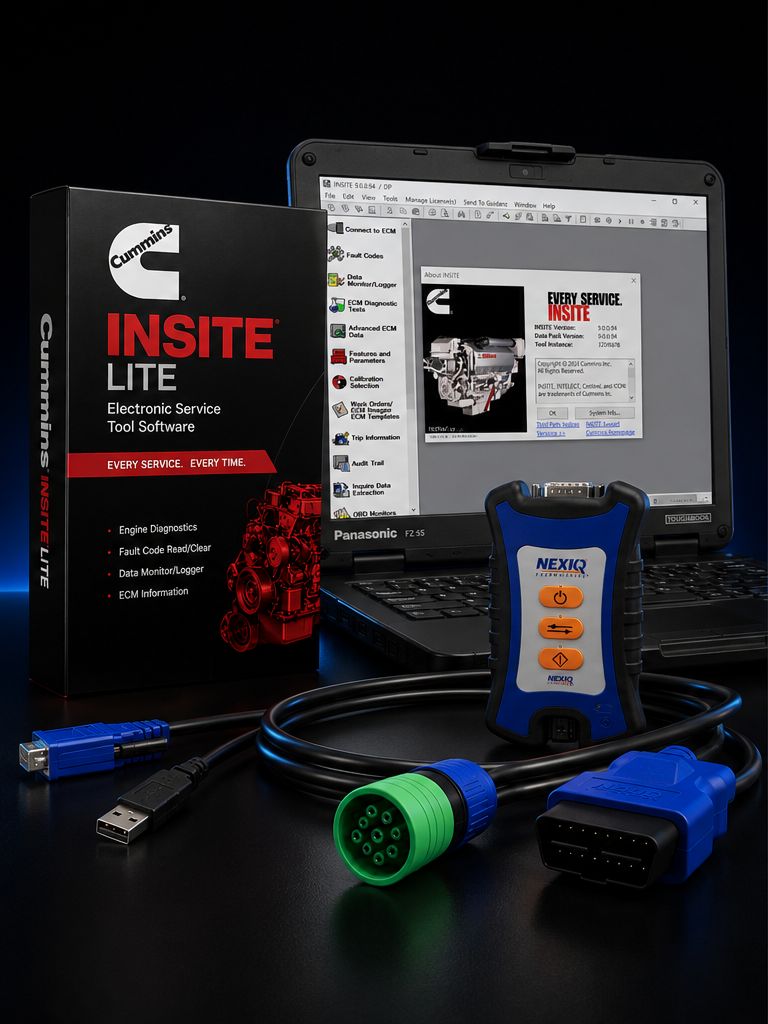
This is the complete turnkey Cummins diagnostic kit a working diesel shop actually needs: the genuine Cummins INSITE Lite software license, a NEXIQ USB-Link 3 universal heavy-duty datalink adapter, and a refurbished Panasonic Toughbook FZ-55 rugged shop laptop. The whole package ships pre-installed, licensed, activated, and bench-tested on a real Cummins engine before it leaves our facility. There is nothing for you to install. There is no driver chase, no activation hold, no "call the manufacturer for the unlock code" step. You unbox the kit, plug the 9-pin Deutsch cable into a Class 8 truck, power up the laptop, launch INSITE, and you are reading active fault codes on a Cummins X15 inside ten minutes.
The thinking behind the kit is simple. INSITE Lite is the software a working tech needs ninety percent of the time. The NEXIQ USB-Link 3 is the universal RP1210 adapter that runs INSITE today and runs Detroit DDDL, Davie4, JPRO, Jaltest, TEXA, CAT ET, Allison DOC, Volvo PTT, Mack PTT, Bendix ACom, and WABCO Toolbox tomorrow without you buying another adapter. And the refurbished Toughbook FZ-55 is the shop laptop that survives concrete floors, diesel exhaust, sub-zero winter mornings, summer heat in a closed truck cab, accidental coffee, brake dust, and the daily abuse a consumer laptop simply will not tolerate.
The refurbished Toughbook is the part most shops have questions about, and that is fair. We chose refurbished over new for one specific reason: it cuts roughly a thousand to fifteen hundred dollars off the kit price without giving up the rugged build that makes a Toughbook worth owning in the first place. The magnesium alloy chassis, the spill-resistant keyboard, the MIL-STD-810H drop rating, the IP53-rated keyboard and touchpad, the 1000-nit sunlight-readable display, the daylight-bright screen that you can actually see through a windshield in July at noon — none of that is removed when a Toughbook is refurbished. A refurbished FZ-55 is the same laptop a fleet maintenance department was using, returned at the end of a lease, professionally tested, professionally cleaned, professionally re-imaged with Windows 11 Pro, and shipped to you with a 90-day shop warranty. Owner-operators and small independent shops have been running refurbished Toughbooks five, six, seven years past the warranty expiration. They are not delicate consumer hardware. They were built for this work.
Kit Includes
- Cummins INSITE Lite software license (12-month subscription) — pre-installed and activated on the included Toughbook, license tied to that specific machine, ready to use the moment you open the box
- NEXIQ USB-Link 3 datalink adapter (P/N 6571050, the dealer-grade NEXIQ-supplied adapter) — RP1210A/B/C/D compliant, RP1226 compliant, USB 2.0 latching connector plus Bluetooth 5.0 and dual-band Wi-Fi 802.11 a/b/g/n on the wireless edition
- Refurbished Panasonic Toughbook FZ-55 with Windows 11 Pro pre-installed, fully tested, professionally cleaned, hard drive wiped and re-imaged, all drivers current
- USB 2.0 cable for direct wired connection between the Toughbook and the USB-Link 3
- 9-pin Deutsch (J1939) cable for Class 8 trucks — the cable you will use 95% of the time on modern Cummins-powered semis
- 6-pin Deutsch cable for legacy J1708/J1587 applications — older school buses, refuse trucks, vocational equipment, and pre-2007 Cummins applications
- OBD-II 16-pin cable for light/medium-duty applications including pickup-truck-mounted Cummins engines and certain medium-duty bus applications
- Toughbook power adapter and AC cord
- Activation documentation, license registration paperwork, and Cummins customer ID materials so the license is recorded under your shop name from day one
About INSITE Lite — what it actually does in the bay
INSITE Lite is the genuine, dealer-grade Cummins diagnostic application. It is the same software a Cummins-authorized service location runs. The "Lite" designation does not mean stripped-down or limited. It means it is missing the calibration upload and ECM reflash functions that most independent shops never need anyway. For day-to-day diagnostic work, Lite does everything Pro does.
Read and clear engine fault codes. Active codes, stored codes, inactive codes, with full SPN/FMI breakdowns and the Cummins-specific fault codes underneath. Lite does not just give you a number — it gives you the Cummins fault description, the trip count, the first occurrence and last occurrence timestamps, the engine hours at fault, and the coolant temperature, ambient temperature, and engine load at the time the fault was logged. That snapshot context is the difference between guessing and knowing.
Live data with commanded versus actual parameter pairs. This is the diagnostic capability that separates real Cummins software from a generic OBD scanner. INSITE shows you what the ECM is commanding the EGR valve to do, alongside what the EGR position sensor is actually reporting. Same for the variable geometry turbo, the dosing valve, the fuel rail pressure regulator, the IMV, the throttle plate, the grid heater. When commanded and actual disagree, you have your culprit. A generic scanner will never show you that.
Bidirectional component testing. Cylinder cutout to find the dead hole on a rough idle. EGR valve sweep to check for sticking or carbon binding. Variable geometry turbo sweep to verify actuator travel. Aftertreatment dosing valve test to confirm DEF spray pattern and check valve function. Grid heater activation. Coolant fan engagement. Engine brake solenoid test. These are real component-level tests you cannot do with a code reader and a multimeter.
Stationary forced regeneration on equipped Cummins engines. This is the workflow most shops buy INSITE for in the first place. When a soot-loaded DPF gets the truck stuck in derate, INSITE Lite walks you through the parked regen — checks ambient and coolant conditions, confirms enable conditions are met, raises engine speed, monitors EGT 1, EGT 2, EGT 3, DPF inlet pressure, DPF outlet pressure, soot load percentage, and aborts cleanly if anything goes outside spec. A successful forced regen drops soot load from 90%+ down to under 10% and gets the truck back on the road that afternoon.
Snapshot recording during fault occurrence. Set the trigger, send the truck out, and INSITE captures all the parameters you flagged when the intermittent fault hits. This is the only honest way to chase an intermittent miss, an intermittent over-pressure, or a fault that only shows up on grade.
Cummins-specific parameter set. Rail pressure commanded and actual, individual injector trim values for all six cylinders, IMV (Inlet Metering Valve) duty cycle, fuel pump suction pressure, lift pump pressure, all six EGT sensors on aftertreatment-equipped engines, NOx sensor inlet and outlet readings, urea quality readings, and the Cummins-proprietary SPN/FMI fault codes that generic RP1210 software cannot decode.
Wiring diagrams and sensor location maps built into the software. When you find a circuit fault and need to know which pin on which connector with what wire color, INSITE pulls the diagram for that specific engine model and serial number range. No more thumbing through paper service manuals on a greasy bench.
Lite vs Pro — the honest difference:
INSITE Lite does not reflash ECMs. It does not load or upload calibration files. It cannot push a horsepower upgrade calibration onto a Cummins engine. Those are dealer-level functions that ninety-five percent of independent shops never use. If you need them — a hot-rod calibration upgrade, a fleet-spec calibration push, a software update flash on a no-start ECM — you need INSITE Pro. Pro adds calibration retrieval, calibration loading, and ECM update install. The price gap is small ($200ish) but the upgrade path exists. Buy Lite today, run it for a year, and if you decide you need Pro at renewal time, we can quote that. Most shops never make the move because they never need it.
About the NEXIQ USB-Link 3
The USB-Link 3 is the industry-standard universal heavy-duty datalink adapter. It is the adapter the dealer techs use, the adapter the fleet shops use, and the adapter that has the most OEM approvals in the commercial vehicle market. The current generation (NEXIQ part numbers NQ121054 wired and NQ121052 wireless) is fully RP1210 A/B/C/D compliant, fully RP1226 compliant, and supports the modern protocols newer trucks require: CAN FD, J1939 FD, ISO 15765 FD at 250K / 500K / 1M baud with auto baud detection, plus DoIP for the trucks transitioning to ethernet diagnostics.
Legacy protocol support is comprehensive. J1708 and J1587 for older Cummins, Detroit, Mack, and Volvo engines back to the 1990s. ISO 9141 and KWP2000 (ISO 14230) on the K and L lines. J1850 VPW (Class 2) and ISO PWM (SCP) for medium-duty applications. ALDL at 9600 and 8192 baud for older domestic stuff. ATEC at 160 baud for legacy GM applications. Single-wire CAN (SWCAN) and ISO 11898-3 fault-tolerant CAN (FTCAN) for newer body-electrical bus systems. If a heavy or medium truck built between 1990 and today plugs into a 6-pin, 9-pin, or 16-pin diagnostic port, the USB-Link 3 talks to it.
Connectivity is wired USB 2.0 with a latching mini-B connector (the latch matters — you cannot accidentally pull the cable mid-flash), Bluetooth Class 1 with up to 50 feet of range, and dual-band Wi-Fi 802.11 a/b/g/n on the wireless edition. The wireless capability is real-world useful: park the truck, plug the adapter into the diagnostic port, and walk to your bench laptop fifteen feet away to run the regen. You are not crawling under the dash with the laptop balanced on your knees.
The housing is rugged. Sealed plastic shell, gasketed cable-entry boots, no exposed circuit board through any vent, designed to live on a service truck or in a tool drawer that gets thrown around daily. Bluetooth pairing is automatic once initial pairing is done. Drivers install themselves the first time you plug it into Windows 11. The adapter remembers the last successful Wi-Fi network and reconnects on power-up.
Multi-Platform Value — the same adapter, every major OEM software:
This is the big argument for the USB-Link 3 over a Cummins-branded INLINE. The INLINE only talks to Cummins. The USB-Link 3 talks to everything. You buy this kit for Cummins today, and the day you decide to add another OEM stack — same adapter. The USB-Link 3 is approved or works as the RP1210 datalink for:
Cummins INSITE (this kit), Detroit DDDL (Detroit Diesel Diagnostic Link), PACCAR Davie4 (PACCAR MX-13, MX-11), Caterpillar ET (CAT C7, C9, C13, C15, C18, 3406E and earlier electronic), Allison DOC (Allison transmission diagnostics, all generations), Volvo PTT (Premium Tech Tool, Volvo D11, D13, D16), Mack PTT (Mack MP7, MP8, MP10), Bendix ACom AE (Bendix ABS and stability), WABCO Toolbox Plus (WABCO/ZF ABS), Meritor WABCO TOOLBOX, Eaton ServiceRanger (Eaton transmissions, UltraShift Plus), Hino DX3, Isuzu IDSS, International Diamond Logic Builder, Navistar ServiceMaxx for legacy MaxxForce, Bendix HHDR, JPRO Professional Diagnostic Software, Jaltest Commercial Vehicle, TEXA IDC6 Truck, ZF TestMan / OpenMatics, Wurth WOW! Trucks, Diesel Laptops eTechnician, and effectively every other RP1210-compliant heavy-duty diagnostic application on the market.
That list is what we mean by "multi-platform value." A shop that wires up a Bluetooth USB-Link 3 once and uses it across four different OEM stacks is a shop that has stopped buying redundant adapters every time it adds capability.
About the Refurbished Panasonic Toughbook FZ-55
The Panasonic Toughbook FZ-55 is the current-generation semi-rugged business laptop in the Toughbook lineup. It replaced the popular CF-54 around 2019 and is now in MK3 (third-generation) production with Intel 13th-generation processors. It is the laptop you see in the hands of fleet maintenance supervisors at large carrier yards, on the dashboards of mobile diesel service trucks, in the diagnostic bay of every dealer-owned shop. There is a reason for that: it is purpose-built for the abuse that wrecks consumer laptops in eighteen months.
Construction is magnesium alloy chassis throughout, not plastic. Magnesium absorbs impact instead of cracking. The keyboard is spill-resistant — you can pour coffee, soda, or fountain Mountain Dew across the keys and the liquid drains out the bottom of the chassis instead of into the motherboard. The 14-inch anti-glare display is full HD (1920x1080) with optional 1000-nit brightness for sunlight readability. A typical office laptop hits 200-300 nits — bright enough indoors, useless in a windshield reflection at noon. 1000 nits is daylight-bright. You can read it on the apron with the bay door open and the sun coming in.
MIL-STD-810H ratings cover drop testing from 36 inches (3 feet) onto plywood over concrete, vibration, shock, bench handling, dust, sand, altitude, freeze and thaw cycles, high-temperature and low-temperature operation, temperature shock, and humidity. IP53 rating on the keyboard and touchpad means dust-protected and protected against water spray from any angle. That is the rating that matters in a shop bay where brake-cleaner overspray, parts-washer mist, and accidental water-bottle spills are routine.
CPU options on current-generation FZ-55 MK3 units are Intel 13th-gen Core i5-1345U vPro (10 cores, up to 4.7 GHz turbo) at the entry level and Intel Core i7-1370P (14 cores, up to 5.2 GHz turbo) at the top end. RAM scales from 16 GB to 64 GB. Storage is M.2 NVMe SSD, configurable from 256 GB up to 3 TB. Battery life is rated at roughly 18-20 hours on a single primary battery, with optional second-bay battery for full-day mobile use. Connectivity is Wi-Fi 6E, Bluetooth 5.3, optional 4G LTE, and optional dual-pass GPS. Six user-removable expansion areas allow RAM, SSD, keyboard, and xPAK module replacement without sending the laptop out for service.
For the configuration we ship in this kit, you get a refurbished FZ-55 with at minimum Intel Core i5, 16 GB RAM, 512 GB SSD, Wi-Fi 6, Bluetooth 5.0+, 14-inch FHD anti-glare display, full-size backlit keyboard, integrated webcam, and Windows 11 Pro pre-installed and licensed. Higher-spec configurations are available — call us if you need an i7, more RAM, more storage, or a touchscreen variant.
The refurb process: every Toughbook is bench-tested for keyboard, trackpad, screen, ports, battery hold time, charging circuit, Wi-Fi, Bluetooth, webcam, and speakers. The chassis is professionally cleaned. The hard drive is wiped clean and re-imaged with a fresh, fully-licensed copy of Windows 11 Pro. All drivers are installed and current. The battery is tested for hold time and replaced if it falls below acceptable threshold. INSITE Lite, the USB-Link 3 driver pack, and any free OEM diagnostic launchers are pre-installed before the kit ships. You unbox a working diagnostic terminal, not a project.
Refurb vs New Toughbook — honest tradeoff:
A new Toughbook FZ-55 from Panasonic with comparable spec runs roughly $4,000-$4,500 by itself, with a 3-year manufacturer warranty and zero prior wear. The refurbished unit in this kit is approximately $1,000-$1,500 less for the laptop alone, with a 90-day shop warranty against defects, typically with under 1,000 hours of total prior use, and almost always running for years past the warranty period. We recommend new for any shop that bills warranty time or warranty repairs back to a manufacturer — clean paperwork matters in those cases. We recommend refurbished for owner-operators, two-or-three-bay independent shops, mobile diesel service trucks, and anyone whose ROI math says "I cannot justify $4,500 for a laptop when $3,000 buys me the laptop, the software, and the adapter." If the kit ships and the Toughbook fails outside the 90-day window, a quality replacement Toughbook of the same generation runs $700-$1,200 used — call us, we will find one. The math still works.
Why Toughbooks Survive Shop Bays vs Consumer Laptops
Run a $700 consumer laptop in an active diesel shop for twelve months and watch what happens. The keyboard fills with brake dust and the keys start sticking. The fan vents pack with diesel-exhaust soot and the CPU starts thermal-throttling at idle. The plastic hinge cracks the second time someone sets it on a workbench too hard. A water bottle gets knocked over and the motherboard is done. Someone trips over the charge cable, the laptop falls eighteen inches off a workbench, and the screen panel cracks. We have watched four-figure consumer laptops die in eight months in shop service. Every shop has a drawer of dead consumer laptops to prove it.
The Toughbook is built to a different standard. The internal motherboard is mounted with vibration-dampening shock isolators. The screen is reinforced behind the bezel. The hard drive is shock-mounted (and SSD on current units removes the spinning-platter risk entirely). The keyboard has a sealed membrane underneath, so brake dust and diesel mist do not reach the contact pads. The hinges are heavy-duty steel-reinforced. The chassis is rated to a 3-foot drop onto plywood over concrete and engineered to keep working after the drop. We have personally watched a Toughbook take a 4-foot fall off the bumper of a Class 8 onto a concrete floor, get picked up, and finish the regen it was running. A consumer laptop would have been finished.
Engine Coverage (via INSITE):
INSITE talks to the entire Cummins lineup with electronic engine controls. On-highway: X15, X12, ISX, ISX12, ISX15, ISB, B6.7, ISC, L9, ISL, ISL9, ISM, plus the legacy ISC 8.3, ISC 8.9, and B5.9 engines from the early electronic era. Off-highway and industrial: QSB, QSC, QSL, QSM, QSX, QSK series, KTA series, plus the ISF light-duty platform. Marine variants of the QSB, QSC, QSL, QSM, QSK. Mining and oil-and-gas variants of the QSK and KTA. Anywhere a Cummins engine has an electronic ECM with a J1939 or J1708 datalink, INSITE reads it.
Real-World Workflow Examples
The forced regen call. Class 8 with an X15 comes in derated, MIL on, dash showing high DPF soot load. Plug the 9-pin into the diagnostic port, plug the USB-Link 3 to the laptop, launch INSITE, read codes (you will see the soot-load fault, possibly an EGT mismatch, possibly a closed-loop dosing fault). Verify enable conditions for parked regen: ambient temperature, coolant temperature, fuel level, parking brake set, transmission in neutral. Run the parked regen wizard. Watch EGT 1, 2, and 3 climb. DPF inlet pressure rises, then falls as soot burns off. Soot load drops from 92% to 4% over 35-45 minutes. Clear codes. Truck rolls.
The rough idle. Cummins ISX with a misfire complaint. Plug in, read codes, see two cylinder misfire counts logged on cylinders 4 and 5. Pull live data. Run cylinder cutout test through INSITE. Cutting cylinder 5 produces no RPM drop — that is your dead hole. Pull the valve cover, find the offending injector, replace, rerun cylinder cutout to verify all six contributing equally, clear the codes, document the repair on the work order.
The intermittent code. Driver complains about a check-engine light that comes on once a week, always on grade, always heavily loaded. Pull the truck in, no active fault. Set up an INSITE snapshot trigger on the suspected SPN. Set up the parameters you want logged: engine load, boost pressure, EGR valve position, EGT readings, fuel rail pressure. Send the truck out for a real run. Driver brings it back, INSITE has captured 30 seconds of data around the fault occurrence. Now you can see what the engine was actually doing when the fault hit, instead of guessing.
The pre-purchase inspection. Used Cummins-powered truck arriving at the lot. Plug in, pull complete fault history (active and stored, all key cycles available), check engine hours, idle hours, fuel-burn history, DPF regen frequency, soot load history, derate event log. Print the report. Now the buyer knows what they are buying.
Common Cummins Faults INSITE Lite Helps Diagnose
SPN 3251 (DPF differential pressure too high). SPN 3361 (DEF dosing valve circuit). SPN 3464 (throttle actuator). SPN 4364 (SCR catalyst conversion efficiency). SPN 5246 (SCR system derate). SPN 1569 (engine-protection derate). SPN 3242, 3246, 3251 (DPF temperature and pressure sensors). SPN 102 (boost pressure). SPN 105 (intake manifold temperature). SPN 110 (coolant temperature). SPN 157 (rail pressure). SPN 651 through 656 (individual cylinder injectors). SPN 729 (intake heater). SPN 4334 (fuel pump pressure). Plus all the Cummins-proprietary fault codes underneath the SAE SPN/FMI structure that only INSITE decodes.
License & Subscription
INSITE Lite is licensed as a 12-month subscription. The license is machine-locked — meaning the license is tied to one Windows install on one specific laptop. The Toughbook in this kit is the licensed laptop. Do not move the license to another machine without contacting us first. Pirated and shared licenses get blacklisted by Cummins on the next online check-in, and that is a problem we cannot fix for you. After 12 months, the license reverts to read-only mode unless you renew. Renewal is straightforward and we handle it for shops that buy from us — call 800-399-9495 a couple weeks before expiration and we will get a new license loaded.
What's NOT Included:
ECM reflash and calibration upload (that is INSITE Pro — call us for the upgrade quote). Cummins dealer-level password unlocks for tamper-protected parameters (those require Cummins-authorized dealer credentials and are not available through any aftermarket channel). Engine-specific calibration files for horsepower upgrades. Cummins INCAL or POWERSPEC subscriptions. A printer for printing reports from the Toughbook (any USB or network printer works fine, but we do not include one). DEF or coolant for actual repairs.
FAQ
Q: Refurbished Toughbook — is that really okay for a working shop? A: Yes, with one caveat. If your shop bills warranty work back to a manufacturer who audits the diagnostic equipment used, ask them whether refurbished is acceptable. For everyone else — owner-operators, independent shops, mobile diesel guys, fleet shops doing their own work — a refurbished Toughbook is the smart buy. They run for years past warranty. The chassis was built to last a decade.
Q: Will the Bluetooth USB-Link 3 work for forced regens, or do I need to be wired? A: Bluetooth works fine for forced regens on Cummins engines. We have run hundreds of parked regens over Bluetooth without issue. If you are reflashing an ECM (which Lite cannot do anyway), use the wired USB connection. For everything Lite can do — read, clear, regen, bidirectional tests, snapshots — Bluetooth is fine.
Q: What if the Toughbook dies — can I move my INSITE license to a new laptop? A: Yes, but it is a process. Cummins has to deactivate the license on the dead machine and reactivate it on the new one. We have done this many times for customers; call 800-399-9495 and we will walk you through the deactivation request and reissue. Plan on a couple business days for the round-trip.
Q: How long do refurbished Toughbooks actually last in shop service? A: We have customers running refurbished CF-54 and CF-53 units they bought from us six and seven years ago. Five-plus years is realistic. The chassis itself is good for ten-plus. The wear items are battery, keyboard membrane, and possibly SSD — all replaceable.
Q: Wired or wireless USB-Link 3 — which one should I get? A: This kit ships with the wired-and-wireless wireless edition (NEXIQ NQ121052) by default, which gives you USB plus Bluetooth plus Wi-Fi. The wired-only edition (NQ121054) is slightly cheaper. For most shops, the wireless flexibility is worth it — being able to set up the laptop on the bench and walk to the truck is a real workflow improvement.
Q: What about the screen in direct sunlight — can I actually use it outside? A: Yes. The FZ-55 screen, especially the 1000-nit variant, is bright enough to read in full direct sun. This is one of the real advantages of a Toughbook over a consumer laptop — anti-glare coating plus high brightness means you can run diagnostics on a truck parked outside on a July afternoon.
Q: Does this kit cover newer Cummins engines with the new ECM platforms? A: Yes. INSITE supports current-production X15, X12, B6.7, and L9 Cummins engines, including 2024 and 2025 model year. The USB-Link 3 supports CAN FD and DoIP, which is what newer Cummins ECMs use. As long as you keep your Lite subscription current, INSITE updates push automatically when new engine support is released.
Why Buy This Kit From Heavy Duty Truck Diagnostics
We bench-test every kit on a real Cummins engine before it ships. Software loaded, license activated, USB-Link 3 paired, regen test run on a live engine. If it does not work on our bench, it does not ship to your bay.
Free phone tech support for the life of the kit. If you call us at 800-399-9495 because INSITE is not seeing the truck, we will troubleshoot it with you. We are not the company that sells the kit and disappears.
Real warranty conversations. The 90-day shop warranty on the Toughbook is real. If something fails inside that window, we replace it. If the USB-Link 3 fails inside its NEXIQ manufacturer warranty, we walk you through the NEXIQ RMA. If your INSITE license has an activation glitch, we get on the phone with Cummins for you.
We sell to working shops. We answer the phone. We have been doing this long enough to know which combinations work and which ones do not, and that is the experience baked into this kit.
Call 800-399-9495 with any questions about Cummins-side compatibility, multi-platform adapter use, laptop options, or the refurbished vs new tradeoff. We bench-test every kit before it ships; if anything ships wrong, we make it right.
All Cummins licenses are subject to applicable sales tax.
MANUFACTURER: Cummins / NEXIQ Technologies / Panasonic MFG PART #: INSITE-LITE / 6571050 / FZ-55-REFURB ITEM: CUM-INSITE-LITE-NXQ3-FZ55-R