
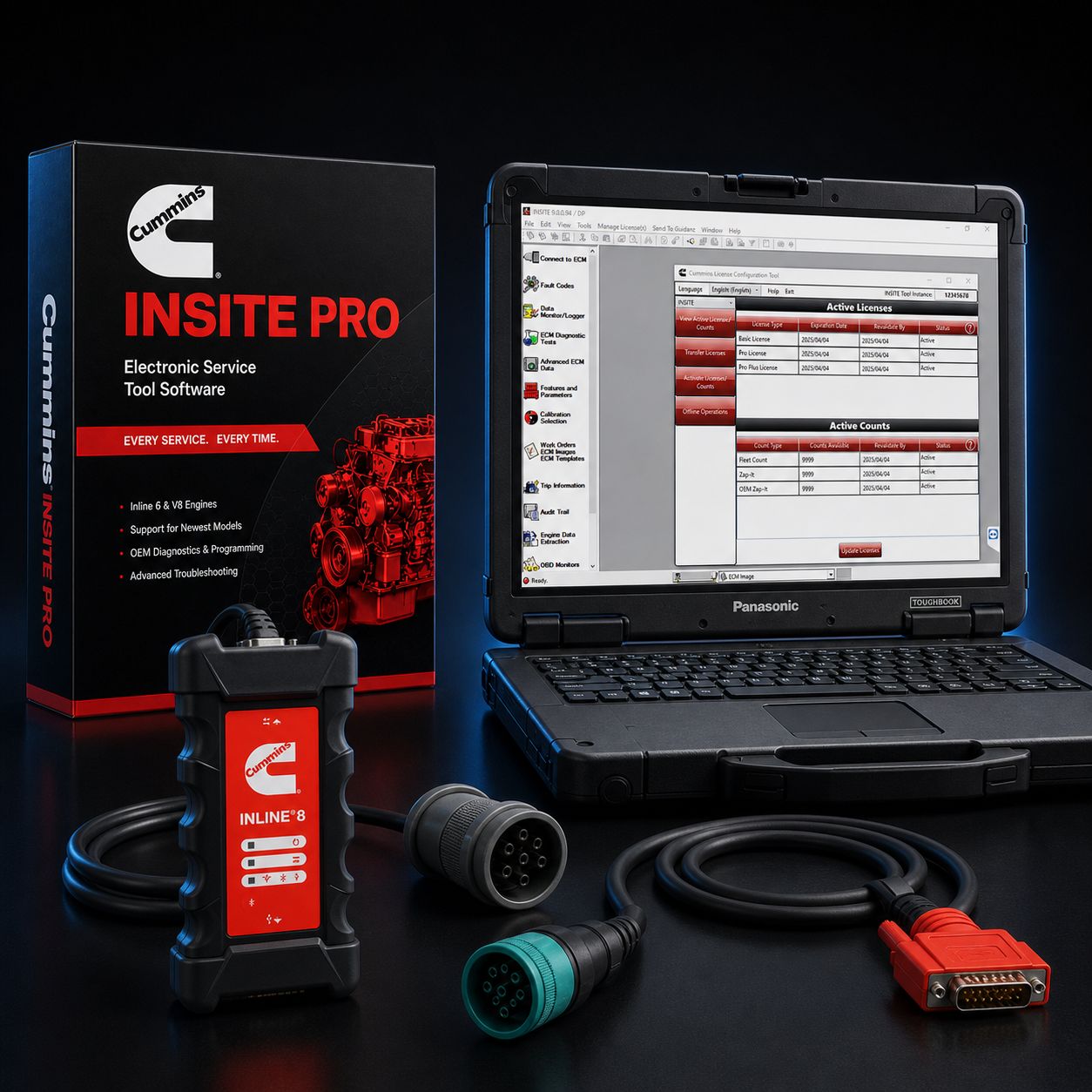
Cummins INSITE Pro + Cummins INLINE 8 + Brand New Panasonic Toughbook FZ-55 Dealer Package
This is the complete, top-of-stack Cummins reflash and programming kit. Cummins INSITE Pro, the dealer-level version of INSITE with full ECM reflash and parameter programming authority, is paired with the Cummins INLINE 8, the company's current-generation OEM datalink adapter, and loaded onto a brand-new Panasonic Toughbook FZ-55 Mk3 with a full three-year Panasonic manufacturer warranty. Three pieces, one bench-tested kit, every component current and supported. There is no more Cummins-correct configuration available to an independent shop. If you opened a Cummins authorized service location tomorrow morning and asked the parts counter what to put on the bench, this is the list they would print.
We built this package for the shop that does real Cummins work and is tired of borrowing the dealer's tooling. Engine swaps, in-frame rebuilds, injector replacements, EGR and aftertreatment updates, governor and PTO setups, road speed adjustments, derate threshold tuning, TSB-driven calibration pushes after a customer hits an issue Cummins later patched in firmware. All of that lives behind INSITE Pro, and all of it runs cleanest on Cummins' own datalink hardware on a laptop that does not flinch when the truck is running, the bay is hot, and the bench has a coffee ring on it.
The kit ships pre-installed, licensed, activated, and bench-tested before it leaves us. We confirm INSITE Pro launches, we confirm the INLINE 8 enumerates as the active RP1210 adapter, we confirm the Toughbook is on Windows 11 Pro with the right drivers in place, and we confirm a clean handshake with a live Cummins ECM on our test bench. When the kit lands at your shop, you plug into the truck and you start working.
Kit Includes: - Cummins INSITE Pro software license (12-month subscription, full reflash plus full parameter programming authority) — pre-installed and activated - Cummins INLINE 8 datalink adapter (current-generation Cummins-built RP1210 adapter) - BRAND NEW Panasonic Toughbook FZ-55 Mk3 with Windows 11 Pro pre-installed (full Panasonic three-year manufacturer warranty) - USB cable for the INLINE 8 (wired connection mode for reflash work) - 9-pin Deutsch (J1939) cable for Class 8 trucks and modern medium-duty - 6-pin Deutsch cable for legacy J1708/J1587 applications (older ISM, ISC, N14 era) - OBD-II 16-pin cable for light/medium-duty pickup applications running Cummins (Ram 2500/3500, light-duty B-series) - Toughbook power adapter - Activation documentation, license registration paperwork, and serial number record
About Cummins INSITE Pro
INSITE is Cummins' factory diagnostic and programming application. There are two license tiers: Lite, which gives you fault code work, live data, basic bidirectional tests, forced regens, and parameter viewing, and Pro, which adds the heavy-duty work that actually pays the bench. Pro is the version Cummins dealer technicians run.
Pro adds full ECM reflash authority, which means you can pull a calibration from QuickServe Online (QSOL), bring it into INSITE's Calibration Workspace, and push it to the truck. Pro adds full parameter programming, which is where governor speed, droop, derate thresholds, road speed limit, idle shutdown, cruise control parameters, and PTO calibrations actually get changed instead of just looked at. Pro adds injector trim coding, which is required any time you replace injectors on a modern Cummins. Pro adds horsepower upgrades on engines where Cummins offers a feature ratings change. Pro adds calibration audit trail, ECM security work, password reset on ECMs the dealer is willing to release, and high-frequency snapshot recording during a fault occurrence so you can show Cummins exactly what the engine was doing the moment the code set.
In short: Lite is a reader. Pro is a writer. If you are not turning a wrench, Lite is fine. If you are replacing parts, programming new ECMs, or chasing a TSB-driven calibration update, you need Pro. This kit is Pro.
ECM Reflash on the Cummins INLINE 8
A reflash is the highest-risk single procedure most diagnostic software performs. You are erasing and rewriting the engine's brain over a serial link in a hot bay with a battery that may or may not hold voltage for the next forty minutes. If anything interrupts that transfer — a dropped USB connection, a battery sag, a Bluetooth pairing flake, a Windows update that decided to start downloading mid-flash — you can brick an ECM and end up with a tow bill or a $4,500 replacement.
The reason this kit exists at all is that running INSITE Pro on a Cummins-designed INLINE 8 over a wired USB connection on a known-clean laptop is the lowest-risk reflash path available outside a Cummins dealership. Every link in the chain is engineered by Cummins or chosen by Cummins. The firmware on the INLINE 8 was written to talk to INSITE. The INSITE protocol stack was written to talk to the INLINE 8. There is no third-party adapter abstraction layer translating between the two. When INSITE asks for a memory page, the INLINE 8 returns the memory page. When INSITE asks for an erase confirm, the INLINE 8 returns the erase confirm. The two were designed together.
A typical reflash workflow on this kit looks like this. You connect the INLINE 8 to the truck's 9-pin Deutsch port and to the Toughbook over USB. You launch INSITE, let it auto-detect the engine, and confirm the ECM software part number against the calibration you want to load. You pull the target calibration from QSOL and drop it into INSITE's Calibration Workspace. You verify a charger is on the truck batteries holding 13.8 to 14.2 volts. You select the calibration, right-click, and Transfer to ECM. INSITE walks the ECM through the erase, the rewrite, and the verify. You watch the progress bar. You do not touch the laptop. You do not let anyone start another truck on the same bench power circuit. When the "Reflash is completed successfully" message comes up, you cycle the key, clear inactive codes, run a quick live data session to confirm the engine is happy, and you're done.
Parameter Programming
Parameters are the dozens of customer-facing knobs Cummins lets the fleet adjust. Road speed limit is the one most people know. The full list is much longer. Governor speed setpoint, governor droop, low idle speed, high idle speed, idle shutdown timer, idle shutdown override conditions, cruise control max and min, cruise control droop, PTO mode setpoints, PTO ramp rates, PTO max engine speed, accelerator pedal interlock, clutch pedal interlock, neutral-only PTO engagement, fan engagement strategy, derate thresholds for coolant temp and oil temp, gear-down protection thresholds, progressive shift parameters, and on a modern engine probably forty more.
Some parameters are wide open. You set them, the ECM accepts them, you move on. Some are gated by Cummins password and require a one-time unlock pulled against the engine's serial number through your QSOL account. INSITE Pro is the only path to actually write any of this on a modern Cummins. Lite shows you the values; Pro changes them.
Injector Trim Coding
Common-rail Cummins engines use injectors with a unique flow signature stamped on the body as a trim code. When you replace an injector, the ECM does not know about the new flow characteristic, and the engine will run rough, set codes, and waste fuel until you tell it. Injector trim coding is the procedure of entering each new injector's six-character trim code into the ECM at its physical cylinder location.
INSITE Pro handles trim coding cleanly. You enter the procedure, it walks you through cylinder-by-cylinder data entry, it writes the new trim file to the ECM, and it confirms acceptance. Without Pro, you cannot do this. Without trim coding done correctly, a $2,400 set of new injectors will run worse than the worn set you pulled.
About the Cummins INLINE 8
The INLINE 8 is the eighth generation of Cummins' OEM datalink adapter program. Cummins designs it, validates it on their own engines first, and ships it as the reference adapter for INSITE. It is fully RP1210C and RP1227 compliant, which means any heavy-duty diagnostic application that follows the TMC standard sees it as a valid adapter — DDDL on Detroit, ServiceMaxx on Navistar, PTT on Volvo and Mack, DOC on Allison, ET on Cat, JPRO on cross-fleet, plus any of the aftermarket platforms.
The protocol stack is the modern one. J1939 at all standard baud rates including 250k, 500k, and 1 megabit per second. CAN FD on the newest engine families. Diagnostics over IP (DoIP) for the Ethernet-based architectures coming into Class 8. Legacy J1708 and J1587 for ISC, ISM, N14, and the older industrial mills. ISO 15765 for OBD-II Cummins applications. ISO 9141, ISO 14230, KWP2000 K-line, and CAT Data Link (CDL) for cross-platform work. Three simultaneous CAN channels means you can sit on engine, transmission, and chassis networks at the same time without re-cabling.
Connection options are USB, Bluetooth 5.1 Classic BR/EDR, and dual-band Wi-Fi 802.11 a/b/g/n/ac. For routine diagnostic work, Wi-Fi is convenient. For reflash work, you use USB. Always. Wireless is fine for reading and parameter changes; we will not flash a calibration over wireless and neither should you.
Compared to the older INLINE 7, the INLINE 8 has a faster onboard processor, larger memory buffers (which matters during the verify phase of a long reflash), better CAN FD support, native DoIP, and Bluetooth 5.1 instead of the older 4.0 stack. Calibration transfer times on equivalent ECMs are noticeably shorter. If you are coming off an INLINE 5 or INLINE 6, the upgrade is dramatic.
INLINE 8 vs USB-Link 3 — Honest Tradeoff for Reflash Work: We sell INSITE Pro on Noregon DLA+ 3.0 and on Nexiq USB-Link 3 hardware as well, and both work fine for reading codes, viewing live data, and running bidirectional tests. For reflash work, the honest answer is that the INLINE 8 has a measurable advantage. It is not because the third-party adapters are bad — they are excellent — it is because Cummins controls the entire stack on their own hardware.
If you are a multi-make shop that does Detroit, Cat, Cummins, and Volvo on the same bench, USB-Link 3 makes sense as a shared all-makes adapter. You can flash a Cummins on it and you will be fine 99% of the time. If you are a Cummins-heavy shop and you flash calibrations weekly, the INLINE 8 is the right call. The 1% of the time matters when it is your customer's truck on a tow hook.
About the New Panasonic Toughbook FZ-55 Mk3
The Toughbook 55 is Panasonic's current semi-rugged business laptop, and the Mk3 is the latest revision shipping today. Magnesium alloy chassis, full-size spill-resistant backlit keyboard, 14-inch HD display readable in direct sunlight (with optional Full HD multi-touch on higher trims), Intel 13th-generation Core i5 vPro processor, 16GB DDR4 RAM standard, 512GB OPAL SSD, Wi-Fi 6E, Bluetooth, Windows 11 Pro pre-installed.
The durability spec is what matters in a shop. MIL-STD-810H certified across drop, shock, vibration, humidity, altitude, temperature shock, and contamination resistance. IP53 rated, which means full protection against dust ingress and protection against water spray from any direction. Three-foot drop spec to concrete on any face. The keyboard is sealed and drains through the bottom. The hinges are metal-on-metal, not plastic. The case feet are real rubber, not adhesive pads.
The headline feature for diagnostic work is the xPak modular bay system and hot-swap dual battery. The FZ-55 has two battery bays, and you can pull and replace either battery while the other one is powering the laptop. In practical terms: you start a 35-minute reflash with both batteries near full, the AC adapter plugged in just in case, the truck running on a charger. If something disconnects mid-flash — and Toughbooks plus dual-battery is exactly the architecture that matters here — the laptop continues. With both batteries fresh, real-world runtime in typical shop use exceeds 20 hours. The xPak bays also accept a DVD drive, additional ports, second SSDs, and other modules. We ship the kit with both batteries installed.
Warranty: every brand-new Toughbook includes Panasonic's standard three-year manufacturer warranty covering manufacturing defects, with priority parts exchange and repair service through Panasonic's authorized service network at no cost. Batteries are covered for one year. You also get lifetime access to Panasonic's technical support hotline, online access to drivers, BIOS updates, utilities, and the ProtectionPlus extended warranty option to push it to four or five years if you want to align it with your shop refresh cycle.
New vs Refurb for a Reflash-Heavy Shop
We sell refurbished Toughbooks all day long, and for code-reading and live-data work they are excellent value. For a flagship reflash kit, new is the right call for three reasons.
First, battery health. Reflash work depends on the laptop staying powered for the entire transfer. Refurbished Toughbooks ship with refurb batteries that are not new, and battery degradation on a five-year-old cell is unpredictable. New means new cells, full capacity, full hot-swap headroom.
Second, full warranty term. Refurb units carry a shorter warranty — typically 90 days to one year. A new Toughbook gives you 36 months of Panasonic-direct coverage. On a $6,000 kit, the difference in residual value at year three is substantial.
Third, current chipset and current Windows 11 support window. The Mk3 will receive Windows feature updates and security patches for years past the older Mk1 and Mk2 silicon. INSITE has a moving compatibility target on Windows; staying current matters.
Why Toughbooks Beat Consumer Laptops in Shop Bays
A consumer laptop running INSITE Pro will work the day you set it up. It will not work in two years. The reasons are dust, vibration, drops, heat, and connector wear. Standard laptops use plastic hinges that crack from being opened a thousand times. Standard keyboards take in coffee, coolant, and shop dust through the spaces between keys. Standard SSDs are fine on a desk and not fine bouncing in a service truck. Standard USB ports wear out at the solder joint when you plug and unplug a heavy diagnostic cable forty times a week.
Toughbooks are built for the use case. The chassis is magnesium alloy, the keyboard drains, the SSD is shock-mounted, the connectors are reinforced, the screen has anti-glare treatment that works in a sunlit bay or under sodium-vapor lights, and the entire machine is engineered to be opened, slammed shut, dropped off a workbench, and wheeled on a cart for a decade. Real shops keep Toughbooks in service for seven to ten years. We have customers running Toughbook 31s from 2012 that still work.
Engine Coverage via INSITE
INSITE auto-detects the connected engine and loads the correct module. Coverage spans current production through legacy. Modern on-highway: Cummins X15, X12, ISX, ISX12, ISX15, B6.7, L9, ISL9. Legacy on-highway: ISB, ISC 8.3, ISC 8.9, B5.9, ISL, ISM, N14, M11. Industrial and off-highway: QSB, QSC, QSL, QSM, QSX, QSK, KTA series across construction, mining, marine, and stationary power. Light-duty: the Cummins-Ram 6.7L pickup engine, accessed via OBD-II.
If a Cummins-built engine has been used in the last 25 years in a road-going or industrial application, INSITE talks to it.
Real-World Workflow — Three Example Jobs:
Job one: 2019 Peterbilt 579 with an X15 sets a fault for fuel pressure during a regen, customer reports complaint matches a Cummins TSB calling for a calibration update. You pull the truck in, plug the INLINE 8 into the 9-pin port, launch INSITE Pro, and let it auto-detect. Current ECM cal is 89898989; the TSB calls for 89898990. You log into QSOL, pull the new cal, drop it into Calibration Workspace, verify the truck is on a charger, and Transfer to ECM. Twenty-six minutes later, the new cal is on the truck, you clear codes, do a confirmation regen, and the truck goes back out. Job ticket: 1.5 hours, parts cost zero, you billed shop labor and a software fee. Without Pro, this job goes to the dealer.
Job two: 2017 Kenworth T880 with an X15 has been chewing through injectors and the customer wants all six replaced as a set. You and the tech pull the valve cover, swap the injectors with a fresh Cummins set, button it up. Now you need to enter the trim codes. INSITE Pro, Injector Trim Codes screen, type the six-character code from each new injector body into its cylinder slot, write to ECM, key cycle, fire it up. Engine is smooth, no rough idle, no rough running, no codes. Without Pro, that engine runs ugly until it goes to a dealer for a 30-minute trim coding job they will charge two hours of labor for.
Job three: a customer's fleet manager calls about the new dump truck running too fast on the highway. They want road speed limited to 68 mph. You pull the truck in, launch INSITE Pro, navigate to Vehicle Speed parameters, change Maximum Vehicle Speed from 75 to 68, write to ECM, key cycle, done. Fifteen-minute job, billed at one hour shop minimum, and the fleet manager calls you next time he buys a truck.
Common Cummins Faults Pro Lets You Close In-House
SPN 5246 / FMI 0 derate fault on aftertreatment efficiency — calibration update from Cummins addresses this on several X15 build dates. Pro reflash closes the ticket. SPN 4364 / FMI 0 SCR conversion efficiency low — same path. SPN 3216 / FMI 16 NOx outlet sensor — calibration update plus DPF parameter reset. SPN 1761 / FMI 1 DEF tank low — physical part plus parameter reset. SPN 5298 / FMI 31 DPF regen disabled — calibration update path. SPN 729 / FMI 5 intake heater — sensor or cal. After-injector replacement rough idle — trim coding. New ECM installed — ECM dataplate write, calibration load, parameter setup, all required and all in Pro.
License & Subscription
INSITE Pro on this kit is a 12-month subscription license. During the term, you have full reflash, full parameter programming, full injector trim coding, full ECM security and password work — everything Pro is rated for. After 12 months, the license reverts to view-only until renewed. Renewal is straightforward and we handle the paperwork.
The license is machine-locked. The first time INSITE Pro contacts Cummins activation servers from this Toughbook, the activation binds to that specific machine's hardware fingerprint. After that, the license lives on this Toughbook and only this Toughbook. Reflash and parameter programming require online activation and a periodic check-in with Cummins servers, so the laptop needs internet at least occasionally.
Piracy warning, plain talk: every legitimate INSITE Pro license is registered to your business name with Cummins. Cracked copies of INSITE float around the internet. They will activate, they will appear to work, they will reflash an ECM, and then six months from now Cummins will revoke them, and the truck you flashed last week will throw a calibration security fault that requires a dealer visit and a forensic investigation of who put what on the ECM. Buy the real license. The cost is what the kit costs. The risk on a fake one is what your shop is worth.
What's Still Dealer-Only: INSITE Pro covers nearly everything an independent shop needs, but Cummins keeps a small set of operations behind the dealer firewall. VIN-locked parameter unlocks (changing certain factory-locked feature settings on a specific engine serial number) require a one-time password generated by Cummins through QSOL on a per-engine basis. ECM password reset on engines where Cummins requires identity verification of the requester. Some warranty-related calibration pushes require a dealer ticket because Cummins wants the work logged against a warranty claim. Feature ratings changes on certain engine families require a parts-counter purchase order before the unlock is issued.
In practice, none of this stops the work — you call Cummins, you place the order, they email the unlock or the password, you load it through INSITE Pro, you do the job. INSITE Pro is the executor; QSOL is the gatekeeper for dealer-only data.
FAQ
Q: How is this different from your INSITE Pro on USB-Link 3 kit? A: Same INSITE Pro license. Different adapter. The USB-Link 3 is Nexiq's all-makes RP1210 adapter and is excellent for cross-fleet shops. The INLINE 8 is Cummins' own OEM adapter, and on Cummins-only reflash work it gives you a slightly faster, slightly more reliable transfer because the entire stack is engineered together. If your shop is mostly Cummins, the INLINE 8 is the right call. If you flip between Cummins, Detroit, and Cat all day, the USB-Link 3 kit is the right call.
Q: Can I hot-swap a battery during a long reflash? A: Yes — that is exactly what the FZ-55's dual battery architecture is for. The standard procedure is: both batteries installed before you start, AC adapter plugged in, truck on a charger. If for any reason the AC drops or one battery fails mid-transfer, the laptop keeps running on the other battery, and you can swap the depleted one without interrupting INSITE. We still recommend you not do unnecessary swaps during a flash, but the headroom is there.
Q: What does the Panasonic 3-year warranty cover? A: Manufacturing defects on the laptop hardware for 36 months from the original ship date, with priority parts exchange and repair service through Panasonic's authorized service network at no cost to you. Batteries are covered separately for 12 months. Software, accidental damage from drops or spills, theft, and consumables are not included unless you upgrade to ProtectionPlus, which adds accidental damage coverage. We can quote ProtectionPlus on request.
Q: Can I run other OEM software on this kit, like Detroit DDDL or Cat ET? A: Yes. The Toughbook is a normal Windows 11 Pro machine; you can install whatever you license. The INLINE 8 is RP1210C compliant, so DDDL, Cat ET, ServiceMaxx, PTT, DOC, JPRO and most aftermarket suites will see it as a valid adapter. Performance on non-Cummins engines is fine; reflash on non-Cummins engines through the INLINE 8 is supported but the OEM-matched USB-Link 3 or DLA+ is generally preferred for cross-make reflash work. For diagnostic and parameter work, the INLINE 8 is universal.
Q: What if my flash gets interrupted? Bricked ECM? A: Modern Cummins ECMs have a recovery mode. If the transfer fails partway through, the ECM reboots into a calibration-pending state, INSITE detects it, and you re-run the transfer from where it stopped. We have not seen a true brick on a Cummins ECM in years of running this hardware, and we have seen plenty of failed transfers. As long as the truck has battery, the laptop has battery, and the cable stays connected, the recovery path works. The dual-battery Toughbook plus a charger on the truck plus the wired USB INLINE 8 is the configuration that minimizes interruption odds in the first place.
Q: Do I need internet at the truck for a reflash? A: For the actual reflash transfer, no. You pre-stage the calibration on the laptop in your office on shop Wi-Fi, drive the laptop to the truck, plug in, and flash. INSITE does need a periodic license check-in with Cummins servers, so the laptop needs to see the internet at least every couple of weeks. For pulling new calibrations from QSOL, you obviously need internet during the pull, not during the flash.
Q: Is training included? A: We provide a phone walkthrough of the first reflash on request — call us before you do the job and we will stay on the phone until the calibration is on the truck. We also provide a written quick-reference for the activation, calibration pull, and reflash workflow. Cummins offers formal INSITE training online through QSOL; many of our customers find a single phone walkthrough is enough to get the workflow into their hands.
Why Buy This Kit From Heavy Duty Truck Diagnostics
We are a real diagnostic equipment dealer with a real shop staff and a real test bench. Every kit ships pre-installed, licensed, activated, and bench-tested on live Cummins hardware before it leaves us. We do not drop-ship from a warehouse. We do not sell cracked software, cloned adapters, or refurb laptops marketed as new. The license on this kit is registered to your business with Cummins, the INLINE 8 is genuine Cummins, and the Toughbook is genuine new Panasonic with full Mk3 warranty paperwork.
Phone support is the difference between a shop tool that works and a shop tool that lives in a drawer. When you call 800-399-9495 you reach a person who knows the workflow, has done the activation a thousand times, and can stay on the phone with you while you do your first reflash. We also handle license renewals, hardware replacement under warranty, and adapter swaps if you decide to add a USB-Link 3 to the kit later for cross-make work.
Call 800-399-9495 to discuss reflash workflow, activation steps, multi-bay fleet pricing, training, or any specific Cummins engine family you are working on. We bench-test every kit before it ships.
All Cummins licenses are subject to applicable sales tax.
MANUFACTURER: Cummins / Cummins / Panasonic MFG PART #: INSITE-PRO / INLINE-8 / FZ-55-MK3-NEW ITEM: CUM-INSITE-PRO-IL8-FZ55-N