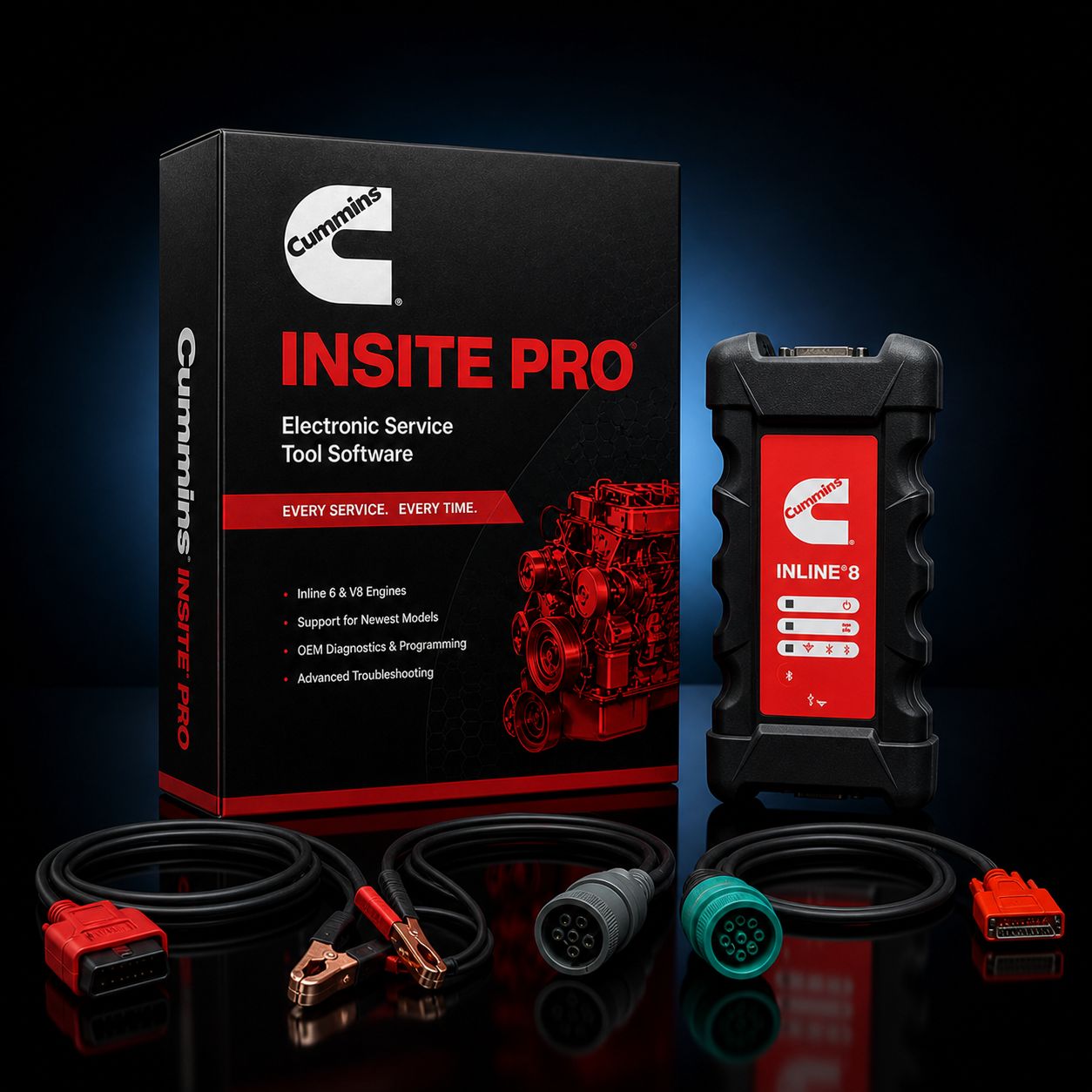
Cummins INSITE Pro + Cummins INLINE 8 Datalink Adapter
This is the all-Cummins reflash kit. INSITE Pro on the software side, the Cummins INLINE 8 on the hardware side. It is the same diagnostic and programming stack a Cummins authorized dealer technician sits in front of when they pull a truck into a service bay, and it is the most stable possible reflash path for a shop that wants to bring calibration updates, parameter programming, and injector trim coding back in-house instead of paying a dealer every time a TSB drops or an injector gets replaced.
The pairing matters. INSITE Pro is the only legitimate path to Cummins ECM reflashes, locked parameter changes, and dealer-level programming, and Cummins built the INLINE 8 specifically as the adapter INSITE expects to talk to. When a flash is moving thousands of bytes of calibration data into an X15 or ISX ECM and a single dropped frame can leave the controller in a half-written state, the adapter that was engineered against the same firmware as the software is the adapter you want on the connector. Generic RP1210 adapters work for diagnostics. For programming, Cummins-on-Cummins is the lowest-risk combination on the bench.
What you get for $3,495 is a 12-month INSITE Pro subscription, the current-generation Cummins INLINE 8 adapter with all three vehicle cables, and the activation paperwork to bring it online. Add your own Windows 10 or Windows 11 laptop and you are working. If you would prefer we build it on a Panasonic Toughbook before it ships so the rig is ready for shop-floor abuse on day one, our INSITE Pro + INLINE 8 + Refurb Toughbook package runs $4,995 and the new Toughbook package runs $6,195. Either way, the software and adapter are the same — the laptop is the only variable.
KIT CONTENTS
- Cummins INSITE Pro software license, 12-month subscription, with full reflash and parameter programming access
- Cummins INLINE 8 datalink adapter, current-generation Cummins-built RP1210 adapter
- USB cable for the primary wired connection between adapter and laptop
- 9-pin Deutsch (J1939) cable for Class 8 trucks and modern medium-duty applications
- 6-pin Deutsch cable for legacy J1708 / J1587 applications, including older ISX, ISM, N14, M11, and Celect-era engines
- OBD-II 16-pin cable for light-duty and medium-duty applications that use the passenger-vehicle connector
- Activation instructions, registration documentation, and a printed quick-start sheet
The cable set covers everything Cummins put a connector on across roughly the last three decades. You will not need to buy adapter pigtails to start a job — you have the right cable for J1939 trucks, the legacy 6-pin for older sleeper-cab tractors and industrial equipment, and 16-pin for the medium-duty side. Spare cables are available if you need a second J1939 cable for a satellite bench, but everything to start is in the box.
ABOUT INSITE PRO
INSITE Pro is the highest-functionality tier of Cummins INSITE. Everything INSITE Lite does, Pro does. Then Pro adds the programming functions that a dealer service bay needs to do its real work. Here is the full picture.
Pro reads and clears every Cummins fault code, active and inactive, including SPN/FMI breakdowns and the Cummins-specific fault information system that explains what the code actually means in plain English instead of just a number. It reads live parameter data — manifold pressure, EGR position, rail pressure, turbo speed, NOx sensor outputs on aftertreatment-equipped engines — at the same refresh rate Cummins technicians get at the dealer. It runs bidirectional component tests. Cylinder cutout, injector kill, EGR valve sweep, VGT actuator stroke, fuel pump priming, aftertreatment cleaning, and forced regenerations are all available. It views and prints schematic wiring diagrams pulled directly from Cummins service documentation.
That is the Lite feature set. Pro adds:
- ECM calibration reflash. Pull a fresh calibration file from QuickServe Online, load it into INSITE, and write it to the ECM. This is the function that closes a TSB or solves a driveability complaint that Cummins has already published a fix for.
- Parameter programming. Customer-adjustable parameters — road speed governor, idle shutdown, droop, derate thresholds, PTO calibration, and dozens more — can be opened, changed, and written back to the ECM.
- Injector trim coding. Each Cummins injector ships with an engraved trim code that tells the ECM how that specific injector flows. Pro is the level that lets you enter those codes when you replace an injector.
- High-frequency snapshot recording. Pro lets you record at a faster rate during fault occurrence so an intermittent code can be diagnosed by the data, not just by guessing.
- Calibration audit trail. Every time the ECM is reflashed, INSITE Pro logs who did it, when, and which calibration was loaded. That history stays with the ECM.
- ECM password and security functions. Pro can read the ECM password (with the ECM connected to the truck — Cummins does not allow remote password retrieval) and is required for any locked-parameter work that the customer's password protects.
If you have been quoting reflashes out to a dealer because Lite would not finish the job, Pro is the upgrade that changes the answer.
ECM REFLASH ON THE INLINE 8
A reflash is the longest, most failure-sensitive operation INSITE performs. The software opens the ECM's flash memory, erases the existing calibration, and writes a new one. If anything interrupts that write — a USB cable that gets bumped loose, a battery that drops below 12.5 volts mid-flash, a laptop that decides to install Windows updates, an adapter that drops a CAN frame at the wrong instant — the ECM ends up partially programmed. Sometimes you can re-enter recovery mode and finish. Sometimes the ECM has to be sent out for bench recovery. The whole point of running Cummins-on-Cummins is keeping the odds of that failure as close to zero as the equipment will allow.
The INLINE 8 reduces flash risk in several specific ways. The processor is faster than the INLINE 7, with larger memory buffers and more aggressive filtering on the J1939 side. That means fewer dropped frames during the high-traffic write phase. The firmware is maintained by Cummins on the same release cycle as INSITE itself, so when INSITE 9.x is updated, the adapter that ships with it has been tested against that exact build. Generic adapters lag. Their RP1210 layer eventually catches up, but during a flash, "eventually" is the wrong word. CAN FD support and DoIP support are baked in, which matters as Cummins moves more of its newer engine families onto faster diagnostic protocols.
When you sit down to do a flash, the workflow is straightforward but demands discipline. Plug the truck in. Confirm battery voltage between 13.0 and 14.5 volts — for a long flash, put a real charger on it, not a trickle charger and not just the alternator. Turn off everything that could draw the battery down: HVAC blower, headlights, marker lights, anything aftermarket. Confirm the engine serial number INSITE reports matches the truck VIN you are working on, and confirm the calibration part number you pulled from QuickServe matches the engine's CPL. Connect the INLINE 8 over USB — wireless works for diagnostics, and it will work for a flash, but USB is the wired path with the fewest dropped frames and is the standard the Cummins ECM Recovery procedure assumes you are on. Run the calibration download. Walk away from the truck. Do not crank the key, do not slam the cab door hard enough to rock the harness, do not let anyone unplug the laptop charger. When INSITE reports the flash complete and asks for a key cycle, follow the prompt and clear inactive codes.
Most of the "flash failed midway" stories on the truck forums trace back to one of three things. Battery voltage sagged. The USB cable on a no-name adapter dropped its connection. Or the laptop went to sleep. Cummins-on-Cummins removes the second one and surfaces the other two as warnings before they become problems.
PARAMETER PROGRAMMING
Parameter programming is the day-to-day reason most independent shops upgrade to Pro. Customers want their road speed limit raised or lowered. Fleet managers want idle shutdown timers configured. A spec'd droop curve does not match how the truck is actually being driven. A PTO application needs a different governed RPM. A derate threshold needs to come back to factory after someone overrode it on a previous truck the customer bought used.
INSITE Pro opens the parameter list under Features and Parameters, sorts them by category — road speed, idle, PTO, governor, transmission, security — and shows current value, default value, and the allowable range. You change the value, INSITE writes it to the ECM, and the change is live. There is no hidden second-tier menu for the things customers actually ask for. Road speed governor adjustments inside the customer's adjustable range, idle shutdown timer changes, PTO RPM setpoints, fan-on coolant temperature, and several dozen other parameters are available and writable.
What is not available are the parameters Cummins has classified as VIN-locked or password-protected. Those still require either the customer's ECM password (which you can read with the truck in front of you) or, in some cases, a Cummins dealer authorization to unlock. If a customer wants something outside their adjustable range, you call Cummins, they verify, and the parameter opens up. That is a Cummins policy, not an INSITE limitation. Pro will tell you exactly which parameter you are looking at and whether it is currently writable.
INJECTOR TRIM CODING
Cummins fuel injectors are not interchangeable in the legal sense. Each injector is built to a flow specification and the actual flow rate of every individual injector is measured at the factory. The variation from injector to injector — small as it is — is encoded as a trim code, usually a 7-character alphanumeric string, that is laser-engraved or printed on the injector body. The ECM uses those codes to compensate fueling per cylinder so all six injectors deliver the same fuel mass even though their physical flow rates vary by a few percent.
When you replace an injector and do not enter the trim code, the ECM is still using the old injector's compensation table. The result is rough idle, uneven cylinder balance, sometimes a misfire code, and on aftertreatment-equipped trucks, regen issues because the cylinder balance is off enough to throw exhaust temperatures off-target. Trim coding is not optional.
INSITE Pro is the level that lets you enter trim codes. You bring up the Injector Trim Codes screen, find the cylinder you replaced, type the new code from the injector body, and write it to the ECM. Five-minute job if the injector code is legible, ten minutes if you have to call the part counter to read it back to you. Without Pro, the truck has to go to a dealer for a function that takes a competent tech ten minutes.
ABOUT THE CUMMINS INLINE 8
The INLINE 8 is the current-generation OEM adapter Cummins builds and sells. It replaced the INLINE 7 as the standard adapter in the dealer network and is the adapter Cummins now ships against the latest INSITE releases.
What the 7-to-8 upgrade brought was modern protocol support and connectivity. CAN FD is supported, which matters for the newest Cummins controllers that use the higher-bandwidth CAN flavor. Diagnostics Over IP (DoIP) is supported, which is the path the industry is moving toward and which some 2023-and-newer Cummins applications already use. ISO 15765, ISO 9141, ISO 14230, and KWP2000 (K/L line) are all there. J1939 and the legacy J1708 / J1587 channels are there for the older trucks. Three simultaneous CAN connections let the adapter monitor multiple data buses at once, which matters on multiplexed Class 8 chassis where engine, transmission, and brake controllers are talking on separate buses.
Baud rates are 250k, 500k, and up to 1 megabaud. The adapter is fully compliant with TMC RP1210 and the newer RP1227. It connects to a PC via USB, Wi-Fi (dual-band 802.11 a/b/g/n/ac), or Bluetooth 5.1 — pick the connection that fits the bay.
Beyond Cummins INSITE itself, the INLINE 8 carries an RP1210 driver that works with most of the major OEM diagnostic stacks: Cummins PowerSpec, Detroit Diesel Diagnostic Link (DDDL), Caterpillar ET, Navistar ServiceMaxx, Volvo PTT, Allison DOC, Eaton ServiceRanger, Bendix ACom AE, and WABCO Toolbox Plus. If you start with Cummins-only and later add a Detroit license, the INLINE 8 is already on the bench and ready.
INLINE 8 VS NEXIQ USB-LINK 3 FOR REFLASH
The honest comparison. The NEXIQ USB-Link 3 is an excellent adapter. It is the multi-platform standard in the industry, and across CAT ET, Detroit DDDL, Allison DOC, Bendix ACom, and a dozen other OEM stacks, it is what most independent shops run because one adapter covers everything. CAN FD and DoIP are supported. Wi-Fi and Bluetooth are supported. RP1210 compliance is solid.
For Cummins reflashes specifically, though, the INLINE 8 has a small but real edge. It is the adapter Cummins's own engineering team tests against on every INSITE build. When INSITE 9.0 dropped, the INLINE 8 firmware had been validated against that exact INSITE release before the release went live. The USB-Link 3, by contrast, is validated by NEXIQ against many things; the Cummins-specific reflash path is one of them but not the only one. Eighty percent of the time, you would never see a difference. The other twenty percent — when a flash hits a marginal calibration file, or a noisy CAN bus, or an ECM with a slow flash response — is where the OEM adapter has historically completed jobs the multi-platform adapter punted on.
If you only ever work on Cummins, the INLINE 8 is the right call and there is no real argument otherwise. If you work on Cummins, Detroit, Cat, and Allison every week, you might run a USB-Link 3 as your daily driver and keep an INLINE on the bench specifically for reflashes. Plenty of well-run shops do exactly that. This kit assumes the first scenario — Cummins is your primary work — and is priced and built around it.
ENGINE COVERAGE VIA INSITE
INSITE covers the full Cummins on-highway, off-highway, and industrial engine catalog of the last several decades. The current-production and recent-history list:
On-highway: - X15, X12 — current Class 8 truck engines - ISX15, ISX12 — predecessor 15L and 12L on-highway engines, late 2000s through mid-2010s - ISX, Signature, ISX Celect Plus — earlier ISX generations, including the legacy Celect Plus electronic platform - ISM — 11L Class 8 engine, retired but still on the road in large numbers - ISL, ISL9, L9 — 9L medium- and heavy-duty engine, including the current L9 transit and refuse application - ISC, ISC 8.3, ISL 8.9 — earlier C-series and L-series - ISB, B6.7 — 6.7L medium-duty workhorse, including pickup and chassis-cab applications - B5.9 (ISB 5.9), 24-valve and earlier — late-model legacy and earlier 24V/12V applications
Off-highway and industrial: - QSB, QSC, QSL, QSM, QSX, QSK — the Q-series industrial and off-highway lineup, generators, mining, marine, agriculture - KTA — heavy industrial KTA19/KTA38/KTA50 platforms
If a Cummins engine is electronically controlled and falls into the supported range, INSITE talks to it. The older mechanical engines (pre-1995 PT-pump engines and earlier) are not in scope — there is no ECM to read.
REAL-WORLD WORKFLOW EXAMPLES
Three jobs that hit a busy independent shop in a typical week.
First job: 2019 Peterbilt 579 with an X15. Customer comes in for a TSB-driven calibration update — Cummins published a revised file to address an EGR cooler diagnostic that was throwing intermittent codes. Pull the truck in. INSITE Pro reads the current calibration. Cross-reference against QuickServe to confirm the latest revision is newer. Download the new calibration to the laptop. Connect the INLINE 8 over USB. Confirm battery voltage. Run the flash. Eight minutes later the new calibration is loaded. Clear codes, key cycle, road test. Job billed as a flat-rate calibration service. The truck does not have to drop at a dealer for two days.
Second job: 2014 Kenworth T680 with an ISX15, customer wants the road speed governor adjusted from 65 to 68 to match a fleet policy change. Open INSITE Pro, navigate to Features and Parameters, expand Road Speed Governor, change the maximum vehicle speed value, write it to the ECM. Cycle the key. Verify the dash speedometer shows the limiter at the new value on a road test. Twenty minutes including paperwork.
Third job: ISL9 in a refuse truck dropping a #4 cylinder injector. Pull the valve cover, replace the injector, write down the trim code from the new injector body, button the engine back up. Connect INSITE Pro, navigate to injector trim, enter the new code for cylinder 4, write to the ECM. Crank, idle, road test. The engine that came in rough now idles smooth and the cylinder balance numbers in INSITE are tight. Without Pro, this truck has to be towed or driven to a dealer for a five-minute coding job.
These three examples are the bread and butter of a Cummins-capable shop. Every one of them is unavailable on Lite. Every one of them is closed in-house with this kit.
COMMON CUMMINS FAULTS PRO LETS YOU CLOSE IN-HOUSE
A short list of Cummins fault patterns where Lite gets you partway and Pro finishes the job:
- Aftertreatment regen failures where the fix is a calibration update Cummins has already published. Pro flashes the calibration; Lite does not.
- DEF dosing rate complaints traced to a TSB. Same answer.
- Idle shake complaints after injector replacement where the previous tech did not write trim codes. Pro writes them.
- High-mileage emissions code patterns that Cummins has fixed in a later calibration revision. Pro pulls the revision and writes it.
- Customer complaints about road speed limiter, idle shutdown timer, fan engagement temperature, or PTO RPM. Pro writes the parameter; Lite reads it but cannot change it.
- ECM swap on a salvage repair where the replacement controller has the wrong calibration. Pro loads the correct calibration to match the engine.
Roughly speaking, Lite covers diagnosis and component tests. Pro covers everything Lite does plus the work that actually closes the repair order without sending the truck somewhere else.
COMPUTER REQUIREMENTS
INSITE 8 and INSITE 9 run on Windows 10 or Windows 11. Minimum spec on paper is 1 GB RAM and 2 GB hard drive space. Realistic spec for a working diagnostic laptop with INSITE plus QuickServe documents plus the OEM stacks you will accumulate is 16 GB RAM, 256 GB SSD, a current-generation Intel or AMD processor, USB-A or USB-C with reliable port stability, and an Ethernet jack for the days when shop Wi-Fi is being uncooperative during activation.
For a laptop that lives in a service bay, the only sensible choice is a Panasonic Toughbook. Magnesium chassis, sealed keyboard, drop-rated to four feet, certified to MIL-STD-810. A Toughbook ignores diesel, brake clean, anti-freeze, dropped wrenches, and sliding off the fender well. A consumer ultrabook does not. The math is simple: a $300 Best Buy laptop that lasts six months in a shop costs more than a refurbished Toughbook over five years, and during a reflash, a USB port that is going intermittent is the worst possible variable to introduce. Our INSITE Pro + INLINE 8 + Refurb Toughbook package adds a bench-tested Panasonic Toughbook for $1,500 over the bare kit. The new Toughbook package is $2,700 over. Either is a better long-term answer than running this software on a laptop that lives in a backpack.
LICENSE AND SUBSCRIPTION
INSITE Pro is a 12-month subscription license. After the 12 months, the software reverts to read-only. You can still read fault codes and view live data — but the reflash, parameter programming, and trim coding functions go dark until you renew. Renewals are straightforward and we handle them.
Activation is online through Cummins servers. The laptop you activate INSITE on becomes the licensed laptop and is machine-locked. Moving the license to a different laptop requires going through Cummins, not just installing the software somewhere else. Plan accordingly — the laptop you activate on should be the laptop you intend to keep using.
A short, plain warning. Cummins does not legally sell perpetual or "lifetime" INSITE licenses. They never have. Anything advertised as a perpetual or lifetime INSITE license is pirated, full stop. Pirated INSITE installs cannot connect to QuickServe to download calibrations, which means they cannot do the one function you bought Pro for. They also get bricked by Cummins server-side checks at unpredictable intervals. We sell only authorized 12-month subscriptions because authorized is the only kind of license that actually does the work.
WHAT IS STILL DEALER-ONLY
Honesty matters here. INSITE Pro is dealer-equivalent for the vast majority of programming work. There are still a few things Cummins reserves to its own service network.
VIN-locked parameter unlocks where Cummins has classified a parameter as outside customer-adjustable range require dealer authorization. You can call Cummins, the dealer can authorize the change, and the parameter opens — but the unlock happens on Cummins' side, not yours. Advanced calibration packages used for emissions warranty repairs sometimes require dealer-only entitlements that Pro does not include. Engine recovery work where the ECM has been bricked beyond INSITE's recovery routine sometimes has to go through a Cummins dealer or a dedicated ECM recovery service. Anything covered by an active Cummins emissions warranty, by policy, generally goes through a dealer to keep the warranty intact.
For the day-to-day work — calibration updates, parameter changes within range, injector trim, fault diagnosis, regens, and snapshot capture — Pro closes the job in your shop.
FAQ
INLINE 8 or NEXIQ USB-Link 3 for reflash work? INLINE 8 if Cummins is your primary brand. The OEM adapter has the smallest "flash failed midway" risk because Cummins validates it against each INSITE release. USB-Link 3 is fine across many platforms and many shops use it as their daily driver, but for Cummins-only reflashes, OEM-on-OEM is the cleanest path.
What if my flash gets interrupted partway through?
INSITE has an ECM Recovery / Reprogram routine for exactly this case. Open INSITE's ECM Diagnostic Tools, select Recover, and follow the prompts without interrupting power. The recovery routine resumes the flash and finishes the write. If recovery fails — which is rare with a stable adapter and stable battery — the ECM may need to go out for bench recovery, but you will get warned long before that point. The biggest single defense is keeping battery voltage between 13.0 and 14.5 volts during the entire flash.
Can I do road speed governor changes with this? Yes, within the customer-adjustable range. Pro opens Road Speed Governor under Features and Parameters and lets you write the new value directly to the ECM. If a customer wants a value outside the adjustable range, that requires Cummins authorization on their side — but for normal fleet limiter adjustments, this kit handles it.
Why is the Cummins-branded adapter worth the upcharge over a generic RP1210 adapter? Two reasons. First, firmware co-developed with INSITE means flash reliability under marginal conditions is better. Second, Cummins technical support will troubleshoot a Cummins-branded adapter; they will not troubleshoot a generic adapter, and INSITE's error logs are written assuming the OEM adapter is on the connector. When something goes wrong, the OEM combination shortens the diagnostic loop dramatically.
Does this work with Calterm? No. Calterm is Cummins' development engineering tool used internally for calibration creation and is not commercially available. INSITE Pro is the commercial dealer-level tool and covers reflashing existing released calibrations, not creating new ones. If you need Calterm, you are working at a different level than retail diagnostic equipment.
Will the INLINE 8 work with non-Cummins software? Yes. The INLINE 8 ships with an RP1210 driver and is recognized by most major OEM diagnostic stacks: Detroit DDDL, Cat ET, Allison DOC, Eaton ServiceRanger, Bendix ACom AE, WABCO Toolbox Plus, Navistar ServiceMaxx, Volvo PTT, and others. If you add other licenses later, the adapter is already on the bench.
Do I need QuickServe Online for reflashes? Yes. Calibration files come from QuickServe, not from INSITE itself. Cummins gates calibration downloads through QuickServe accounts. If you do not have a QuickServe account, we walk you through the setup at no charge.
WHY BUY THIS KIT FROM HEAVY DUTY TRUCK DIAGNOSTICS
Every kit we ship is bench-tested before it leaves the building. The INLINE 8 gets connected to a live Cummins ECM, INSITE gets activated and verified, the cables get continuity-checked, and the activation paperwork gets confirmed against the laptop's machine ID. If something is going to go wrong, it goes wrong here, not in your shop.
We are an authorized Cummins reseller. The INSITE Pro license you receive comes through legitimate Cummins channels with full subscription support and renewal eligibility. There is no piracy chance, no server-side bricking risk, and no broken QuickServe connectivity.
Tech support is included and free. If you hit a question on the first reflash, the first parameter change, the first activation, call us. We have walked dozens of shops through their first INSITE Pro deployment, and we know which corners trip people up — battery voltage during flashes, machine-locked activation, the QuickServe handoff, cable selection on legacy 6-pin trucks.
PHONE AND ORDERING
Call 800-399-9495 to discuss reflash workflow, parameter programming questions, activation help, or to spec a complete bench-tested kit on a Toughbook before it ships. We answer the phone with technicians, not a script. Same-day shipping on stocked configurations.
All Cummins licenses are subject to applicable sales tax.
MANUFACTURER: Cummins MFG PART #: INSITE-PRO-INLINE8 ITEM: CUM-INSITE-PRO-IL8