
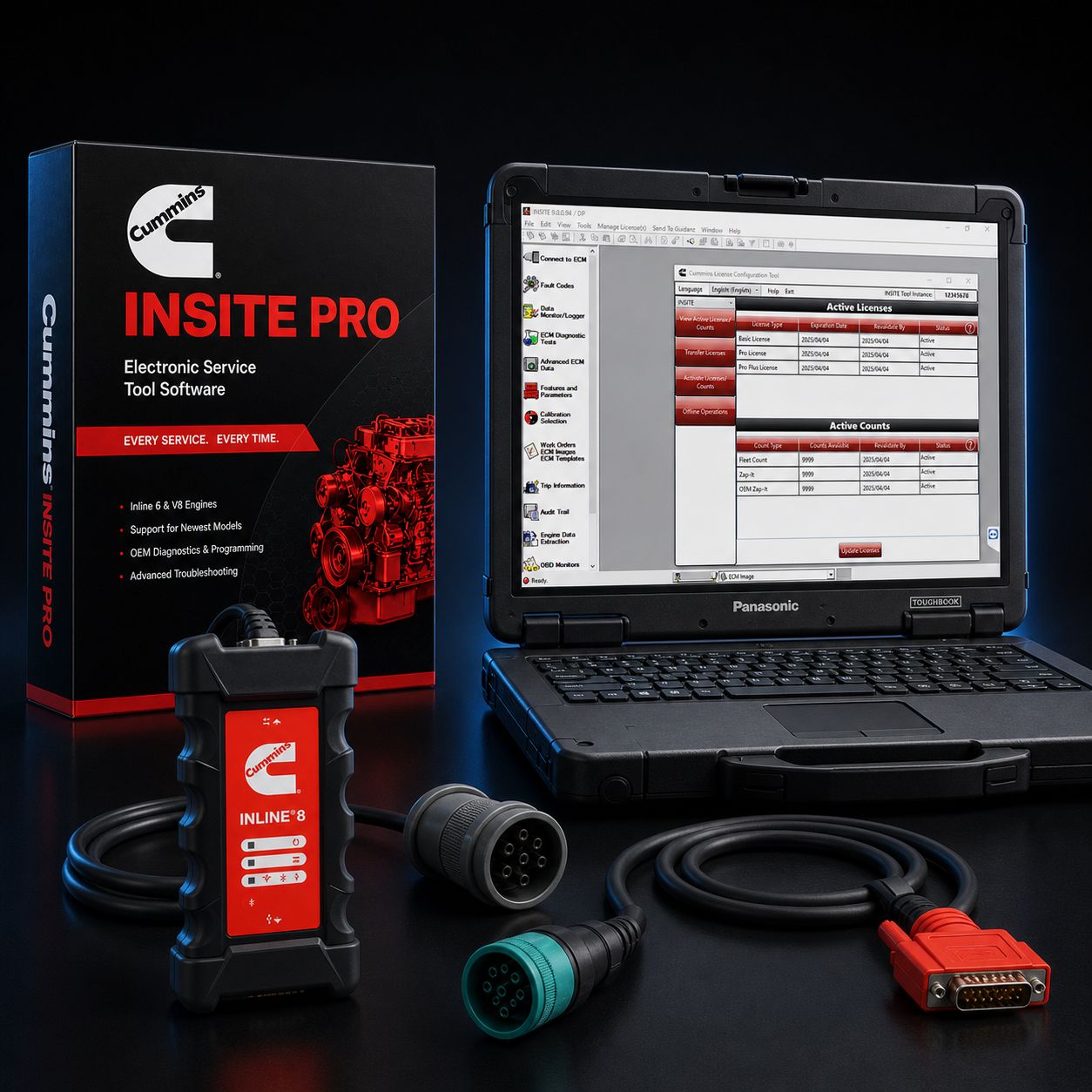
This is a dealer-tier all-Cummins reflash kit positioned at the value end of the price ladder. The license is the Pro tier, which means real ECM reflash, real parameter unlock, and real injector trim coding rather than the read-only world of INSITE Lite. The adapter is the Cummins-branded INLINE 8, which is the current OEM datalink adapter Cummins sells through its own Marketplace and ships into Cummins distributor service bays. The laptop is a Panasonic Toughbook FZ-55, professionally refurbished, sanitized, re-imaged with Windows 11 Pro, and bench-tested before it leaves our shop. Every piece carries an OEM nameplate and every piece is purpose-built for the job. There is no clone INLINE, no third-party J1939 adapter, no consumer Dell or HP laptop pretending to survive a diesel bay.
What this kit gives you is the most Cummins-correct reflash bench you can build without buying brand-new hardware top to bottom. A new Cummins-spec setup with a fresh-from-factory FZ-55 MK3 typically lands several thousand dollars north of where this kit sits. By using a refurbished Toughbook in place of new, the price comes down to working-shop reality without giving up any of the diagnostic capability. The INLINE 8 is identical to what a Cummins dealer technician plugs into a 9-pin Deutsch every morning. The INSITE Pro license is the same license a dealer runs. The only difference is the laptop's birthday, and Toughbooks routinely outlast their second owner.
Plug this kit into a 9-pin Deutsch on a Class 8 truck and you are reflashing inside of three minutes. Everything ships pre-installed, pre-licensed, and bench-verified against a live Cummins datalink before it goes in the box. You unbox it, you connect, you work.
KIT INCLUDES
- Cummins INSITE Pro software license (12-month subscription, full reflash + parameter programming + injector trim) - pre-installed and activated on the included Toughbook
- Cummins INLINE 8 datalink adapter (P/N 6395440) - current-generation Cummins-built RP1210 / RP1227 compliant adapter, USB / Wi-Fi / Bluetooth
- Refurbished Panasonic Toughbook FZ-55 - 14-inch FHD display, Intel Core i5/i7, 16 GB RAM, 512 GB SSD, Windows 11 Pro pre-installed, drivers configured, INSITE pre-loaded
- USB cable (adapter to laptop, shielded, full-speed USB 2.0+)
- 9-pin Deutsch (J1939) cable for Class 8 trucks and modern medium-duty
- 6-pin Deutsch cable for legacy J1708 / J1587 applications
- OBD-II 16-pin cable for light and medium-duty applications running ISO 15765
- Toughbook 65W power adapter and grounded shop cord
- Activation paperwork, license registration sheet, INSITE quick-start guide
ABOUT INSITE PRO
INSITE is Cummins' proprietary diagnostic and programming software, and the Pro tier is the dealer-grade level. It is the same software that runs on the bench at a Cummins distributor, and it is the only software in the world authorized by Cummins to write calibrations into a Cummins ECM. There is no equivalent. Heavy-duty multi-brand scanners can read Cummins fault codes through J1939, can run live data, can even command bidirectional tests, but none of them can write a calibration file into a Cummins control module. That capability lives behind the Pro license and behind the Cummins datalink, period.
With INSITE Pro you can pull and clear fault codes including inactive history, including counts and first/last occurrence stamps. You can run live datastream on every sensor reporting on the bus, watching coolant temp, intake manifold pressure, rail pressure, EGR position, DEF dosing rate, fuel rate, turbo speed, NOx in and out, soot load, ash load, and every aftertreatment derate counter. You can command bidirectional tests including injector cutout, cylinder balance, compression test, fan clutch engagement, EGR valve sweep, VGT vane sweep, intake throttle sweep, DEF dosing test, and forced regen. You can capture high-frequency snapshots that record sensor values at fault occurrence so you can see exactly what the engine was doing when it set the code. And on top of that read-only and bidirectional layer, the Pro license adds the three things this kit was built for - calibration reflash, parameter programming, and injector trim coding.
ECM REFLASH ON INLINE 8
A reflash is rewriting the ECM's calibration file. Cummins releases new calibrations for two reasons - to fix something in the field (driveability complaint, false fault code, aftertreatment regen logic problem, fuel economy callout) or to deliver a software-side recall, sometimes called a Field Action or Campaign. Pulling the latest calibration onto a customer's truck is one of the fastest ways to close a no-fault driveability complaint without throwing parts at it.
The risk in any reflash is the flash interrupting partway through. If the connection drops, if the truck battery sags, if the laptop hibernates, if the cable gets bumped loose, the ECM can be left with a partial calibration. That is the failure mode that scares technicians, and it is the failure mode that gives Cummins-on-Cummins-on-Cummins the smallest possible exposure. The INSITE software was written by Cummins. The INLINE 8 firmware was written by Cummins. They were validated against each other on Cummins ECMs at every release. Mixing a non-OEM adapter into a reflash, or running a third-party RP1210 driver, is where shops get into trouble. With this kit, every link in the chain carries the same nameplate.
That said, the cardinal rule still applies - stable power. Before you start a reflash, put the truck on a battery maintainer or a stable power supply at 13.0 volts or above. Confirm the laptop is on AC power, not battery, with the power adapter solidly plugged into shop power that does not share a circuit with anything that cycles (compressors, MIG welders, lifts). Disable Windows sleep, hibernate, and screen lock for the duration of the flash. Do not let anyone start cranking another truck on the same battery cart. INSITE will warn you if voltage drops below threshold during the flash and will attempt to abort cleanly, but the safest reflash is the one where voltage never moved.
If a flash does interrupt, INSITE has a recovery path. Reconnect with the key off, wait for INSITE to detect the partial calibration state, and let it reattempt. In most cases, the same calibration file written cleanly the second time recovers the ECM. The cases where this fails are nearly always traced back to either a non-OEM adapter, a low-voltage condition, or a calibration mismatched to the ECM part number. Stick to the rules and the reflash is routine.
PARAMETER PROGRAMMING
Parameters are the customer-changeable settings inside the ECM. Pro lets you write them. The list is long and depends on engine family and chassis spec, but the parameters you will be programming most often include road speed governor (maximum vehicle speed), cruise control upper limit, droop, idle speed setpoint, idle shutdown timer, cold idle elevation, gear-down protection, PTO mode (cab, remote, or stationary), PTO setpoint speeds, PTO maximum speed, PTO ramp rate, fan engagement temperature, transmission interface settings, dual-engine ratings (medium / heavy), trip data reset, and dozens of vocational-specific settings on industrial / off-highway engines like governor type, droop curve, alternate ratings, and load anticipation.
Each parameter write is recorded in the ECM's calibration audit trail with timestamp, technician ID, and the old and new values. That trail is what Cummins reviews when a warranty claim comes in. Pro gives you full visibility into the audit trail and full ability to write new entries.
INJECTOR TRIM CODING
When you replace injectors on a Cummins, the new injectors come with calibration codes (also called trim codes or barcodes) printed on the injector body. Each injector flows slightly differently from the next, and the trim code tells the ECM how to compensate so all six (or all eight) cylinders deliver the same torque per stroke. Skipping injector trim coding after a swap leads to rough idle, shudder, white smoke at startup, codes for cylinder imbalance, and noticeably poor fuel economy.
INSITE Pro is the tool that programs those codes. On older ISX, ISB, and ISC engines you enter a numeric trim code per cylinder. On newer X15 and X12 engines using XPI fuel systems, the workflow is to scan or type the injector barcode and let INSITE generate the matched trim. Newer XPI logic also includes a learning phase - the ECM refines trim values during a motoring event after the swap - but the initial barcode entry through Pro is still required.
ABOUT THE CUMMINS INLINE 8
The INLINE 8 is Cummins' current-generation OEM datalink adapter. Built by Cummins, sold by Cummins, supported by Cummins. Part number 6395440. It is fully compliant with TMC RP1210 and RP1227, which are the heavy-duty diagnostic adapter standards every fleet-spec scan tool talks to. RP1210 compliance is what makes the INLINE 8 a universal heavy-duty adapter - it does not just run INSITE, it runs every other RP1210 application your shop touches.
Protocol coverage is the full heavy-duty stack. J1939 at 250 kbps and 500 kbps is the modern Class 8 standard. J1708 / J1587 is the legacy serial link used on pre-2007 and many off-highway engines. ISO 15765 is the CAN protocol on light and medium-duty 16-pin OBD-II vehicles. ISO 9141, ISO 14230, and KWP2000 cover older European-influenced K-line systems. The INLINE 8 also supports CAT Data Link (CDL) for Caterpillar engines and CAN FD plus Diagnostics over IP (DoIP) for the newest control modules coming out of every OEM. Three simultaneous CAN connections at up to 1 Mbps means you can sit on the engine bus, the chassis bus, and the body bus at the same time without the adapter dropping frames.
Connectivity is USB, Bluetooth 5.1, and dual-band Wi-Fi (802.11 a/b/g/n/ac). For a reflash you should always use USB. For live datastream during a road test where the laptop sits in the cab and the adapter sits at the connector, Bluetooth is fine. Wi-Fi is useful when the truck is in a wash bay or up on a lift and the laptop stays at the bench.
The INLINE 8 carries a faster processor, larger memory buffers, and more sophisticated message filtering than the INLINE 7 it replaces. In practice that means snapshot data captures cleaner, datastream refresh rates are higher, and bus-loaded scenarios (a tractor pulling a smart trailer with a CAN-equipped reefer) do not bog down. Beyond INSITE, the INLINE 8 is a verified RP1210 adapter for Detroit Diesel Diagnostic Link (DDDL) on Detroit DD-series engines, Caterpillar Electronic Technician (CAT ET) on C-series engines, Navistar ServiceMaxx on MaxxForce, Volvo Premium Tech Tool (PTT) on D-series, Allison DOC on transmissions, Bendix ACom on brake systems, and Wabco Toolbox on legacy ABS. One adapter, every shop application.
INLINE 8 VS USB-LINK 3 FOR REFLASH
The honest comparison most shops are weighing. The Nexiq USB-Link 3 is a fully capable RP1210 adapter that handles Cummins INSITE reflashes and runs every other heavy-duty application out there. It is the universal pick for a multi-brand fleet shop. For a Cummins-heavy bay, though, the INLINE 8 has a measurable edge on Cummins reflashes specifically. INSITE is written and tested against the INLINE 8 first. Cummins releases firmware for the INLINE 8 in lockstep with INSITE updates. When something edge-case goes wrong on a reflash, the Cummins TAC team troubleshoots INLINE 8 chains immediately and asks USB-Link 3 customers to swap to an INLINE before they go further.
If your bay is mostly Cummins (you reflash X15s, ISXs, ISBs, B6.7s, X12s, ISLs day after day), buy the INLINE 8. If your bay is genuinely mixed and you need one adapter for Detroit, Cummins, Cat, and Volvo without favoring any one brand, the USB-Link 3 is the more universal choice. This kit is built for the first scenario.
ABOUT THE REFURBISHED PANASONIC TOUGHBOOK FZ-55
The FZ-55 is Panasonic's current semi-rugged business laptop. It is the laptop you see every fleet supervisor and every roadside DOT inspector carrying. The chassis is magnesium alloy, the keyboard is spill-resistant, and the whole machine is drop-tested to MIL-STD-810H Method 516.8 Procedure IV at three feet onto plywood-over-concrete - which is roughly the height of a tool bench. Sealing is IP53, meaning the keyboard and ports shrug off shop dust and the kind of light spray you get from a power-washer mist drifting across the bay. It is not a rain laptop and not a pressure-wash laptop, but it is a diesel-shop laptop in a way that no consumer machine ever has been.
The display is a 14-inch FHD (1920 x 1080) panel with anti-glare and anti-reflective coatings, in many configurations a 1,000-nit brightness panel that stays readable in sunlight at the tailgate. Touchscreen models accept a stylus and gloved fingers. The keyboard is backlit and emissive. The webcam is 1080p with privacy cover and IR Windows Hello. The processor in the units we ship is typically Intel Core i5 or i7 in the 8th, 10th, 11th, or 13th generation depending on availability, paired with 16 GB RAM and a 512 GB NVMe SSD. Every unit ships with Wi-Fi 6, Bluetooth 5.x, multiple USB-A and USB-C ports, full-size HDMI, and an RJ-45 Ethernet jack. The xPAK expansion slot system gives the FZ-55 a uniquely modular layout - serial, optical drive, second battery, smart card, and other modules slot in through user-accessible bays, which is part of why these laptops stay current for so long in field service.
Every refurbished FZ-55 we ship goes through the same intake. Functional test of every port, screen, keyboard key, and battery cell. Disassembly and physical inspection of the chassis. Replacement of any failed component. Deep clean of the keyboard well, fan, and heat exchanger. Battery health check (we will replace any battery measuring under 80 percent of design capacity). Reimage from factory media to clean Windows 11 Pro. Driver and firmware update from Panasonic's current Toughbook channel. Bench test. Then INSITE Pro is installed, INLINE 8 drivers are installed, the license is activated against this specific laptop, and the kit is plugged into a live Cummins datalink to confirm communication before it goes in the box.
REFURB VS NEW FOR A REFLASH-HEAVY SHOP
The argument for new is warranty length and pristine cosmetics. The argument for refurb is price, value retention, and the fact that a refurbished Toughbook in shop service routinely runs five years or more before it needs anything beyond a battery. A new FZ-55 MK3 with comparable specs runs roughly twice the cost of a refurbished MK1 or MK2 and delivers the same INSITE experience. INSITE is not a CPU-bound workload - it is a serial protocol stack and a UI - and it will run identically well on an i5 from 2019 and an i7 from 2024.
Where you would prefer new is if your shop is contracted to a fleet that requires new hardware on diagnostic benches as part of audit. For everyone else, refurbished is the sharper buy. We ship every refurbished Toughbook with a 90-day shop warranty against defects, and an extended 1-year or 2-year coverage option is available - call to discuss.
WHY TOUGHBOOKS BEAT CONSUMER LAPTOPS IN SHOP BAYS
Consumer laptops fail in shop bays for predictable reasons. The chassis flexes when set on an uneven cart. The keyboard ingests metal shavings, oil mist, and DEF. The fan inhales soot and overheats inside six months. A two-foot fall off a bumper cracks the screen. The battery swells from heat cycling. The port plastics fatigue from constant cable insertion. Anyone who has watched a $1,500 ultrabook die in a diesel bay six weeks after deployment knows the math.
Toughbooks are engineered against every one of those failure modes. Magnesium chassis. Sealed keyboard. Filtered fan path. Dropped corners reinforced. Replaceable battery in a sealed compartment. Reinforced port surrounds with metal cores. The result is a laptop that lasts the full warranty period and several years past it, and a laptop that holds resale value when the fleet decides to upgrade.
ENGINE COVERAGE VIA INSITE
Cummins X15 (current and CM2350/CM2450/CM2550 generations), X12, ISX, ISX12, ISX15, ISB, ISB6.7, B6.7, ISC, ISC8.3, ISL, ISL9, L9, ISM, ISM11, plus the legacy 5.9 / 8.3 / 8.9 platforms (B5.9, ISB 5.9, ISC 8.3, ISL 8.9). Off-highway and industrial coverage includes QSB, QSC, QSL, QSM, QSX, QSK19, QSK23, QSK38, QSK45, QSK60, QSK78, and the KTA family. Generator drive engines through the QS-G series. Marine ratings on QSB, QSC, QSL, QSM, and QSK platforms. If it has a Cummins ECM and a J1939 or J1708 connector, INSITE Pro reaches it.
REAL-WORLD WORKFLOW - THREE EXAMPLE JOBS
Job one - X15 with a customer complaint of intermittent SPN 4364 (SCR conversion efficiency low). Hook up to the 9-pin Deutsch, pull fault history, see the code as inactive after the truck cleared during the morning. Live data on NOx in and NOx out shows ratio in spec, no derate currently active. Pull the calibration revision off the ECM, cross-reference against the latest Cummins release, see a calibration update available that revises SCR derate logic for cold-start scenarios. Reflash takes about 12 minutes on USB. Clear codes, road test, customer never sees the light again.
Job two - ISB6.7 in a delivery box truck just had injectors swapped. Plug in, navigate to Fuel System and select Injector Trim. Type each barcode in cylinder order, double check, write. Run a cylinder cutout test to confirm all six injectors firing balanced. Force a learning event by running the engine through its motoring sequence. Done in 25 minutes.
Job three - new municipal fleet truck, customer wants road speed limited to 65 mph and an idle shutdown of 5 minutes. Open Features and Parameters, navigate to Road Speed Governor, set max vehicle speed to 65, save. Navigate to Idle Shutdown, set to 5 minutes with override on PTO active, save. Print the audit trail for the customer's records. 10 minutes total.
COMMON CUMMINS FAULTS PRO LETS YOU CLOSE IN-HOUSE
SPN 3251 (DPF differential pressure) - read soot load percentage, run a stationary regen, decide whether to clean or replace the DPF. SPN 4364 (SCR efficiency) - read NOx ratio history, snapshot at fault occurrence, decide between DEF quality, dosing module, or SCR catalyst. SPN 411 / 412 (EGR position / EGR valve) - command an EGR sweep, watch position feedback, diagnose stuck or sluggish actuator. SPN 651-656 (injector cylinder faults) - run cylinder balance, identify the weak hole, decide swap or replace. SPN 5246 (DEF derate) - read the derate counter, regen if eligible, parameter check on DEF tank heater. SPN 1761 (DEF tank level) - clear sensor history, calibrate level. SPN 5443 (DEF dosing valve) - command dosing test, confirm spray pattern with a borescope.
These are the daily in-house wins for a shop running INSITE Pro. Every one of these would be a tow-to-the-dealer call without the Pro license.
LICENSE AND SUBSCRIPTION
INSITE Pro is a 12-month subscription license. During the term you have full access to reflash, parameter programming, injector trim, fault code reading and clearing, snapshots, bidirectional tests, and every Lite feature. After 12 months the license reverts to read-only mode (codes and live data only) until you renew. Renewal is straightforward - call us or go through Cummins Marketplace. The license is machine-locked. The activation binds INSITE to the specific Toughbook in this kit. Moving the license to a different laptop requires a transfer authorization through Cummins, which we can help with on request, but the workflow is built around the assumption that the laptop and the license live together.
Cummins enforces piracy aggressively. Cracked INSITE installations and stolen license codes are detected on the next online INCAL pull, and the consequences range from license revocation to legal action. Activation requires online connection through Cummins servers - the laptop needs to see the internet at activation, at every INCAL update, and periodically for license check-in. Plan for shop Wi-Fi or a hotspot.
WHAT IS STILL DEALER-ONLY
Honesty matters. INSITE Pro does not unlock everything. The Cummins distributor network retains a few dealer-only capabilities. Engine de-rate / re-rate (changing the horsepower / torque curve from one published rating to another on the same engine family) is restricted to authorized Cummins service centers and requires a VIN-locked authorization file. Some emissions-related parameters are locked behind the same authorization. Warranty repair authorization (the ability to file a claim against a Cummins warranty) requires being a Cummins ASC. Password removal on a locked ECM requires Cummins TAC and the Zap-It tool.
For a non-dealer shop, that leaves about 95 percent of the daily work fully unlocked - reflash, parameter programming, injector trim, codes, live data, bidirectional, snapshots, audit trail, calibration updates. That is what this kit delivers.
FAQ
Q: INLINE 8 vs USB-Link 3 for reflash - is the difference real? A: Yes, on Cummins specifically. Both adapters reflash Cummins ECMs through INSITE. The INLINE 8 is the adapter Cummins develops and validates INSITE against, so on the rare occasion something goes sideways during a reflash, you are on the supported chain. For Cummins-heavy shops, the INLINE 8 is the right pick. For genuinely mixed-fleet shops, the USB-Link 3 is more universal.
Q: Refurbished Toughbook for warranty work - will it pass a Cummins audit? A: A Cummins ASC audit looks at license validity, technician training, and audit trail integrity. The age of the laptop hardware is not a variable. We have placed refurbished FZ-55s in dealer-affiliated shops without issue. If your specific contract demands new hardware on benches, call us before ordering.
Q: What if the flash gets interrupted partway through? A: INSITE has a recovery routine. Reconnect with the key off, let INSITE detect the partial calibration state, and rerun the same calibration file. The truck almost always recovers. The exceptions trace back to non-OEM adapters, low voltage during the original flash, or a wrong calibration file for the ECM part number. Use a battery maintainer, use a stable AC outlet for the laptop, and use the calibration file INSITE recommends.
Q: Can I update calibrations from a 2024 X15 with this? A: Yes. INSITE 9 covers the current X15 generation including CM2450 and CM2550 ECMs. The 12-month subscription includes all INCAL updates released during your term, so when Cummins ships a new calibration for a 2024 X15 you pull it through INSITE and write it. The same applies to current B6.7, X12, and L9 platforms.
Q: How does INLINE 8 driver support look on Windows 11? A: Solid. Cummins maintains current Windows 11 drivers for the INLINE 8, and we install and verify those drivers on every kit before shipping. Bluetooth pairing, Wi-Fi enrollment, and USB connection all work cleanly on Windows 11 Pro 23H2 and 24H2. We have not seen the driver issues that some older INLINE 7 setups experienced on Windows 11 - the INLINE 8 was designed for it.
Q: Can I run other manufacturers' software on this same laptop? A: Yes. The Toughbook is a standard Windows 11 Pro machine. You can install Detroit DDDL, CAT ET, Allison DOC, Bendix ACom, Wabco Toolbox, Nexiq eTechnician, Diesel Explorer, JPRO, or any RP1210 application you license separately. The INLINE 8 will work with all of them. We commonly see customers run INSITE Pro plus DDDL plus CAT ET on the same Toughbook.
Q: What kind of internet connection does activation need? A: Anything stable. Shop Wi-Fi, a phone hotspot, a tethered laptop. Activation pulls a license file from Cummins, INCAL updates pull calibration files, and license check-ins pulse periodically. None of it is bandwidth-heavy.
WHY BUY THIS KIT FROM HEAVY DUTY TRUCK DIAGNOSTICS
We bench-test every kit before shipping. The Toughbook gets imaged, drivered, and INSITE-installed. The INLINE 8 gets paired and verified. The license gets activated. Then the whole rig goes onto a live Cummins datalink in our shop and pulls codes off a real ECM before the box is sealed. If anything in the chain is wrong, we catch it at the bench, not at your customer's truck.
We answer the phone at 800-399-9495 and the call goes to a person who has run this kit. Activation, INCAL updates, license renewals, calibration mismatch headaches, driver questions on Windows 11, INLINE 8 firmware updates - we have walked dozens of shops through every one of those scenarios. The 90-day warranty on the refurbished hardware is real. The license registration paperwork is real. The relationship after the sale is real.
Call 800-399-9495 to discuss reflash workflow, activation, license transfers, or to spec a complete bench-tested kit. We will walk you through the first reflash on the phone if you want. We bench-test every kit before shipping.
All Cummins licenses are subject to applicable sales tax.
MANUFACTURER: Cummins / Cummins / Panasonic MFG PART #: INSITE-PRO / 6395440 / FZ-55-REFURB ITEM: CUM-INSITE-PRO-IL8-FZ55-R