Heavy Duty Truck Diagnostics

Store

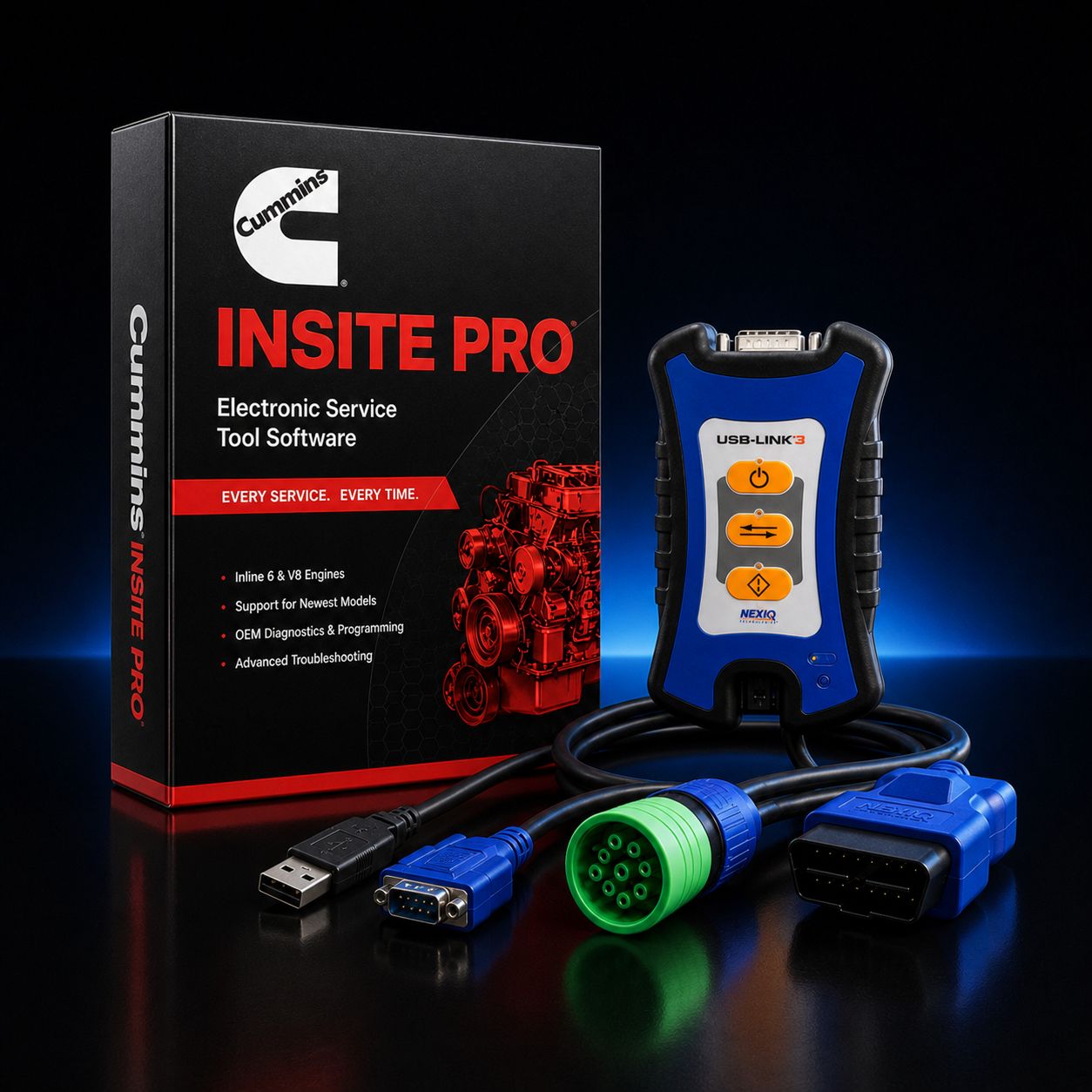
Cummins INSITE Pro + NEXIQ USB-Link 3

$2 295.00
In stock
Share this product with your friends
Cummins INSITE Pro + NEXIQ USB-Link 3
Product Details

Cummins INSITE Pro paired with the NEXIQ USB-Link 3 is the most flexible full-capability Cummins reflash kit at this price point, and it is built for shops that want every dealer-tier Cummins function on day one without locking the hardware to a single brand of software for the rest of its service life. INSITE Pro is the only legitimate path to update a Cummins ECM calibration, modify locked engine parameters, or program the trim file on a replacement injector. Lite reads codes, watches data, and runs forced regens; Pro is what closes the file when an injector goes in, when a calibration TSB drops, when the customer needs the road speed pulled down, or when the truck arrives with the wrong governor settings from a previous owner. With Pro on the bench, work that used to leave the shop on a tow strap stays inside the bay door.

The NEXIQ USB-Link 3 is the universal RP1210 datalink adapter that turns this kit into a long-term hardware investment. It does the Cummins job today, and it pairs cleanly with Detroit DDDL, PACCAR Davie4, Volvo Premium Tech Tool, Mack Premium Tech Tool, CAT ET, Allison DOC, Eaton ServiceRanger, Bendix ACom Pro, WABCO Toolbox, Navistar ServiceMaxx, Hino DX, Isuzu IDSS, JPRO Professional, Noregon NextStep, Jaltest CV, TEXA IDC6 Truck, and most other RP1210 a/b/c/d-compliant heavy-duty diagnostic platforms tomorrow. One adapter, one set of cables, every truck that rolls through the door. Shops that buy a Cummins-only INLINE adapter end up buying a second adapter the first time a Detroit or a PACCAR shows up; this kit puts that adapter purchase behind you.

This is the working configuration we recommend for an independent diesel shop that handles mixed Class 6, 7, and 8 fleets, runs a fair amount of Cummins ISX, X15, ISB, and B6.7 work, and has either added or is planning to add Detroit, PACCAR, Volvo, Mack, or Allison capability inside the next twenty-four months. If you are a Cummins-only operation that lives in INSITE all day every day, the OEM Cummins INLINE 8 is faster on the reflash because Cummins built it specifically for INSITE; if you are a multi-line shop that needs to be productive across half a dozen brands, the USB-Link 3 is the smarter buy and the difference in reflash performance is measured in minutes, not hours.

Kit Includes: - Cummins INSITE Pro software license, 12-month subscription, full reflash and programming access - NEXIQ USB-Link 3 datalink adapter, current generation, supports USB 2.0, Bluetooth 5.0, dual-band 2.4 GHz / 5 GHz Wi-Fi - Latching USB 2.0 cable, vehicle to PC - 9-pin Deutsch (J1939) cable for Class 8 trucks and most modern heavy-duty applications - 6-pin Deutsch cable for legacy J1708 / J1587 applications - OBD-II 16-pin (J1962) cable for light and medium-duty applications - USB-Link 3 carrying case - Activation instructions, registration documentation, and the URL for the latest INSITE installer - Heavy Duty Truck Diagnostics phone support number for activation walk-through and first-flash assistance

About Cummins INSITE Pro

INSITE Pro is the full-featured edition of the Cummins electronic service tool. The license sits on top of every capability in INSITE Lite, which means the technician keeps everything Lite already does and gains the operations that actually require dealer-tier software. From Lite, you keep active and inactive fault code reading and clearing, full bidirectional component testing (cylinder cutout, injector kill, VGT actuator, EGR valve sweep, fuel pump, aftertreatment dosing, doser injector, fan clutch, and the rest of the standard test menu), forced DPF regeneration, SCR doser priming, NOx sensor reset and learn, EGR valve learn, intake throttle learn, turbocharger learn, live data with multi-PID graphing, snapshot playback, datalogger export, ECM information readout, monitor system status, and emissions readiness. From Pro, you add the work that closes the ticket.

ECM reflash is the headline. INSITE Pro reads the connected ECM, identifies the current calibration revision, queries the Cummins server for any newer or campaign-mandated calibrations that apply to that engine serial number and platform, downloads the calibration package, and writes it to the controller. This is how you close a TSB, how you correct a bad earlier flash, and how you bring an engine current after a control module replacement. INSITE Pro is also how you program a brand-new replacement ECM from blank, which is the only way a replacement controller will run the engine at all.

Parameter programming opens the customer-adjustable side of the engine. Governor speed, governor droop, derate thresholds, road speed governor, idle shutdown, idle speed, cruise control limits, PTO speeds and ramp rates, gear-down protection, accelerator interlock, transmission output, two-speed axle thresholds, fan-on temperature, brake saver enable, and the rest of the customer parameter family are all adjustable inside INSITE Pro provided the truck owner has not VIN-locked them at the dealer.

Injector trim coding is the per-cylinder calibration step that has to happen any time you replace a Cummins common-rail injector. Every modern Cummins injector ships with a trim code printed on the injector body or supplied on a card; that code tells the ECM exactly how that specific injector flows so fueling stays balanced cylinder to cylinder. Skip the trim coding and the engine runs, but it runs rough, smokes more than it should, throws balance and misfire codes within a few hundred miles, and tears up the new injector. INSITE Pro is how you enter that code.

High-frequency snapshot recording is the diagnostic feature that catches the intermittent. Where Lite snapshot is sample-rate-limited, Pro records a full set of PIDs at a far higher rate around the moment a target fault becomes active, so the technician sees what fuel rail pressure, turbo position, EGR delta-P, and air-fuel ratio actually did in the half second before the code set, not just the slow-trending averages. That is what closes a no-start-when-hot, an intermittent derate, or a fuel pressure drop that resets before Lite can sample it.

ECM Reflash on the USB-Link 3

A reflash on a USB-Link 3 will run on USB 2.0 cable, on Bluetooth 5.0, or on Wi-Fi. The honest recommendation is simple. Stay wired during a reflash. Plug the latching USB cable into the laptop, plug the 9-pin into the truck, leave the laptop on AC power on the cab seat or on a fender stand, and do not move anything until the flash is verified. Bluetooth 5.0 is more reliable than the 4.x radios in older adapters and we have customers running Bluetooth flashes daily without trouble; that does not change the rule. A flash interrupted by a dropped Bluetooth packet, a depleted laptop battery, a tripped shore power breaker, a bumped key cycle, or a cable kicked loose by a boot can leave the ECM in a partially-written state that requires either a recovery flash or, in the worst case, a controller replacement. The fix for that is free and takes thirty seconds: hard-wire the adapter, bypass the radio, and let the flash run.

If the truck has been running on a marginal battery, charge it or put it on a stable shop charger before the flash. INSITE will warn you if pack voltage drops during the write, but a clean flash starts at fourteen volts steady, not at eleven and falling. Confirm shore power is on a circuit that is not shared with a welder or a lift. Close the chase pop-ups on Windows. Disable sleep, disable the screen saver, disable Windows Update for the duration. Plug the laptop in, and if you can, plug it into a UPS. None of this is overkill on a job where the deliverable is a controller you cannot un-brick. When the flash completes, INSITE verifies the calibration and writes a calibration audit entry the dealer can read; that audit trail is part of the legitimate license.

Parameter Programming

Once the ECM is on the right calibration, the rest of the day-to-day Pro work is parameter programming. Owner-side parameters are the ones a fleet, an owner-operator, or a body builder is allowed to change without a Cummins dealer in the loop, and INSITE Pro programs them directly. Common jobs:


  • Pulling road speed governor down on a vocational truck whose insurance carrier wants 65 mph
  • Tightening idle shutdown from 30 minutes to 5 minutes on a delivery truck the customer is tired of refueling
  • Setting PTO RPM and ramp rate on a fresh hydraulic pack
  • Bumping idle speed up to handle a parasitic accessory load
  • Setting maximum cruise speed lower than road speed for fuel economy
  • Programming gear-down protection thresholds on a manual-transmission truck
  • Adjusting fan-on temperature on a re-powered or re-cooled chassis
  • Removing PTO interlocks on a service truck that was previously a sleeper

Customer-locked or VIN-locked parameters are a different story. When a fleet has its parameters locked at the dealer with a password, INSITE Pro will read them and display them but will not write them without the password. That is by Cummins design; it protects the lockout for the parameter owner. If the truck arrives with locked parameters and the customer cannot produce the password, the dealer is the only path. INSITE Pro is honest about this in the dialog box.

Injector Trim Coding

Any Cummins common-rail injector replacement, on any modern engine in this kit's coverage list, requires the new trim code be programmed before the engine is started for any meaningful run time. The trim code is the per-injector flow correction that compensates for manufacturing variance; the ECM uses it to balance cylinder fueling. INSITE Pro reads the current trim file, lets the technician enter the trim code printed on each new injector or supplied on the trim card, writes the new trim file, and verifies. Skip this step on a CM2350 X15 and the customer is back inside two hundred miles with a misfire code, a balance code, and a soot-loaded DPF. Do it correctly, and the truck rolls out balanced.

About the NEXIQ USB-Link 3

The NEXIQ USB-Link 3 is the third-generation universal datalink adapter from NEXIQ Technologies, an IDSC Holdings company under the Snap-on family of brands. NEXIQ has been building heavy-duty datalink adapters since the original Brick and the USB-Link 1; the USB-Link 3 is the modern current product and is sold in two configurations: the wired USB-Link 3 (P/N NQ121054) and the wireless USB-Link 3 (P/N NQ121052) with USB, Bluetooth 5.0, and dual-band Wi-Fi.

Vehicle network protocol coverage is broad and current. The adapter handles CAN FD, J1939 FD, and ISO 15765 FD at 250K, 500K, and 1M baud with auto baud detection; Single Wire CAN (SWCAN); ISO 11898-3 Fault Tolerant CAN (FTCAN); Diagnostics Over Internet Protocol (DoIP) for the newest model-year platforms moving to Ethernet-based diagnostics; legacy J1708 / J1587 for any 6-pin truck still in fleet service; J1850 VPW Class 2 and J1850 PWM SCP for older medium-duty Ford and GM medium platforms; ISO 9141 / KWP2000 (ISO 14230) K and L line; ALDL at 8192 and 9600 baud; and ATEC. Windows vehicle communication APIs are RP1210 a/b/c/d and J2534 (2004 draft) with partial J2534-1 commercial-vehicle implementation. That covers every modern Cummins, Detroit, PACCAR, Volvo, Mack, CAT, Navistar, Hino, Isuzu, and Allison platform in commercial service today.

Connectivity is USB 2.0 with a latching cable on the wired NQ121054, plus Bluetooth 5.0 and dual-band 2.4 GHz / 5 GHz 802.11 a/b/g/n Wi-Fi on the wireless NQ121052. The wireless can also tether to iOS and Android tablets and phones for road-call diagnostics where carrying a laptop into the truck cab is impractical, though INSITE itself is a Windows-only application. The housing is impact-resistant, the adapter is shop-rated, and the latching USB connector is the detail that keeps the cable in the port when somebody walks past it. The IDSC / Snap-on backing matters when you call for warranty: this is not an off-brand adapter that goes silent if the importer disappears; the parts and service path is real.

Multi-Platform Value

This is the part of the kit that most shops underestimate the first time and never undervalue again. The same USB-Link 3 that runs INSITE Pro today will run, on the same laptop, with no extra hardware:


  • Detroit Diesel Diagnostic Link (DDDL) for DD13, DD15, DD16, DD5, DD8, MBE 4000, MBE 900, Series 60
  • PACCAR Davie4 for MX-13 and MX-11
  • Volvo Premium Tech Tool (PTT) for D11, D13, D16, and Volvo-built Mack engines
  • Mack Premium Tech Tool for MP7, MP8, MP10
  • CAT Electronic Technician (ET) for C7, C9, C11, C12, C13, C15, C16, C18 on-highway and most off-highway CAT platforms
  • Navistar ServiceMaxx for MaxxForce 7, 9, 10, 11, 13, 15, DT, N9, N10, N13, A26
  • Hino DX2 / DX3
  • Isuzu IDSS
  • Allison DOC for 1000, 2000, 3000, 4000 series transmissions
  • Eaton ServiceRanger for UltraShift PLUS, Endurant HD, Procision
  • Bendix ACom Pro and ACom AE for ABS and stability control
  • WABCO / ZF Toolbox Plus for trailer ABS and SmartTrac
  • Meritor / WABCO TOOLBOX
  • Haldex DIAG+ for trailer ABS
  • Bosch ESI[truck]
  • JPRO Professional (Noregon)
  • Jaltest CV (Cojali)
  • TEXA IDC6 Truck
  • Diesel Laptops Diesel Decoder, Diesel Explorer, and TruckFault Code Lookup hardware-paired tools
  • Cummins INSITE itself, including INSITE Lite and PowerSpec for Cummins-powered fleets

Budget math is the easy version. A single Cummins INLINE adapter runs roughly the same money as a USB-Link 3 and only does Cummins. A separate Detroit-specific NRS adapter, a separate Davie4 adapter, and a separate aftermarket adapter for Jaltest or JPRO each cost their own money, take their own bench space, and require their own driver stack. The USB-Link 3 collapses that pile down to one device and one driver. For a multi-line independent shop, the USB-Link 3 pays for itself the second piece of software you add to the laptop.

USB-Link 3 vs Cummins INLINE 8 for Reflash

This is a fair question, and the honest answer is platform-dependent. The Cummins INLINE 8 is the OEM adapter Cummins designs INSITE around; on a heavy reflash workload, particularly on the X15 CM2350 and ISX CM2250 platforms with large calibration packages, the INLINE 8 is typically faster than the USB-Link 3 by a few minutes per flash and slightly more tolerant of marginal vehicle CAN bus conditions. If your shop is genuinely Cummins-only and you flash all day, the INLINE 8 is the right buy and we sell that kit too. If your shop is multi-line, or you flash a couple of trucks a week and diagnose dozens, the USB-Link 3 is the right buy: you give up a few minutes on a flash, you gain every other OEM and aftermarket platform on the same hardware, and the total dollar-per-job for the bay drops substantially. The kit on this page is the multi-line answer.

Engine Coverage via INSITE Pro

INSITE auto-detects the engine on the J1939 bus and loads the correct profile. Coverage spans the full modern lineup and the legacy heavy lineup most independent shops still see daily.

On-highway heavy-duty: X15 (CM2350 and CM2450), X12, ISX15 (CM2250 and earlier CM871, CM870), ISX12 (CM2250 and CM2350), ISX (CM870, CM871), ISM (CM876, CM875, CM870), ISL9 (CM2250 and CM2350), ISL (CM850, CM2150, CM2250), L9 (CM2350), ISC 8.3 (CM850, CM2150), ISB 6.7 (CM2150 through CM2350), ISB 5.9 (CM550, CM850), ISB 4.5, B6.7 (CM2350 B6.7).

Medium-duty and bus: ISC 8.3, ISL 8.9, B5.9 / B3.9 legacy industrial, plus the medium-duty marine and bus variants.

Off-highway and industrial: QSB 4.5, QSB 6.7, QSC 8.3, QSL 9, QSM 11, QSX 15, QSK 19, QSK 23, QSK 38, QSK 50, QSK 60, QSK 78, QSK 95, KTA 19, KTA 38, KTA 50.

Power generation, mining, and agricultural variants share most of these calibrations and are covered as long as the engine is electronically controlled.

Real-World Workflow Examples

Job one: 2019 Peterbilt 567 with X15 CM2350. Customer chases an intermittent SPN 3251 (DPF differential pressure) and a derate that resets after a key cycle. INSITE Pro lets you pull the calibration revision, check Cummins for an applicable TSB, find a calibration update, flash the ECM on the latching USB cable, drop it back on the lot for an active regen, and write the calibration audit. Forty-five minutes of bay time, no tow to the dealer, customer back on the road that afternoon.

Job two: 2016 Freightliner Cascadia with ISL9. Number-three injector replacement after a copper-washer leak burned the seat. INSITE Pro reads the current trim file, the technician enters the new injector trim code from the parts paperwork, writes the new trim file, runs cylinder cutout to confirm balance, clears codes, road tests. The truck rolls out balanced and the customer pays for parts plus an hour of labor instead of parts plus a tow plus dealer rate.

Job three: 2021 International HV with B6.7. New owner bought a former municipal truck whose road speed governor is set at 55 mph and whose idle shutdown is locked at 5 minutes. Parameters are not VIN-locked. INSITE Pro reads the parameter file, owner authorizes a pull-up to 68 mph and a stretch on idle shutdown to 30 minutes for sleeper use, programs the new values, verifies, prints the parameter report for the customer's records. Twenty minutes including the road test.

Common Cummins Faults Pro Lets You Close In-House

The Pro license closes the loop on faults that Lite can identify but cannot fully resolve.


  • SPN 3251 / FMI 0 DPF differential pressure high after service replacement; needs reset and sometimes a calibration update
  • SPN 4364 SCR conversion efficiency low; reset doser, NOx sensor learn, sometimes calibration
  • SPN 5246 aftertreatment SCR operator inducement; requires reset path Pro can complete
  • SPN 1569 fuel system protection derate; calibration-correctable in many TSB cases
  • SPN 411 / 412 EGR delta pressure faults; valve learn and reset
  • SPN 651-654 injector cylinder faults after replacement; trim coding closes
  • SPN 723 / 190 engine speed sensor faults after camshaft sensor work; learn and reset
  • SPN 102 / 105 boost and intake manifold pressure correlation faults; turbo learn closes
  • Active regen incomplete events on CM2350 platforms; calibration-correctable
  • Derate timer reset and parked regen completion on aftertreatment service

Computer Requirements

INSITE installs on Windows 10 or Windows 11. Minimum 1 GB RAM, 2 GB free disk for the application, plus working space for calibration downloads. Realistically, run an i5 or better with 8 GB RAM and an SSD; reflashes are I/O sensitive and a slow disk turns a fifteen-minute flash into a thirty-minute one. We strongly recommend a Panasonic Toughbook for shop-floor durability. Toughbooks survive the drop, the spilled coffee, the diesel splash, and the back-of-the-truck ride better than any consumer laptop on the market, and the spinning HDD models we ship come with SSDs already installed for INSITE I/O. We bench-test our Toughbooks with INSITE installed and the USB-Link 3 paired before they ship.

If you want a ready-to-run setup, see our INSITE Pro + USB-Link 3 + Refurbished Toughbook package at $3,795 and our INSITE Pro + USB-Link 3 + New Toughbook package at $4,995. Both ship pre-imaged, pre-activated against the customer's INSITE registration, and pre-paired with the USB-Link 3. The customer plugs the 9-pin into the truck and starts working.

License and Subscription

INSITE Pro is a 12-month subscription license issued by Cummins. The subscription gives you full reflash and programming entitlement for the term, including any calibration updates Cummins releases during that period. After the term ends, the license reverts to read-only mode (Lite-equivalent) until renewed. Renewal is a re-up against the same registration; you do not lose your data, your audit trail, or your activation history.

A direct word on piracy. Cummins does not legally sell perpetual or "lifetime" INSITE licenses. Any listing on eBay, Amazon, AliExpress, or social marketplace claiming a "lifetime INSITE Pro license" for a few hundred dollars is a pirated installer with a cracked DLL, a leaked dealer license, or both. Those installs phone home, get blacklisted, and stop reflashing within weeks; some of them ship with secondary payloads and we have seen them brick the laptop they were installed on. The legitimate kit on this page is registered to your shop, activated through Cummins servers, supported by Cummins, and updateable. The pirated one is not. We refuse to sell pirated software and we will not unblacklist a laptop that has had pirated INSITE installed.

Reflash and parameter programming require online activation through Cummins servers. The laptop you activate becomes the licensed laptop. Plan accordingly: install on the Toughbook you intend to use in the bay, not on a desktop you do not want to carry to the truck.

What Is Still Dealer-Only

A handful of Cummins functions remain Cummins-dealer-only and are not part of any INSITE Pro license sold outside the dealer network. These include: VIN-locked customer parameter unlocks (the password reset path), some emissions-mandated reset routines for warranty closure, certain factory-locked OEM body builder parameter sets that ship locked from the engine plant, and serial number reassignment after an ECM swap when the controller has already been programmed to a different VIN. If a job requires any of those, the dealer is the only path. Pro covers everything else.

FAQ

Q: Wired or wireless USB-Link 3 for a reflash? A: Wired. The wireless USB-Link 3 will reflash, and Bluetooth 5.0 is reliable, but the consequence of a dropped flash is large enough that we recommend the latching USB cable any time you write to the ECM. Use Bluetooth and Wi-Fi for diagnostics, road tests, and live data; use the cable for writes.

Q: Will the same USB-Link 3 run JPRO and DDDL too? A: Yes. RP1210 a/b/c/d compliance means the USB-Link 3 is the adapter for JPRO Professional, Detroit DDDL, PACCAR Davie4, Volvo PTT, Mack PTT, CAT ET, Allison DOC, Navistar ServiceMaxx, Eaton ServiceRanger, Bendix ACom Pro, Jaltest CV, TEXA IDC6 Truck, and most other RP1210 platforms. Each of those is a separate software license, but the hardware is the same.

Q: What happens if Bluetooth disconnects during a flash? A: INSITE will throw an error, the calibration write will halt, and the ECM may be left in a partially-written state. Recovery flash is usually possible by reconnecting on USB and letting INSITE detect and resume; in worst-case the ECM needs replacement. This is exactly why we recommend wired for flashes.

Q: Multi-platform support sounds great. What is the catch? A: There is no hardware catch. The catch is that each OEM and aftermarket platform is its own separate software license. INSITE Pro is included in this kit. JPRO, DDDL, Davie4, PTT, CAT ET, Jaltest, TEXA, and the rest are each their own subscription or perpetual license you buy separately. The USB-Link 3 unlocks the hardware path; you still buy the software when you need it.

Q: INLINE 8 or USB-Link 3 for a reflash-heavy shop? A: If you are Cummins-only and you flash daily, INLINE 8. If you are multi-line and flash a couple of trucks a week, USB-Link 3. The OEM adapter is faster on Cummins; the universal adapter is the one device that does the rest of your bay.

Q: Can I move INSITE to a new laptop? A: Once per license term, with a Cummins deactivation request from the old laptop and reactivation on the new one. Plan for the move; do not just install on a second machine and expect both to work.

Q: Does the kit cover off-highway and power generation Cummins? A: Yes. INSITE auto-detects QSB, QSC, QSL, QSM, QSX, QSK, and KTA platforms in addition to on-highway. The same kit handles a generator set, a mining haul truck, an agricultural QSB, or a marine QSM.

Why Buy This Kit From Heavy Duty Truck Diagnostics

Three reasons. First, every kit is bench-tested before it ships. The USB-Link 3 is paired, INSITE is installed and verified against a live ECM on our test stand (X15 and ISL9 are our standing test mules), and the activation walk-through is documented before the box leaves us. Second, the support number on the box is a working phone number, not a voicemail. If a flash hangs, an activation fails, or a customer parameter does not write, you call 800-399-9495 and a tech who has done the job answers. Third, we sell legitimate Cummins licenses, period. No cracked installers, no shared dealer keys, no marketplace fakes. The license registered to your shop is the license your shop owns, and Cummins sees you as a legitimate customer when you call them for support during the term.

We also sell the laptop kits, the cable upgrades, and the multi-platform software bundles that pair with this hardware. If a year from now you want to add JPRO Professional to the same Toughbook, the same USB-Link 3 talks to it. If you want to add DDDL after a Detroit fleet customer shows up, same story. The hardware investment carries forward; we are here to add the software when you are ready.

Call 800-399-9495 to discuss reflash workflow, multi-platform adapter use, customer parameter programming questions, the difference between INLINE 8 and USB-Link 3 for your specific bay, or to spec a complete bench-tested kit. We will walk through what your shop actually sees in the bay and recommend the configuration that pays for itself fastest.

All Cummins licenses are subject to applicable sales tax.

MANUFACTURER: Cummins (software) / NEXIQ Technologies (adapter) MFG PART #: INSITE-PRO / NQ121054 (wired) or NQ121052 (wireless) ITEM: CUM-INSITE-PRO-NXQ3