
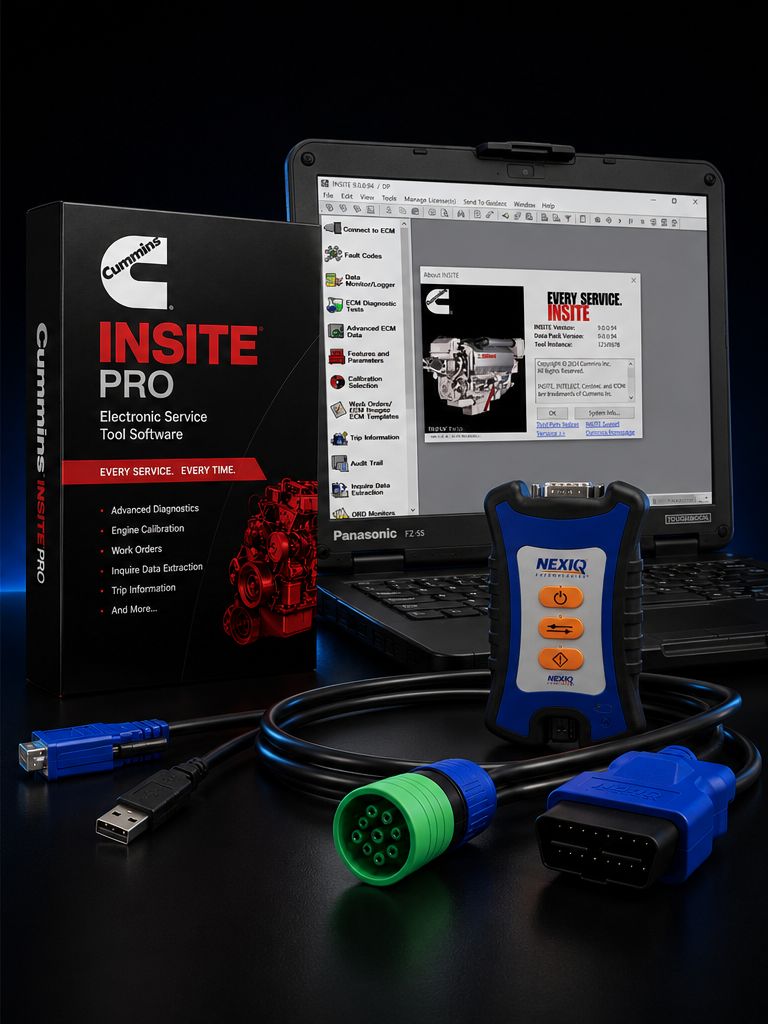
This is a complete dealer-level Cummins diagnostic and reflash kit, bench-tested and shipped ready to use. Cummins INSITE Pro gives you the same software a Cummins dealer technician runs on the bay floor: full ECM reflash, parameter programming, injector trim coding, and the deepest diagnostic functions available outside a Cummins dealer service center. Paired with it is the NEXIQ USB-Link 3 datalink adapter, the multi-platform RP1210/RP1226-compliant interface that pairs with virtually every other major OEM and aftermarket diagnostic platform on the market today. Underneath it all sits a refurbished Panasonic Toughbook FZ-55, the rugged shop laptop that was built to live in working bays, get knocked off fenders, ride in service trucks, and keep running. One kit, one bench-tested package, ready to plug into a truck and reflash an ECM the day it arrives.
The job this kit was put together to handle is straightforward: give an independent shop, fleet maintenance group, mobile mechanic, or aftermarket diesel performance shop the ability to do dealer-level Cummins work in-house. That means closing fault codes the way the dealer closes them, downloading factory calibrations from QuickServe Online and writing them to the ECM, programming governor and road speed parameters on a fleet truck, coding new injector trim files when injectors are replaced, and running every bidirectional test the engine supports without sending the truck somewhere else. The financial logic is the same logic every shop runs through eventually. Each reflash a dealer charges for is two to three hours of bay time and a standard programming fee. A handful of in-house reflashes per year pays for the kit. After that, the laptop, the adapter, and the software are tools you own.
This kit ships pre-installed, licensed, and bench-tested. Plug into the truck and you are reflashing.
Kit Includes: - Cummins INSITE Pro software license (12-month subscription, full reflash plus programming) — pre-installed on the Toughbook, online-activated, and ready for the first connection. Pro is the dealer-level tier; it includes everything Lite does plus calibration download, parameter programming, and injector trim coding. - NEXIQ USB-Link 3 datalink adapter (P/N 6571050) — the wireless edition VCI with USB, Bluetooth 5.0, and dual-band Wi-Fi connectivity. RP1210 a/b/c/d compliant and J2534 compliant, supporting CAN, CAN FD, J1939, J1939 FD, ISO15765, ISO15765 FD, single-wire CAN, fault-tolerant CAN (ISO 11898-3), J1708/J1587, and Diagnostics Over Internet Protocol (DoIP) for the newest equipment. - Refurbished Panasonic Toughbook FZ-55 with Windows 11 Pro pre-installed — semi-rugged magnesium alloy chassis, 14-inch display, configured with Intel Core i-series processor, 16 GB RAM, and a fast NVMe SSD with INSITE and the NEXIQ Device Tester pre-installed. - USB 2.0 cable — for direct wired connection between the Toughbook and the USB-Link 3 when wireless conditions are not ideal or when policy requires a hard-wired link during a flash. - 9-pin Deutsch (J1939) cable for Class 8 trucks — the standard heavy-duty diagnostic connector found on virtually every modern Cummins-powered Class 7 and 8 truck. - 6-pin Deutsch cable for legacy J1708/J1587 applications — covers older ISX, ISM, ISC 8.3, ISB, and N14 Celect Plus trucks that pre-date the J1939 9-pin standard. - OBD-II 16-pin cable for light/medium-duty applications — for medium-duty Cummins B6.7 chassis, fire/EMS, RV, and other applications that route diagnostics through a 16-pin connector. - Toughbook power adapter — Panasonic OEM brick sized for sustained reflash sessions where you do not want the battery dying mid-write. - Activation documentation and license registration paperwork — your INSITE serial, activation record, and the printed reminder that the Toughbook in this kit is the licensed laptop.
About Cummins INSITE Pro
INSITE is the official Cummins electronic service tool. The Pro tier is the highest standard subscription level and is what every Cummins dealer technician uses for engine programming work. The full capability list runs deep. Pro reads and clears active and inactive fault codes and pulls the symptom-based fault tree, full step-by-step troubleshooting trees, complete wiring diagrams, sensor location maps, and the calibration audit trail. It runs every bidirectional test the ECM supports — cylinder cutout for misfire diagnosis, EGR valve sweep, VGT actuator sweep, turbocharger position tests, dosing valve and DEF system tests, aftertreatment regen requests, injector solenoid tests, and forced regenerations. It logs high-frequency snapshot data when a fault occurs so you can see exactly what the engine was doing in the seconds before and after the event. It pulls trip and vehicle history, fuel economy data, idle time, and engine hours. It exposes Cummins-specific live parameter sets including rail pressure, individual injector trim values, IMV (inlet metering valve) duty cycle, turbo speed, and aftertreatment temperatures.
What separates Pro from Lite is what every shop building this kit cares about: calibration download capability. Pro can write to the ECM. Pro can program parameters. Pro can update injector trim codes. Lite can only read. If you bought Lite, you would still need to send the truck somewhere else to actually finish the work. Pro keeps the work in your bay.
ECM Reflash Workflow
A real reflash on the bay floor goes like this. The truck rolls in with a TSB, a customer complaint, or a fault that the latest Cummins calibration release is supposed to address. You connect the 9-pin Deutsch cable to the truck, the USB-Link 3 to the cable, and either pair the USB-Link 3 over Bluetooth or run the USB cable straight into the Toughbook. You key the ignition on, engine off. You open INSITE, the application auto-detects the engine, and it pulls the current calibration code, ECM code, and engine serial number. You log into QuickServe Online, enter the engine serial number and ECM code, and download the calibration zip file Cummins publishes for that exact engine. You extract the zip, then in INSITE you go to Calibration Selection, point INSITE at the workspace where you saved the calibration, right-click the calibration code, and select Transfer to ECM. The Calibration Download Wizard takes over. You confirm the device, accept the warning prompts, and the flash begins.
During the flash itself, the rules do not change. Stable battery voltage is mandatory — a voltage drop in the middle of a write will brick an ECM, and a bricked ECM is a Cummins dealer recovery job at best and an ECM core swap at worst. Plug the truck into a battery maintainer or a quality stabilized power supply before you start. Do not start the engine. Do not crank. Do not pull the key. Do not unplug the USB-Link 3. Do not let the Toughbook sleep, hibernate, or run low on battery. The Toughbook power adapter is in the kit for that exact reason. The flash itself usually runs five to fifteen minutes depending on the calibration size and the engine platform. INSITE will display "Reflash completed successfully" when it finishes. You then key cycle, clear codes, verify the new calibration code is reading back correctly, and run a short live-data check to confirm the engine is responding.
Parameter Programming
INSITE Pro is also where you adjust customer parameters. The standard adjustable parameter set on most Cummins engines includes maximum road speed, cruise control upper and lower limits, idle shutdown timer, idle shutdown override, PTO speed and PTO ramp rates, PTO maximum and minimum, governor droop, idle speed, idle warm-up, accelerator interlock, low-idle adjust, and gear-down protection. On fleet trucks the road speed parameter is the most-requested change; setting a max road speed to 65 mph saves measurable fuel and is something fleet maintenance shops do constantly when a truck moves between accounts. PTO calibration is the second-most-common change for utility, vocational, and refuse trucks. Idle shutdown is the third.
Honest caveat that needs to be said clearly. Some parameters are factory-locked or password-locked. Engine protection thresholds, derate settings, and certain emissions-related values are read-only at any standard INSITE access level. If a fleet ordered the truck with a locked ECM configuration, the lock applies until the fleet provides authorization or until a Cummins Field Service Engineer overrides it through CALTERM. INSITE Pro will let you see the parameter and read its value. It will not let you change it without the unlock. That is a vehicle and fleet configuration limitation, not a software limitation. We are honest about it because surprise on the bay floor is not what you want.
Injector Trim Coding
Every Cummins fuel injector ships with a trim code laser-etched on the injector body. The code is a string of characters that describes that specific injector's flow rate at multiple pressures, calibrated against a known reference. The ECM uses the trim codes to compensate fuel command on a per-cylinder basis so combustion is balanced across the bank. When an injector is replaced, the new injector's trim code must be programmed into the ECM, against the cylinder it was installed on. Skip this step and the engine will run rough, throw misfire-related codes, and burn injectors prematurely. INSITE Pro is where you do this. You navigate to the Fuel System or Calibration section, open the Injector Trim Codes screen, enter the new trim code in the box that matches the cylinder number, double-check it against the etching on the injector itself, and write to the ECM. Save, key cycle, verify. This is dealer work, and it is what Pro buys you.
About the NEXIQ USB-Link 3
NEXIQ is the OEM datalink adapter brand most heavy-duty shops standardize on, and the USB-Link 3 is the current generation. The wireless edition (P/N NQ121052, also tagged 6571050 by Cummins) connects three ways: USB 2.0 wired, Bluetooth 2.1+EDR (rated through Bluetooth 5.0 on the current firmware), and dual-band Wi-Fi for iOS, Android, and Windows clients. The unit is housed in a rugged sealed case sized for the toolbox or hung on a magnetic mount under the dash during a long flash. It supports the full modern protocol stack: CAN, CAN FD, J1939, J1939 FD, ISO15765, ISO15765 FD at 250K, 500K, and 1 Mbps with auto baud detection; single-wire CAN; ISO 11898-3 fault-tolerant CAN; J1708/J1587; and Diagnostics Over Internet Protocol (DoIP) for the newest aftertreatment platforms. It is RP1210 a/b/c/d compliant and J2534-2 compliant, which is what enables it to act as the universal interface between the Toughbook and any RP1210-compatible diagnostic application.
Multi-Platform Value
The whole reason to standardize on a NEXIQ USB-Link 3 instead of a single-OEM dongle is that the same adapter pairs with practically every other major diagnostic stack on the market. Cummins INSITE today, add another OEM next month, the adapter does not change. Confirmed compatibility includes Cummins INSITE, Detroit Diesel Diagnostic Link (DDDL) for DD13/DD15/DD16/Series 60, PACCAR Davie4 for MX-13 and MX-11, CAT Electronic Technician (CAT ET), Allison DOC, Volvo Tech Tool (PTT), Mack Tech Tool (PTT), International ServiceMaxx, Bendix ACom Pro, WABCO Toolbox Plus, Eaton ServiceRanger, Hino DX, Isuzu IDSS, Noregon JPRO Professional, Cojali Jaltest CV, TEXA IDC6 Truck, Diesel Laptops Diesel Explorer, and the long tail of niche RP1210 applications. One adapter, one interface library, one set of cables. That is the multi-platform value, and it is the reason the USB-Link 3 has become the default heavy-duty VCI for shops that touch more than one OEM.
About the Refurbished Panasonic Toughbook FZ-55
The Panasonic Toughbook FZ-55 is Panasonic's current-generation 14-inch semi-rugged business laptop. The chassis is magnesium alloy, hinges are reinforced, the keyboard is spill-resistant and on most configurations backlit, and the entire unit is drop-tested to MIL-STD-810H — the U.S. military environmental durability standard covering drop, vibration, humidity, dust, salt fog, altitude, and thermal extremes. The FZ-55 is rated for three-foot drops, has an IP53 ingress rating against dust and dripping water, and survives the kind of bench handling a shop laptop is going to see every day.
The FZ-55 generations span MK1 (Intel 8th-gen i5/i7), MK2 (Intel 11th-gen Tiger Lake i5/i7), and MK3 (Intel 13th-gen Raptor Lake i5/i7 vPro). Refurbished units in this kit are MK1 or MK2 depending on stock, with current-supply MK2 units running an Intel Core i5-1145G7, 16 GB DDR4 RAM, and a 512 GB NVMe SSD as the standard configuration; MK1 units run an Intel Core i5-8365U or i7-8665U, 16 GB DDR4, and a 512 GB NVMe SSD. Display is 14 inches at either HD or full HD 1920x1080, with optional touchscreen on certain units; the touchscreen FHD display reaches up to 1000 nits of brightness, which is the spec that matters in a sun-lit overhead door bay. Battery life is rated up to 18-20 hours on the MK2/MK3 platforms with the standard battery, and the unit supports a hot-swappable second battery. Weight is approximately 4.6 pounds, light enough to carry from truck to bench all day. Connectivity includes Wi-Fi 6/6E (depending on generation), Bluetooth, optional 4G LTE, multiple USB-A and USB-C ports, HDMI, VGA on most configurations, and a serial port option that still matters in the heavy-duty world.
The refurbishment process is straightforward. Each unit is functionally tested, inspected, cleaned, has the battery health checked, the SSD wiped and re-imaged with Windows 11 Pro and a clean activation, drivers brought current, and the chassis cosmetically reconditioned. Diagnostic software (INSITE, NEXIQ Device Tester, NEXIQ drivers) is installed and verified before the unit ships. Refurbished Toughbooks routinely run five-plus years in active shop service. We have customers still running MK1 units bought in 2019 in 2026.
Refurb vs New Toughbook
Honest tradeoff. A new MK3 Toughbook FZ-55 with comparable spec lists at roughly $3,500-$4,500 by itself before software, before adapter, before cables, before a year of subscription. A refurbished FZ-55 in this kit costs a fraction of that, leaves money in the budget for the INSITE Pro license and the USB-Link 3 adapter, and the durability of the platform means a refurbished MK1 or MK2 unit still has years of bay life left. New gets you a longer manufacturer warranty, a newer CPU generation, Wi-Fi 6E on MK3, and a fresh battery. Refurb gets you the same chassis, the same drop rating, the same reliability profile, at the price point that lets you actually afford the full kit. For reflash work the CPU difference is invisible; INSITE is not a CPU-bound application. The honest answer is that refurb wins on dollars-per-year-of-shop-life unless your shop standardizes on new-only Toughbooks for every laptop in inventory.
Why Toughbooks Beat Consumer Laptops in Shop Bays
A standard consumer laptop dies in a heavy-duty shop. The aluminum-and-plastic clamshell laptops that retail customers buy were not designed for the environment. Diesel exhaust, brake dust, oil mist, hydraulic fluid splash, sub-freezing winter mornings, ninety-degree summer afternoons, and the daily reality of being put down on a fender, slid across a workbench, or dropped from a service truck step — that is what a shop laptop sees. Consumer laptops fail at the hinge, at the keyboard membrane, at the battery, at the trackpad, and at the chassis where the magnesium alloy of a Toughbook simply does not fail. Toughbooks are sealed against dust ingress, the keyboard drains, the screen has anti-glare and anti-reflective coatings, the chassis takes a three-foot drop on concrete, and the platform is designed and supported on a multi-year roadmap so drivers and parts are still available years after purchase. The cost-per-year math overwhelmingly favors the Toughbook when the alternative is replacing a consumer laptop annually.
Engine Coverage via INSITE
INSITE covers the full Cummins on-highway, vocational, off-highway, and industrial lineup. On-highway coverage includes the X15 (2017+), X12 (2017+), ISX15 (2010-2016), ISX12 (2010-2016), ISX (pre-EGR through EGR through DPF generations 2002-2010), ISM (1998-2010), ISL9 and L9 (2002-current), ISC and ISC 8.3 (1998-2010), B6.7 (2014-current), ISB and ISB 6.7 (2007-2013), ISB 5.9 (1998-2007), and the legacy N14 and M11 platforms running on Celect/Celect Plus. Off-highway and industrial coverage spans the QSB, QSC, QSL, QSM, QSX, QSK, KTA, K19, and K38/K50 platforms across construction, mining, marine, gen-set, agricultural, and oil-field applications. INSITE auto-detects the connected engine on key-on, pulls the correct fault tree, and surfaces the parameter set for that platform. Common applications include Freightliner Cascadia and Columbia, Peterbilt 379/389/567/579, Kenworth T680/T880/W900, International ProStar/LT/9900i, Volvo VNL with Cummins option, Mack with Cummins option, Western Star, Ram 2500/3500/4500/5500 with the B6.7, school buses, motorhomes, fire and EMS, RV chassis, refuse trucks, dump trucks, and the full vocational equipment base.
Real-World Workflow Examples
Job one. A Peterbilt 579 with an X15 rolls in throwing a SPN 3251 FMI 0 (DPF differential pressure high) that has been chased twice already. The shop pulls the calibration code in INSITE, checks Cummins QuickServe Online, finds a TSB pointing at a calibration update that addresses the differential pressure regen logic. Shop downloads the calibration zip, extracts to the workspace, plugs in the battery maintainer, and runs the reflash through INSITE Pro and the USB-Link 3. Twelve minutes later the new calibration is in. Forced regen runs clean. Truck goes back to work. Two hours of bay time, no dealer trip, customer billed at the shop rate.
Job two. A B6.7 in a Ram 5500 service truck has had three injectors replaced under warranty. The shop opens INSITE, navigates to Injector Trim Codes, pulls the trim strings off the new injectors, enters them against cylinders 2, 4, and 6, writes to the ECM, key cycles, and verifies the read-back values. Engine smooths out immediately on a no-load idle and a road test. Total programming time fifteen minutes.
Job three. A fleet account drops off six identical Kenworth T680 day cabs that need road speed dropped from 68 mph to 65 mph and idle shutdown set from disabled to ten minutes. INSITE Pro lets the technician build a parameter template once, then push it to all six trucks in sequence. Forty-five minutes for the whole batch. Same job at a Cummins dealer is six trips, six work orders, six shop fees.
Common Cummins Faults INSITE Pro Lets You Close In-House
SPN 3251 (DPF differential pressure) calibration updates and forced regen recovery; SPN 4364 (SCR conversion efficiency) fault diagnosis with bidirectional dosing valve tests; injector failures requiring trim code reprogramming on cylinders 1-6; turbo actuator faults requiring VGT sweep and learn cycles; EGR valve sticking and fault clearing; rail pressure faults requiring IMV duty cycle inspection and pump testing; aftertreatment temperature faults; sensor faults with full wiring diagram lookup; idle quality complaints requiring cylinder cutout testing; derate diagnosis pre-and-post calibration update; emissions readiness verification before a smog check; PTO and cruise control complaints traced through customer parameter audits.
License and Subscription
INSITE Pro ships as a 12-month subscription license. The license is machine-locked. The Toughbook in this kit is the licensed laptop. When the kit ships it has been online-activated against Cummins servers; the license is bound to the hardware fingerprint. Reflash and parameter programming require periodic online verification through Cummins servers, so the laptop needs internet at least intermittently. Plan for that. Renewing at month twelve happens through the License Configuration Tool (LCT); we can walk you through the renewal call when the time comes. After expiration the license reverts to read-only — you keep the ability to read codes, view live data, and pull history, but writing (reflash, parameter changes, trim coding) is locked until the subscription is renewed.
Piracy warning, said plainly. There is a market for cracked or "patched" INSITE installs that show up cheap online. Do not run them on a shop laptop. Cummins servers detect non-genuine activation and will refuse to push calibrations; the laptop gets blacklisted; the dealer network can flag the engine serial; and you have no support path when something goes wrong. The kit you are buying here is genuine, online-activated, and supported. That matters when the flash gets stuck at 60 percent and you need someone to call.
What Is Still Dealer-Only
Honest list of what this kit will not do. VIN-locked parameter unlocks (the ZAP-IT codes Cummins issues against an engine serial number for parameter unlocking) require Cummins approval and in many cases fleet authorization; INSITE Pro alone does not generate them. Some emissions-locked parameters cannot be changed at any standard INSITE level — those are CALTERM-only and a Cummins Field Service Engineer's job. Certain warranty parameter changes require the dealer for warranty traceability. Engine serial number changes, ECM core swaps requiring serial migration, and certain factory configuration changes are dealer-only. Final-stage validation calibrations on engine builds are dealer or factory only. Pro covers the dealer-technician scope of work; it does not replace the engineer-level ECM access that lives at Cummins.
Frequently Asked Questions
Q: Refurb versus new Toughbook for a reflash-heavy shop? A: Refurb wins on dollars-per-year for almost every shop. The chassis is the same, the drop rating is the same, the reliability profile is the same. INSITE is not CPU-bound, so the generational CPU difference is invisible during a flash. The money you save on refurb pays for a year of license. New makes sense if your shop standardizes on new-only laptops for inventory or compliance reasons.
Q: Will the Bluetooth USB-Link 3 stay connected during a flash? A: Yes, the wireless link is stable for reflash work, and we have done thousands of them this way. That said, if you want zero risk, run the USB cable for the flash itself. The kit ships with the USB cable for exactly that reason. Bluetooth dropouts during a parameter write are rare; during a multi-megabyte calibration push they are still rare but the consequences of one are higher. Wired during a flash is the conservative call.
Q: If the Toughbook dies mid-subscription, what happens to my INSITE license? A: Call us. The license is machine-locked, so a hardware failure is the one scenario where Cummins will issue a license transfer, with documentation and a Cummins service request. We have walked customers through this multiple times. Do not throw the dead Toughbook out — Cummins may want the hardware ID before issuing the transfer.
Q: How long do refurbished Toughbooks last? A: Five-plus years in active shop service is the realistic expectation, and we have customers running 2019-vintage units in 2026. Battery is the first thing to age; replacement Panasonic batteries are still readily available and user-swappable. SSDs effectively never wear out under INSITE's read/write pattern.
Q: Can I run JPRO or DDDL on this same kit? A: Yes, that is the whole point of standardizing on the USB-Link 3. JPRO Professional, Detroit DDDL, PACCAR Davie4, CAT ET, Volvo PTT, Mack PTT, Allison DOC, Bendix ACom Pro, WABCO Toolbox, and the rest of the RP1210 ecosystem will all run on the same Toughbook against the same adapter. You buy the additional licenses through their respective channels; the hardware does not change.
Q: Does this work on the Cummins B6.7 in a Ram 2500/3500? A: Yes. The B6.7 is a standard Cummins engine on the INSITE coverage list. The OBD-II 16-pin cable in the kit is for exactly this application.
Q: Can I use this on a Cummins-powered RV or motorhome? A: Yes. ISB, ISC, ISL, B6.7, and L9 platforms in motorhome chassis are all covered. Connector type depends on the chassis manufacturer; the kit's three cables (9-pin, 6-pin, OBD-II) cover essentially every Cummins on-highway and motorhome application currently in the field.
Q: How long does a typical reflash take? A: Five to fifteen minutes for the calibration write itself, plus the time to pull and download the calibration from QSOL and the post-flash key cycle and code clear. Plan thirty to forty-five minutes total for an unfamiliar truck, fifteen to twenty for a familiar one.
Why Buy This Kit From Heavy Duty Truck Diagnostics
We bench-test every kit before it ships. The INSITE installation is verified against the licensed Toughbook, the USB-Link 3 firmware is current, the NEXIQ Device Tester confirms the adapter passes its self-check, the cables are continuity-tested, and the Toughbook gets a final hardware pass before it goes in the box. Free tech support is included for the life of the kit; if something on the Toughbook misbehaves or INSITE throws a license error, you call us, not a foreign-language tier-one queue. Standard 90-day shop warranty on the refurbished hardware against defects, and extended warranty options are available on request. We do this every day. We know what shops actually need from a reflash kit and we configure the package accordingly.
Call 800-399-9495 with questions about the reflash workflow, multi-platform adapter use, license activation, the difference between Pro and Lite, the Toughbook generation in current stock, or anything else. We are technicians who happen to also sell the tools, and we will tell you straight whether this is the right kit for your shop or whether you should buy something different.
All Cummins licenses are subject to applicable sales tax.
MANUFACTURER: Cummins / NEXIQ Technologies / Panasonic MFG PART #: INSITE-PRO / 6571050 / FZ-55-REFURB ITEM: CUM-INSITE-PRO-NXQ3-FZ55-R