Professional DiagnosticsMatch the software environment to your vehicles, equipment and repair tasks.
JPRO Diagnostics Software & Laptop Kits
Shop the JPRO Professional and NextStep Repair Toughbook package, or choose Noregon connection hardware for your existing setup. Get help with software-only purchases and renewals.
- JPRO Professional
- NextStep Repair kit
- Noregon adapters
- Subscription help
Expert SupportU.S.-based technicians with dealer and fleet experience ready to help.
Ready-to-Run KitsPreconfigured software with everything you need to get up and running fast.
Financing Available0% APR options available on qualifying orders over $1,500.
Featured JPRO Products
View All JPRO Products →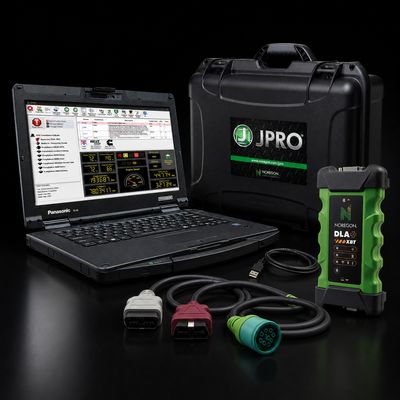
JPRO + NextStep Repair Toughbook kit
Annual subscriptions; refurbished laptop; DLA+ 2.0
$6,599.00 View Product
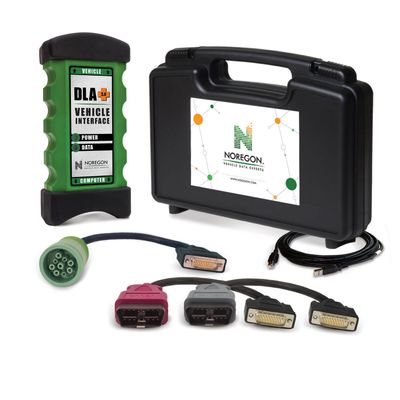
Noregon DLA+ 3.0 XBT adapter kit
Vehicle interface hardware; software separate
$1,089.00 View Product
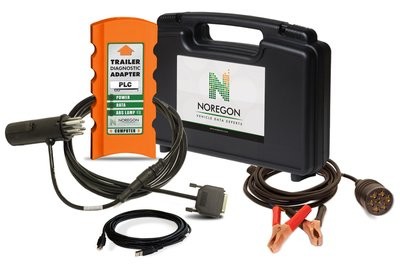
Compare the JPRO kit and Noregon adapter prices
The full kit includes software and a computer. The separate adapter listings are hardware purchases.
| Kit / adapter | Application / package | Catalog price |
|---|---|---|
| JPRO + NextStep Repair Toughbook kit | Annual subscriptions; refurbished laptop; DLA+ 2.0 | $6,599.00 |
| Noregon DLA+ 3.0 XBT adapter kit | Vehicle interface hardware; software separate | $1,089.00 |
| Noregon ABS trailer adapter kit | Trailer connection hardware; software separate | $839.00 |
Prices reflect the listed default configuration. Review selected options, availability, shipping and tax on the product and checkout pages. Ask us to match a kit to your equipment or call 866-217-0063.
Read the detailed JPRO buying guide ↓
Choose your JPRO purchase
- A listed Toughbook package with JPRO and NextStep Repair
- Annual software subscriptions identified in kit contents
- Separate Noregon vehicle and trailer adapters
- Renewal help for existing JPRO owners
- Vehicle and function checks before selecting cables
Shop JPRO by Category
Find the Right JPRO Tool
Answer a few quick questions and we'll help you find the best tool for your shop's needs.
- Personalized Recommendations
- Expert Guidance
- Fast & Easy
Powerful Diagnostics. Proven Performance.
Capabilities vary by tool, software license, vehicle, and manufacturer requirements. Contact HDT to confirm compatibility.
Expert Phone SupportU.S.-based technicians
Setup & Training HelpGet started with confidence
Shipping HelpConfirm availability and timing
Warranty & SupportBacked by HDT
0% APR FinancingOn qualifying orders
Buying JPRO software or a complete diagnostic kit
Start with the equipment you already have. Our listed JPRO Toughbook package combines diagnostic software, repair information, a computer and connection hardware. Existing owners may need only a software renewal or replacement adapter. Compare the full kit and separate adapter prices before choosing.
What our JPRO and NextStep Repair kit includes
The listed package includes annual JPRO Professional and NextStep Repair subscriptions, a professionally refurbished Panasonic Toughbook, a DLA+ 2.0 adapter kit, the listed vehicle cables and a carrying case. Check the product's cable list against your vehicles. The separate DLA+ 3.0 XBT listing is a different hardware purchase; it is not an automatic substitution in this kit.
For trailer ABS work, review the separate Noregon trailer adapter kit and its J560 connection accessories. Buying an adapter does not include a laptop or a JPRO subscription. For software-only purchases or renewals, request a quote from HDT with your existing license details.
JPRO subscriptions and downloads
JPRO needs an active license. Use the official JPRO installer and update page for downloads. Keep your subscription details with the computer and adapter records so a renewal can be matched to the right setup.
Which adapter and vehicle coverage?
A compatible computer, Noregon adapter and suitable vehicle cable are required. Noregon's software-only listing separates those hardware requirements from the annual software subscription. For the specific make, model and system you service, check current JPRO vehicle and equipment coverage.
JPRO does not reprogram ECUs. OEM software licenses remain separate. For programming work, identify the required manufacturer application and access before choosing the hardware. Noregon FAQ.
Get a JPRO package recommendation
Send your truck or equipment list, the functions you need, existing adapter generation and computer model. Include whether you are buying a first system, adding another laptop or renewing an existing license. Contact HDT about JPRO, view the JPRO kit, or call 866-217-0063. Guide reviewed September 19, 2026.
Frequently Asked Questions
How much does JPRO cost?
The table shows our listed JPRO/NextStep Repair Toughbook kit and separate Noregon adapter prices. For software-only licensing or a renewal, request a quote using your current license details. An adapter price is not the price of a complete JPRO system.
What is included in the HDT JPRO Toughbook kit?
Our listed package includes annual JPRO Professional and NextStep Repair subscriptions, a professionally refurbished Panasonic Toughbook, a DLA+ 2.0 adapter kit, listed vehicle cables and a carrying case. The separately listed DLA+ 3.0 XBT adapter is a different hardware purchase.
Does JPRO keep working after its subscription expires?
JPRO requires an active subscription. Contact HDT with your license details before renewal so we can identify the appropriate software package. A downloaded installer does not replace the active license.
Can JPRO replace OEM programming software or use a NEXIQ adapter?
JPRO is for diagnostics and supported service tests; it does not reprogram ECUs. Current JPRO requires a Noregon adapter. OEM applications and their licenses are separate. Check the exact vehicle, function and adapter before ordering.
Resources & Buyer Guides
JPRO vs Jaltest — Honest Comparison
How to choose the right kit for your shop.
Read Guide →Heavy Duty Scan Tool Comparison 2026
Explore software features and capabilities.
Read Guide →Mixed Fleet Class 3-8 Diagnostic Tools
Understanding the difference and when to use each.
Read Guide →JPRO diagnostic tools: detailed buying guide
Reviewed September 21, 2026
JPRO's role in a mixed-fleet shop
JPRO is Noregon's diagnostic application for shops working across vehicle makes. It can serve as a common starting point for inspection and supported service work, while focused OEM applications remain useful for their specific operations. Choose the platform against the vehicles and jobs your shop actually handles.
Noregon's current coverage page includes both on-highway and off-highway applications. For an equipment purchase, check the specific machine, system and operation before choosing the kit and cables.
A useful shop list separates heavy trucks, medium-duty vehicles, trailers and equipment. Add the recurring complaints and service tasks for each group. This gives you a practical comparison with other multi-brand platforms and identifies the cables or additional applications you may need.
Diagnostics, Fault Guidance and NextStep Repair
Noregon's JPRO and NextStep package information distinguishes diagnostic software from repair-information services. The package describes fault guidance, wiring and troubleshooting information alongside removal and replacement information. Supported bidirectional functions include examples such as regeneration and cylinder-related tests; availability must be checked for the application.
These functions address different stages of the job. A scan report identifies what the vehicle is reporting. Relevant data and supported tests help investigate the complaint. Repair information helps the technician follow the appropriate process. A complete purchasing comparison should identify which of those resources is included.
For a new technician or a busy shared workstation, access to usable repair information can be as important as the headline number of vehicle makes. Compare the information package and its subscription term along with the diagnostic application, rather than treating every offer bearing the JPRO name as identical.
The HDT Toughbook kit and separate adapter choices
Our listed JPRO Professional kit includes annual JPRO and NextStep Repair subscriptions, a professionally refurbished Panasonic Toughbook, a DLA+ 2.0 adapter kit, the listed vehicle cables and a carrying case. That is the configuration being sold in this listing.
The separately listed DLA+ 3.0 XBT is a different hardware purchase. Its appearance on the same page does not automatically upgrade the adapter inside the Toughbook kit. Compare the actual contents of each offer and request a configuration change explicitly if you need a different interface.
A generic manufacturer service-kit photo or a newer product announcement should not be used to infer that this refurbished package contains a new laptop. Review computer condition, specifications and included accessories on the selected product before ordering.
Noregon adapters and trailer connections
JPRO requires an active subscription. Its Noregon adapter requirement is also identified in the software-package information linked above.
The software, interface driver and vehicle cable must work together. Record the model of the interface already in your shop before choosing additional equipment. A driver download is not a diagnostic-software purchase, and buying another laptop does not supply another licensed installation.
Our Noregon ABS trailer-adapter listing is a separate connection option, with a J560 connection arrangement and its listed power cable. If you need trailer work, explain whether trailers will be connected to a tractor or diagnosed separately. Do not assume that the ordinary in-cab truck connection solves every trailer requirement.
From an initial scan to a verified repair
Save the initial report before clearing faults, especially when the vehicle has several complaints. Retain the controller identities and relevant conditions so the customer record shows what was present when the truck arrived.
For an aftertreatment complaint, distinguish inspection from a supported regeneration or service routine. The right purchase should support the work you intend to perform, including the information needed to investigate why the fault occurred. A tool should not be selected on a promise to clear every derate without diagnosis.
For an intermittent issue, the ability to inspect and record relevant data may matter more than a quick code clear. For a vehicle returning after a repair, compare the saved information with the prescribed verification. These are workflow considerations that help turn a diagnostic application into a useful shop tool.
JPRO and OEM software serve different requirements
List the exact jobs that need an OEM application, calibration service or additional account access. A multi-brand diagnostic license should not be assumed to include every manufacturer's programming entitlement. If a repair depends on one of those operations, identify it before purchasing the kit.
A shop can combine JPRO for its broader inspection work with applications such as INSITE, DiagnosticLink or Allison DOC where appropriate. Check interface support separately for each application instead of assuming one hardware choice automatically supports every program.
When comparing JPRO with Jaltest or TEXA, use the same vehicle-and-task list. Compare coverage, information services, hardware and renewal terms. Unsupported rankings or percentages of “dealer coverage” do not tell you which option completes the work in your bays.
Renewal and workstation records
Keep the software package, license details and renewal dates with the equipment inventory. Record which computer and interface form the working system. That makes a renewal, computer replacement or additional workstation easier to specify.
For a renewal quote, identify both JPRO and any repair-information services currently held. For a new purchase, decide whether you need a complete Toughbook kit or software and hardware additions to an existing setup. An adapter price is not the price of the entire diagnostic station.
Use the current offers above, then send HDT your fleet mix and required operations or call 866-217-0063. Include existing Noregon hardware and license details so the recommendation can build on equipment you already own.
Ready to Upgrade Your Diagnostic Game?
Our experts are here to help you choose the right JPRO solution for your shop. Call now or shop online today.